Desertcart purchases this item on your behalf and handles shipping, customs, and support to KUWAIT.
🎧 Elevate your audio game—capture every detail, no noise, no hassle!
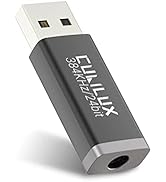
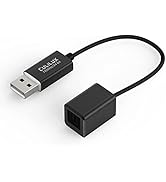
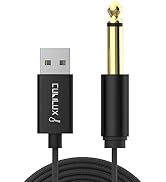
The Cubilux SPDIF USB A Adapter is a high-fidelity optical-to-USB receiver designed exclusively for stereo audio recording. Supporting 48kHz/16-bit studio-grade sound, it connects effortlessly to laptops and consoles without drivers. Its premium aluminum casing and braided cable ensure durable, interference-free performance, making it the go-to tool for gamers, streamers, and audio professionals seeking crystal-clear digital audio capture.


| ASIN | B0BQQLFQ59 |
| Amazon 売れ筋ランキング | パソコン・周辺機器 - 9,640位 ( パソコン・周辺機器の売れ筋ランキングを見る ) Bluetoothアダプタ - 31位 |
| おすすめ度 | 5つ星のうち4.3 173 レビュー |
| カラー | ブラック |
| コネクタタイプ | USB Type-A |
| コネクタータイプ | USB Type-A |
| パッケージ商品数 | 1 |
| ブランド | Cubilux |
| ブランド名 | Cubilux |
| ポート数 | 1 |
| メーカー名 | Cubilux |
| メーカー型番 | E52-Z10-19BK |
| ユニット数 | 1.0 個 |
| 主電源のプラグタイプ | プラグがありません |
| 互換デバイス | ノートパソコン |
| 仕上げ | メタリック |
| 付属品総数 | 1 |
| 商品の用途 | PC |
| 商品の重量 | 0.02 キログラム |
| 商品寸法 (長さx幅x高さ) | 23 x 2 x 1.5 cm |
| 商品本体サイズ | 23 x 2 x 1.5 cm |
| 商品用途・使用方法 | PC |
| 型番 | SPDIF to USB A Receiver |
| 対応デバイス | ノートパソコン |
| 色 | ブラック |
中**村
PCに光デジタル入力が欲しかった
自分の思い通りの使い方ができました。使う前に幾つか設定をする必要がありますが、linuxでもwindowsでも、問題なく使えました。良い商品です。
A**様
ゲーム音をPCに取り込むにはベストな選択
ゲーム音(PS4/Switch)をPCに取り込み、ボイスチャットとミックスする目的で買いましたがベストな選択でした。 もっと早くこの商品と出会いたかった。 別で音声分離器を買ってHDMIからゲーム音を抽出する必要はありますが、ノイズのないきれいな音をPCに取り込めました。 ドライバやソフトウェアのインストールが不要なのも素晴らしいです。 PC側で認識したら、サウンドの録音タブでCubilux SPDIFを探してプロパティから「このデバイスを聴く」にチェックを入れてOKするだけでゲーム音が取り込めました。 ゲーム音をPCの音とミックスするには高額なオーデイオIFが必要と思っていたので、かなり安く実現できました。 遅延もなくある程度高音質なので定位感も良いです。 音量もWindows側で管理できるので快適にゲームしながらボイチャできるようになりました。 今まではゲーミングDACにアナログでゲーム音を取り込んでいましたが、とにかくノイズが気になってアイソレーターとかを挟んだりしていましたが、この商品で問題が全て解決しました。 ゲーム音をPCの音とミキシングしたい人にとっては最安で実現できる素晴らしい商品です。
チ**ニ
光の速さで信号を受け取りたい
マザボに光入力なかったので買いました 認識もして、問題なく使えます ちょっと高いなと思ってしまうのは自分だけ? 他にないからしょうがないのだけれども ただ今は光入出力付いたUSBDAC買ったので使ってません そう思うとコスパいいのかな?
A**ー
Win11で使用
Windows11で問題なく認識し使用できました。USBケーブルが細いので要注意です。
G**G
半年もたなかったが、他にないので再購入
購入4~5か月で、ブツブツ音が入ったり突然全く入力しなくなったり。 しかしデジタル入力インタフェースは他に製品がなく、再度購入しました。 熱が原因かと思い、今度はUSB側にヒートシンクを付けて様子見です。
Y**K
Hifime Audio UR23 SPDIF Optical to USB Converter の廉価版としてはほぼ満足出来ます
この商品は Hifime Audio UR23 SPDIF Optical to USB Converter ($29.99) の廉価版として捉えればおおむね満足出来るかと思います。 中国製の廉価なCD Player(\10,000未満のもの)付属のOPT OUTPUTに接続して古典西洋音楽を聴いて見ましたが、音楽を「ながら聴き」するにはもうこれで十分かなと感じました。 この種の製品で現在入手出来る最高の物を求めるのであれば、Hifime Audio UR23/S2 SPDIF Optical to USB Converter ($49.99) を目指すしか他に道はありませんが、果たして価格に比例した効果が得られるかどうかは試して見ないことには分かりません。
あ**ね
ラズパイでも使用可
ラズパイ4でも追加のドライバーなしで音声入力デバイスとして認識でき、テレビの光デジタル音声(48kHz/16bit)の取り込みに利用しています。 光デジタル出力する製品は多いのですが、入力となると急に選択肢がなくなってしまうので重宝しています。
E**Z
想定どおり
目的は果たせました
G**Y
High Quality Sound, Works Very Well
I got this device so I could connect the analog output of my turntable to to my laptop computer for vinyl record conversions. My turntable already had an analog to digital converter (ADC) that I'd previously bought from Amazon, which converts standard two-channel analog audio outputs on the turntable to a digital optical signal (SPDIF). My laptop, like most computers, has no connection for an SPDIF cable, so I needed a bridge between the ADC's optical output to my laptop's USB port. This device does exactly that. Optical SPDIF cables use a thin glass fiber housed in a protective sleeve, similar to a wire's insulated cover, to send light pulses containing audio information between stereo components. These cables use Toslink connectors at both ends that snap into compatible Toslink ports you'll find on some CD/DVD players, AV receivers, TVs and other components. So how can you connect a non-electrical optical cable to a computer's USB port? With this Cubilux adapter, which saved the day. The Cubilux does an excellent job of converting SPDIF optical audio signals into electrical data via a standard USB A port on your computer. All you need is an optical output on your source device such as a CD player or TV/video device (or, in my case, a turntable with an A to D converter), an SPDIF cable of the appropriate length for your setup, and this Cubilux adapter that plugs into your computer's USB port. Of course you'll need software in the computer that knows how to accept the USB port's digital audio signal -- I've been using a program called VinylStudio for this -- and you're off and running. This setup provides a bridge between the home entertainment world and the computer world, since SPDIF was only intended to provide clean digital connections between consumer electronics equipment without any electrical interference (it uses a light beam). It was never intended to be used with computers, so I'm very appreciative that this converter exists, and that Amazon sells it for a very reasonable price. I really don't know where such a device could be found anywhere else. Performance-wise, the adapter works like a charm. The sound quality is excellent, and appears to be transparent, meaning that it doesn't seem to be affecting or coloring the source signal in any way. It's powered by the computer's USB port, so there's no wall wart or other power connection required to use it. I'm very impressed by the adapter's performance. It's been rock solid during nearly 100 vinyl album conversions so far, and it does exactly what I needed it to do. Most importantly, t's allowing me to rediscover music, some of which is long out of print, that I've not heard for decades, which can now be stored on my phone and computer and listened to wherever I am. Many thanks to the company that developed this excellent product.
J**C
Debian Linux - fait le job
Testé avec Pulseaudio - parfait.
D**I
Works great!
I've been having trouble being able to capture optical in, have tried 2 different sound cards and nothing. But this was just quite literally plug and play, and it just works, I have nice clear audio. It is only 2 channel audio which is kinda a down side but I only need to capture 2 channel audio, so it works perfect for me.
G**E
Great little adaptor
Great little adaptor, works straight out of the box , does what it says.
S**R
Connection from optical output (audio device) to USB A input (computer)
Excellent product, just what I needed to make a connection from my DAB radio with optical output to the USB A connector of my computer. The adapter installs itself under the Windows audio devices without installing any drivers.
Trustpilot
2 days ago
3 weeks ago