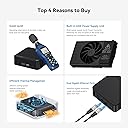
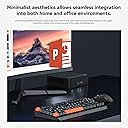
🚀 Mini PC, Mega Impact — Power Your Productivity in Style!
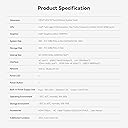
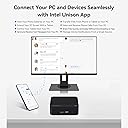
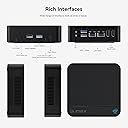
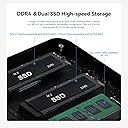
The OUMAX Mini Desktop PC features a cutting-edge 13th Gen Intel N150 quad-core processor clocked up to 3.6GHz, paired with 16GB DDR4 RAM and a lightning-fast 1TB M.2 SSD expandable to 4TB. Designed for professionals craving high performance in a compact form, it supports dual 4K displays via HDMI 2.0, offers robust connectivity with WiFi 5, Bluetooth 5.0, dual LAN ports, and operates silently with efficient heat dissipation. Pre-installed with Windows 11 Pro, it’s ready to elevate your office, creative, or home server setup right out of the box.


| ASIN | B0FBX524NX |
| Best Sellers Rank | #60,986 in Computers & Accessories ( See Top 100 in Computers & Accessories ) #1,802 in Mini Computers |
| Brand | OUMAX |
| Card Description | Integrated |
| Chipset Brand | Intel |
| Color | Black |
| Computer Memory Type | DDR4 SDRAM |
| Customer Reviews | 4.5 4.5 out of 5 stars (23) |
| Date First Available | June 4, 2025 |
| Flash Memory Size | 1 TB |
| Graphics Card Ram Size | 512 |
| Graphics Coprocessor | Integrated Graphics |
| Hard Drive | 1024 GB SSD |
| Hard Drive Interface | Serial ATA-600 |
| Item Weight | 1.43 pounds |
| Item model number | max n |
| Max Screen Resolution | 3840x2160 |
| Memory Speed | 3200 MHz |
| Number of Processors | 4 |
| Number of USB 2.0 Ports | 1 |
| Number of USB 3.0 Ports | 3 |
| Operating System | OS Pro |
| Package Dimensions | 8.27 x 5.12 x 1.97 inches |
| Processor | 3.6 GHz celeron |
| Processor Brand | Intel |
| RAM | 16 GB DDR4 |
| Screen Resolution | 3840 x 2160 |
| Series | max n |
| Wireless Type | 802.11ac |
A**D
Very Decent Little Mini PC!
Bought this for a headless file server and to host a few Windows XP VMs. Windows 11 setup went smoothly, no bloatware installed at all as far as I can tell and passed several virus scans with no malware found. All ports work as intended and saw no driver issues. This thing runs nearly silent, and I have not had the fan throttle up once (as far as I can tell) idles between 7-8 watts as read by my kill-a-watt. (note that I was also seeing a 1.5 watt pull with the PC off). The most power use I saw was right around 22 watts, very reasonable for an x86 machine. This is no gaming PC, but runs a web browser/office applications/light VMs very well. It's been running several weeks now without a hiccup. For the price paid for this mini PC, I'm very satisfied.
K**.
Great mini desktop. Comes with Windows 11 Pro installed
Review is for: OUMAX Mini Desktops PC 13th N150 Up to 3.6GHz 4C 4T 16GB DDR4 1TB M.2 SSD Mini Comp... This was a great purchase. It is a fantastic little PC, very quiet, and I was pleasantly surprised it came with Windows 11 Pro already installed and activated. This comes with double the storage of others in this price range, a faster processor, and I really like that it has an available open slot for an additional SSD hard drive. Ready to use right out of the box; just plug in peripherals and turn it on.
K**H
Quality, silent, energy saving, ubuntu
Was worry about the build and cpu speed. It is much faster than raspberry Pi 2 which I plan to replace. Ubuntu runs extremely well. Plan to run containers, pi-hole, dlna, file server and other utilities on it. It performs very well and draw little power. If the price is right, I might get one for desktop.
C**E
Very compact and valuable mini PC
Very compact mini PC. I am very impressed with the performance most notably the 16GB of ram for this price. Super easy to setup, simply plugin everything, and windows 11 downloads very quickly. Even playing games the fans do not get noisy, and this desktop is very valuable for the price i’m very impressed.
W**N
Faulty CPU throttling - way slower than it should be
This is a very inexpensive mini PC, which uses less electricity than older computers. BUT, in the process of testing it on a Linux install, I noticed that after doing a long CPU-intensive action (backing up my disk with a parallel xz compression running), the CPU would get throttled down to 800MHz. The problem: The CPU would never get back to the un-throttled mode. I could manually override the max CPU freq via setting /sys/devices/system/cpu/cpu*/cpufreq/scaling_max_freq BUT, no human being should ever be required to do such a thing. As such, the poor rating here. If you're on Linux, you can avoid this problem via setting "processor.ignore_ppc=1" in the grub boot commandline. If you're on another OS, then I don't know. You're on your own. After 15 minutes of a 100% CPU activity after making this change to allow full CPU speed, the CPU temp is 62C (144F). Which is fine for any computer. At an idle Linux text-only login screen, this system uses 8W of energy. This is pretty good for an Intel system. At the same time, my 5-year-old Mac Mini uses less than 1W at a full-blown macOS GUI desktop. So yeah, they still have a lot of catching up to do. I've heard that N100 platforms have a bit less power draw than N95. But not enough to get me to switch again.
T**R
Love this Mini PC it's great!
The OUMAX MAX_N Mini PC really impressed me right out of the box. It runs on Intel’s 13th Gen Alder Lake-N150 processor, which handles everyday tasks, business apps, and light education use smoothly. With 16GB of DDR4 RAM and a 500GB M.2 SSD, boot-ups and file transfers are fast, and multitasking feels effortless. I love the minimalist design—it’s sleek, compact, and fits perfectly on a small desk or entertainment center without taking up space. The built-in power supply and ultra-quiet fan (less than 40db) make it ideal for work or study sessions without any distracting noise. Dual HDMI 4K 60Hz outputs are a great bonus for anyone running a two-monitor setup. It also has dual LAN ports for stable, wired connections, and plenty of USB ports for accessories. I appreciate the additional SSD expansion option for future storage upgrades. Pros: Fast Intel 13th Gen processor 16GB RAM + 500GB SSD for smooth performance Dual HDMI 4K 60Hz display support Ultra-quiet operation (under 40db) Dual LAN ports for better networking flexibility Compact, minimalist design Built-in power supply—no bulky adapter Cons: No dedicated graphics (integrated only, but expected for this size/price) Limited to SATA3 for storage expansion (not NVMe) Final Thoughts: If you need a reliable mini PC for everyday tasks, streaming, remote work, or light business use, this is a great choice. It’s quiet, powerful for its size, and offers excellent connectivity options. Definitely recommend!
家**徹
家庭内 server として余生を送っていた古い PC (Win11 への移行不可) の置き換えで、 H/W 仕様が使用目的にぴったりだったのでこの製品を選びました。 S/W に関しては最初からクリーンインストールするつもりで臨みました。 Win10 RETAIL の Product Key が手持ちに残っていたので。 クリーンインストールは、概ね以下の手順を踏んでいます。 別 PC での準備作業: 1. 本家 Microsoft の「Windows 11 のインストール メディアを作成する」をダウンロード。 2. ダウンロードした MediaCreationTool で USB メモリにインストーラーを構成。 実機での導入作業: 1. LAN につながずに起動。Activation していないのに Win11 Pro が立ち上がるのを確認。 2. Command Prompt で“slmgr /dli”して VOLUME_MAK であることを確認。 3. C:\Windows\system32\DriverStore\ を丸ごと USB メモリーにコピー。 4. 再起動して BIOS で USB の boot 優先順位を格上げ。 5. 準備 2. で作っておいた USB メモリを挿して再起動。 6. 立ち上がったインストーラーで Win11 のインストールを開始。 7. Product key を訊かれて、手持ちの Win10 のものを入力。 8. 準備完了後、勝手に再起動するので、USB メモリを抜く。(忘れると 6. から繰り返す) 9. 何度か再起動ののち、めでたく Win11 が起動。 10. Command Prompt で“slmgr /dli”して RETAIL であることを確認。 11. Device Manager を起動して、欠けている device が5つあるのを確認。 12. 導入 3. で用意しておいた USB メモリを挿す。 13. 欠けている device のそれぞれに USB メモリから driver をあてがう。 14. 再起動して Win11 が問題のない状態にあることを確認。 15. LAN につないで、のんびりと Windows Update。 要点は下記の二つ: ・Win10 の Product Key でも Win11 は入れられます。(Win10 を経由する必要なし) ・オリジナルの driver をとっておくことをお忘れなく。(N150 の device は別口) ※ Windows 10/11 の Product Key をお持ちでない方はマネしないでください。
し**し
N150が初めてなのと、内蔵電源もめずらしいので購入してみました。 以下、簡単レビュー ・コネクタの配置が絶妙ですね。やはり裏面にUSB3があると助かり ます。内蔵電源と相まってコード類がスッキリします。 ・増設レーンは端がPCie x3らしいです(掲載写真と違う) 真ん中がSATA /Nvme 両用です。早速Nvmeに差し替えると良い数字が出ました。 この速さを活かせるゲーム等はあまりしませんが・・ ・静音です。無音と言っても差し支えないでしょう。 ・ドラクエベンチは2473/やや重で、これは他のN97とほぼ同等。エン コード速度(avi→mp4) は6:30。N97が5:00だったのでちょっと 差がつきました。ただN100も5:00なので、CPUよりPCの作りに よる差だと思われます(※Ryzen5560で2:20) ・Windows11はPROでボリュームでしたが、クリーンインストール とは別の方法でOEMに変更しました。 ・特筆すべきはM.2 SSDの放熱仕様。底面とシリコンシートを介して 接触してます。SSDがたった1-2mm厚いだけでも蓋が閉まらなく なりました。元々がすごく薄いSSDなのでこれを乗せ換えるのは 苦労しそうです。シリコンシートはがせば0.3mmぐらいは稼げ ますが、手持ち7枚の中で乗せられそうなのは約半数ぐらい? 他社にない積極的な放熱は評価したいのですが・・ ・全体的にとても作りが良く完成度が高い製品です。一方N150は 微妙ですね。今ならN97製品の方が充実してて良さそうです。
J**N
インターネット閲覧やオフィス作業には十分!
A**ー
N150 メモリ16GB SSD500GBと、CPUの性能は最低限ですが、他は少し余力のある仕様です。 届いた実物の仕様も偽りはなかったです。 安価なN100のものと比べるとしっかり作り込まれて、見た目にも高級感があります。 ただ、N150の性能はN100とさして変わらないので注意が必要です。 もっとも、3Dや動画などをやらなければ困らない性能はあります。 総合して、普通に使えるものでした。 特徴としては電源を内蔵なので、コードがすっきりしています。 大口径のファンを使ってるので、動作音は静かです。 SSDの熱を逃す構造なのも安心です。 VESAマウントとUSB-Cが無いことには注意が必要です。 また、中国メーカーあるあるですが、OSがボリュームライセンスでした。 ライセンス違反なので、最悪使えなくなる可能性があります。
I**3
電源投入後の自動起動の設定方法 BIOS→Chipset→PCH-IO Configuration → State After G3 [ここをS0 State に変更]
Trustpilot
2 weeks ago
2 weeks ago