We remain fully operational. Our teams are working around the clock to ensure your deliveries continue safely.

DOWNLOAD THE APP


Copyright © 2025 Desertcart Holdings Limited
DOWNLOAD THE APP
Buy anything from 5,000+ international stores. One checkout price. No surprise fees. Join 2M+ shoppers on Desertcart.
Desertcart purchases this item on your behalf and handles shipping, customs, and support to KUWAIT.
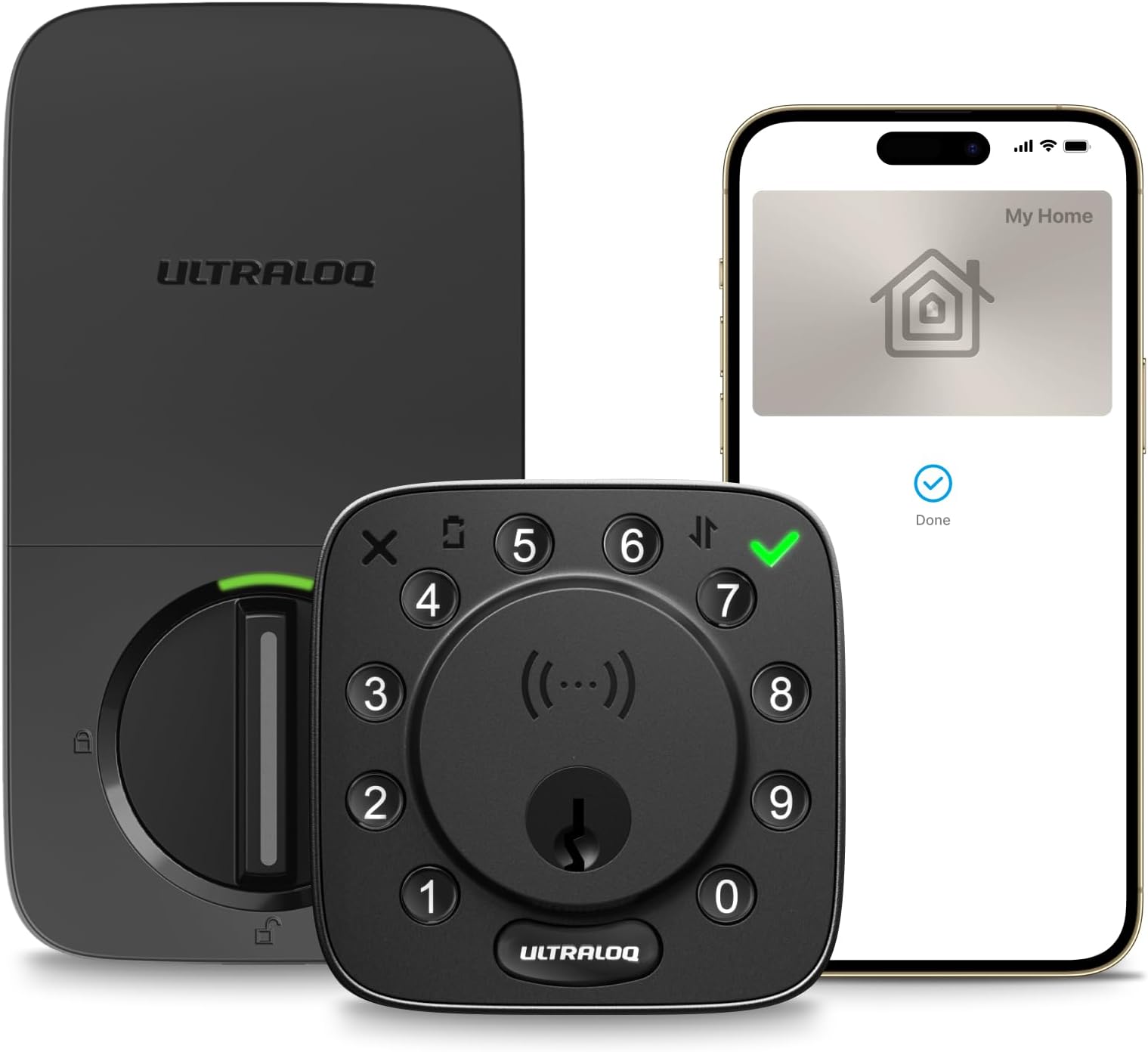
🔐 Elevate your entry game—smart security that’s always a tap ahead!
The ULTRALOQ Bolt NFC Smart Lock is a cutting-edge, BHMA-certified deadbolt that offers instant tap-to-unlock via Apple Home Key and Android NFC, built-in WiFi for remote control, and seamless integration with major smart home ecosystems. Featuring 8 versatile keyless entry methods, auto lock/unlock functionality, and easy DIY installation, it delivers robust security and convenience tailored for modern connected lifestyles.




| ASIN | B0FQ5P2M5T |
| Additional Features | Tap to Unlock, Supports Both Apple Home Key & Android NFC, High-strength Zinc Alloy, ANSI/BHMA Certified, Works with Apple Home, Alexa, Google, SmartThings, Android/IOS App Remote Control, Auto Unlock, Fingerprint-resistant Backlit Keypad, Easy DIY Installation, 8 AA Batteries included |
| Best Sellers Rank | #78,558 in Tools & Home Improvement ( See Top 100 in Tools & Home Improvement ) #315 in Deadbolts |
| Brand Name | ULTRALOQ |
| Color | Black |
| Connectivity Protocol | Bluetooth, Wi-Fi |
| Control Method | App, Push Button, Remote, Voice |
| Controller Type | Amazon Alexa, Android, Apple HomeKit, Google Assistant, SmartThings |
| Customer Reviews | 4.0 4.0 out of 5 stars (1,382) |
| Finish Types | Brushed |
| Included Components | 2 Emergency Keys, 2 Keyfobs, 8* AA Batteries, Installation Kit and User Guide, ULTRALOQ Bolt NFC Smart Wifi Deadbolt with Door Sensor |
| Item Dimensions | 2.96 x 1.35 x 2.96 inches |
| Item Weight | 3.4 Pounds |
| Lock Type | Combination Lock, Deadbolt, Keypad, Smart Lock with Apple Home Key |
| Manufacturer | ULTRALOQ |
| Manufacturer Warranty Description | Lifetime mechanical and 18-month electronic warranty |
| Material Type | Metal, Zinc |
| Model Number | BOLT-N-W-NK |
| Recommended Uses For Product | Home/Airbnb/Office/Hotel/Apartment/Rentals |
| Shape | Square |
| Style Name | Modern |
| UPC | 850056978729 |
| Unit Count | 1.0 Count |
C**Y
Great lock, almost perfect!
We have owned this lock for 1 year. (I wrote this review at 2 months, but we still love the lock, and even bought the cheaper code only version for the back door, since we could share the wifi bridge with multiple locks.) Ok, first of all, installation was a breeze. We were replacing a manual deadbolt, and I'm not even sure we looked at the directions - everything went together without a hitch! Setup was pretty easy too, though if you set it up from the lock itself, and then you want to use the app, you'll have to reset the lock and start over. But even with setting up, resetting and doing it again from the app, we were up and running in about 30 minutes. The lock detects my and my wife's fingerprints just fine. My mom, who is 92, not so much. We assumed her complaints about not being able to grip with her finger tips any more was a grip strength issue, not a friction issue, but maybe not - this lock just does not recognize her fingerprints. It allows her to save them, but when she goes to open the door, it rejects her every time. But as she doesn't go out on her own any more, and her code works fine, so it's not a big deal. The fingerprint is more so we can get in quickly if there is an issue, without having to have her key in hand, so it is fine for us. The app is good, and simple to use. Sometimes it doesn't connect on the first try, but it's like it times out too early, as the second try is always successful. There are indicators in the app as to what method it is using to connect, which is good to see what it's trying to do. It's very simple to add a user to the lock, and I like that you can choose for each user if they have a code, a fingerprint, or the app, or any combination. Each user is allowed two fingerprints. (I saw another user saying "only two?" but for me, based on height and doorjamb, I really ever only use my thumbs to open the lock, and 95% my left thumb. It's too awkward otherwise.) You can also disable a user without deleting that user. We have a code that is shared with the neighbors if we go out of town, but when we are in town, we disable that user. A user can also have scheduled times or days when it works; for example, you could allow a health worker access between 9 and 12 every weekday, but nothing else outside of those hours and days. You can set up a temporary code for say a repair person, that expires after one use. I've never seen quite so many options on a lock! The only "connected" service I've tried this with is IFTTT, and I'm disappointed in that. I have motion sensors set up in the house to "see" if my Mom is moving around (in a non-invasive way) and the triggers feed a spreadsheet. I'd like the lock to do the same thing, and IFTTT is set up correctly to do so as it works occasionally. Maybe 1 in 10, but that's generous. I know that it *should* work, because the text notification I get seems to work 100% of the time. So I don't really have a theory as to why the other fails - both are internet based - if one works the other should. To respond to a few other reviews I saw: It's never given me a "lock jammed" warning. It's never lost its memory on "handing" - whether the lock is installed left side or right side. I don't use the "automatic unlock" feature. We purchased this lock to give us anytime access to the house without having to find the key, and to allow outside access to the house if necessary - she wears a medical alert device, and now the responders can get in if needed. So everything else is fluff, and we are very happy with this lock!
R**V
Solid device, better with rechargeables
Overall, this is a solid and reliable device. If you are opting for the WiFi version, I highly recommend investing an extra $20–$30 into a quality set of rechargeable AA batteries+charger right from the start. Since high-performance smart tech naturally draws power, having a second set ready for a quick 'hot-swap' every few months ensures you never have downtime. Installing took 20 min. Easy and fast.
D**K
decent replacement for similar model that croaked after barely 2 years
This was purchased to replace their previous model that lasted a mere 2 years. It didn't fail 100% but stopped being able to retract the bold completely--thus it took 4 or 5 tries to get in. This new one has finger print detection which works for me one out of 3 tries and never for the wife. The "Training" for finger print went ok. Since this fingerprint tech is so fragile and unreliable I recommend ignore their suggestion to try different orientations and to just pick the finger/thumb and your preferred angle and train all samples the same way. That will provide a better chance of a "hit". Happily the code works fine and the geo fencing works for me. Their geo fencing (unlock automatically when you arrive within 900 feet) is hit and miss. I worked for wife several months, then me not her for several. It is worth setting up and enjoying, just don't depend on it. Their app (as others have posted) is ok for lock/unlock but very difficult to use and not at all intuitive. I use many apps and lots of tech, so I can say, this non-US designed app is BARELY ok. Just try to delete a location, change Settings, find the place to turn on/off alerts, notifications, logging, and geo fencing. It takes a LOT of experimentation. But it does work and as a simple code based Dead Bolt, it's fine.
N**H
Could've kept my normal lock
I wouldn't say I'm fully ecstatic about the purchase but I am happy with the purchase. The installation was super easy, it comes with 2 keys just in case & I keep one on my keyring in case the batteries do die but you get alerted when the battery's low so really not a big deal. I only used the key to ensure it actually worked & it does. Great thing about this is the fact that you won't have to cut a bunch of keys for those who tend to lose them, especially if you have kids. Everyone in my household has their print &/or code for entry & I can also see whenever they enter digitally which is cool. You can also set a schedule for certain users to enter your house so if you have cleaners coming to your house you can set schedule for when they're allowed to enter. There's even a full "lockout" function that does exactly what it states; no matter who you are, you won't be able to enter unless someone physically lets you in. The bridge itself started off great but has been giving me issues recently & the Ultraloq customer service never answers nor gets back to you which stinks. I know we're supposed to be rating the product but I rate everything as a whole so if it wasn't for the horrid customer service & bridge issue, this would've been a 5-star rating. ***UPDATE*** It no longer works! After multiple emails & calls, I was finally able to get in touch with customer service for them to tell me that they're aware that there's a fault in the device but I missed my warranty by a month so there's nothing they can do but offer a discount on another or I can PURCHASE some wire to fix the issue myself like I'm an IT. So now I have a fancy looking lock & key.
C**U
I like that the number pad is tactile, one of the few if not only digital lock i found usable by the number pad for a blind person. The keys are made of rubber, and has a springy feel to it. It is around the fingerprint sensor in a circle, somewhat like an old-fashioned telephone pad Thumbprint sensor is sensitive and I as specially found the automatic unlock function when I am nearing very handy when my hands are full. Only complaint is I have to go far enough from the property for it to recognise that I am coming back and automatically unlocking. Overall a fantastic product at a very affordable price point that is accessible and easy to use.
S**E
Muito boa mas não consegui sincronizar de outro bairro por exemplo (era o que eu mais queria para poder controlar o acesso de longe). Para usar a fechadura pelo celular tem que estar ao lado da porta (não faz sentido pra mim).
E**O
I have been wanting something using Apple Home key and looks good. This lock was easy to install and get going. You do need to have a proper 2.4 ghz network in your home. I created a separate home network for my 2.4ghz devices and it has kept the connection just fine that way. I only wish I could get my Apple Watch to use the express pass feature. I still have to double click the watch button and select the key to make it work. It’s my own problem and not ULTRALOQ. My phone does it great and my son’s watch works with the express pass. Lastly, I had a couple of issues that turned out to be user error. The company was great about resolving my problems and their support was fast and helpful.
J**O
Funciona muy bien. Lo mejor es que funciona con las huellas dactilares ya que es algo muy muy practico. La apertura automatica por bluetooth (por cercania) no siempre me funciona como me gustaria, pero la verdad es que tampoco es algo tan critico si funcionan las huellas. Agregar personas es muy sencillo tambien. Super recomendable.
A**D
My first smart deadbolt. I replaced a normal key only deadbolt to put this in and I have to preface by saying as I often do on reviews which involve a screwdriver :P that I am not into DIY and feel like I'm hopeless at it. That said, this was an absolute piece of cake. If you have an existing standard deadbolt then this install is single digit minutes if you know what you're doing. I was taking my time - even reading the instructions which are excellent - because I was so nervous about it and even there it took me about 15 minutes to do. Most of that being double checking to see what I'd missed because it seemed *too* easy. But it was done. So what is it like when installed? Well I actually do love that it comes with the door sensor so you can - if you want, and only via the Ultraloq (Xthings Home) app make it so that as soon as the door is closed it locks. Alas this sensor / capability isn't exposed to HomeKit so it's via the app or not at all. (Well of course you could add your own HomeKit or Matter sensors to the door and use HomeKit automation if you wanted... but that's off topic for this unit) I love that it has so much variety of options for locking and unlocking. You can have the door auto lock when closed, or you can have it that if you press the Ultraloq button on the lock outside it will lock or you could even use a key if you wanted. To unlock you have HomeKey so tapping your phone to the outside unit (and can choose to make it work without unlocking the phone or requiring your FaceID unlocking before it will work), you can put in a pin code (4 - 8 digits) and can obfuscate that with "anti-peek" mode by putting random stuff before and/or after it before trying to unlock to prevent anyone grabbing the code if they're watching. You can use the NFC cards supplied with it, and you can use the key which is a great fall back to have should it say run out of juice. You can also set up temporary pins which I've tried out for a future case where I will have pet sitters coming around. Perfect. Honestly, I was a bit suspicious of this but at the price I thought it was worth giving it a go given it has so many features and integrates so well with Apple HomeKit. I've had this in place now for a week and I've been very happy with it so far.
Trustpilot
3 days ago
3 weeks ago