

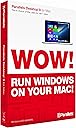
Parallels Desktop 9 for Mac
Product ID: 809621
⚡Seamless Windows & Mac apps side-by-side
🔄Drag & drop + copy & paste cross-OS
☁️Cloud sync without file duplication
Buy anything from 5,000+ international stores. One checkout price. No surprise fees. Join 2M+ shoppers on Desertcart.
Desertcart purchases this item on your behalf and handles shipping, customs, and support to KUWAIT.
🚀 Unlock the ultimate Mac + Windows fusion — never reboot, just run!
Parallels Desktop 9 for Mac is the industry-leading virtualization software that lets professionals run Windows and Mac applications side-by-side on a single Mac without rebooting. It supports multiple Windows versions and other OSs, integrates Mac features like gestures and Dictation into Windows apps, and enables seamless file sharing and cloud syncing without duplicating files locally. Ideal for power users, developers, and business pros who demand smooth cross-platform performance and productivity.
| ASIN | B00ENFVLAQ |
| Best Sellers Rank | #1,814 in Software ( See Top 100 in Software ) #188 in Utilities (Software) #508 in Mac Software |
| Customer Reviews | 3.7 3.7 out of 5 stars (1,087) |
| Date First Available | August 28, 2013 |
| Is Discontinued By Manufacturer | No |
| Item model number | PDFM9L-BX1-NT-EN |
| Manufacturer | Parallels Software |
| Product Dimensions | 1.25 x 5.25 x 7.5 inches; 2.47 ounces |
D**S
Best Virtual Machine Software for MAC Ever!
I was a long time user of VMWare. But It had a lot of problems and didn't use it much. I only used it because it was what we used at work and the VMs were compatible between Widows and MAC. Now I've migrated to Parallels Desktop 9 with Windows 7 and I love it. I've been using it for four months now. I haven't looked back. Complaints by other reviewers that Parallels only supports two versions previous to the current don't hold water as that is the same as Apple for OS X. Parallels is currently only $67 on Amazon. Not all that expensive. Pros: - You can run individual Windows programs as if they were MAC programs with Parallels Coherence (a feature of Parallels Desktop). There are still programs that only run on Windows (my Glucose Meter database is one) - A Parallels VM can have complete access to the MAC's file system - The MAC can have complete access to the Windows File system - If you have an Office 365 Home subscription, you can have MS Office installed on both OS X and Windows - Offce 2011 on MAC and Office 2013 on Windows. If you try to open (using "Open with") an Office file within the VM you will be asked if you want to use the MAC or Windows version of Office - When you plug in a USB device you are asked if you want OS X or Windows to have it - If Windows has access to the OS X filesystem, then a full NORTON Antivirus scan will check both filesystems for viruses, trojans, spyware, etc. Cons: - If you give OS X and Windows access to each other's filesystems, you need to install a Windows antivirus program (such as NORTON) to keep a Windows virus from trashing your OS X filesystem. - OS X's Time Machine will warn you that the VM may run slow when it is doing a backup every time it runs a backup. This is annoying, but you can turn this off. My MAC has 16GB of memory and I've allocated 4GB to the VM, so it never runs noticeably slow. - The VM uses a significant amount of disk space (I've allocated up to 20GB for now). However, it grows the space as needed until the maximum designated. - Changes in OS X versions may require an upgrade to Parallels since the software uses very low level APIs and drivers whose nature may change when OS X changes. New versions of Parallels may not be immediately available when OS X changes versions. - You have to buy your own copy of Windows ($99-$299 depending on version) as Parallels Desktop is merely a host for a foreign OS on MAC
J**.
It's the Right Product for Me, But Has a Glitch
INSTALLATION This product was relatively easy to install on my rMBP, along with Windows 7. It works flawlessly, with one annoying exception. GLITCH with PRINTING I purchased this product for one reason: to run certain proprietary software an hour a day that requires Windows. Originally I was unable to print. Tech support eventually solved this. Problem is, each morning when I open Windows, I have to reset the default printer to the Parallels virtual printer. When I exit out of Parallels, the default printer check mark shifts to a grayed-out printer icon. Apparently there's no way to fix this. PARALLELS' PRODUCT SUPPORT I give them a B plus. I called, and after 15 minutes was speaking with a tech. They're located in Manilla, Philippines. He was pleasant enough, but not especially adept at dealing with new issues. It was I who suggested we re-download the printer driver, and later, that we reboot the computer. This was needed, but didn't solve the issue. To his credit, he was able to take it from there. However, I wasn't thrilled that he was all too willing to quickly settle for the work-around. I cajole him to try other things, which he did, but they proved futile anyway. WINDOWS 8.1 I'm thinking I should have gone with Windows 8.1, rather than 7; and that this would have prevented the problem, since my printer is new. I may try upgrading, even thought I despise navigating in 8.1. But I really don't spend much time in Windows, and once there, don't need to navigate much. BETTER THAN BOOT CAMP The glitch does bug me a bit, given that I've spent over $4,000 on new hardware and software. However, resetting the default printer once a day is easier than re-booting in Boot Camp. So buying Parallels was the right move.
S**.
Great Tool!
I recent purchased a MacBook Pro and was considering installing Virtual Box to run my Windows platforms. I have used Virtual Box on my PC for over a year and it worked well but I've read mixed reviews about its use on Mac. I decided to try Parallels 9 and am glad I did. The software installed without a glitch and was ready to use right out of the box. I have since installed four operating systems and they all work perfectly. When setting up a virtual machine, the software gives the option to set it up in coherence mode ( integrated) or separate. The added icon in Apple's dock makes for quick access to your list of virtual machines. Depending on your host machine's capabilities, the software can easily run several platforms simultaneously. Other reviews have complained about renewing or upgrade fees. I've only had the product installed for two months so I can't comment on those but I just received a notice of a new version available, for free! Along with connection enhancements, this new version states that; "Subscriptions are now per-user rather than per-remote-machine. You may now access up to 10 computers with a subscription." " Full support for OS Mavericks and Windows 7, 8 and 8.1 as remote machines." They seem to be working to continually improve their product, which is encouraging. I would recommend Parallels if you're in the market for a good virtual platform software. Steve B.
A**O
very good one for ur computer with mac smile :)
Trustpilot
1 month ago
3 weeks ago