Buy anything from 5,000+ international stores. One checkout price. No surprise fees. Join 2M+ shoppers on Desertcart.
Desertcart purchases this item on your behalf and handles shipping, customs, and support to KUWAIT.
🔥 Cool like a pro, perform like a legend
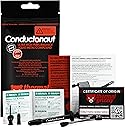
Thermal Grizzly Conductonaut is a premium 1-gram liquid metal thermal paste made in Germany, featuring an ultra-high thermal conductivity alloy of gallium, tin, and indium. Designed for serious overclockers and gamers, it delivers superior heat transfer for CPUs, GPUs, and consoles like PS5 and Xbox. The included precision syringe ensures clean, exact application, while its electrically conductive and corrosive nature demands careful use on compatible copper or nickel surfaces only.


| ASIN | B01A9KIGSI |
| Best Sellers Rank | #22 in Silicon Grease |
| Brand | Thermal Grizzly |
| Brand Name | Thermal Grizzly |
| Customer Reviews | 4.7 out of 5 stars 6,500 Reviews |
| Global Trade Identification Number | 00753677507449 |
| Item Dimensions L x W x H | 0.04"L x 0.04"W x 0.04"H |
| Item Type Name | CPU-Cooler |
| Item Weight | 2 Grams |
| Manufacturer | Thermal Grizzly |
| Model | TG-C-001-R |
| Number of Packs | 1 |
| Part Number | ConductonauTG |
| Product Dimensions | 0.04"L x 0.04"W x 0.04"H |
| UPC | 753677507449 |
| Unit Count | 1.0 Count |
| Warranty Description | Manufacturer Warranty |
C**1
Cooled my Razer Blade Pro almost too well...!
I ordered this over a year ago when I bought a used Razer Blade Pro 2018. This laptop is notorious for running at its thermal throttling point basically any time it's running anything remotely intensive. I put Kryonaut on it when I got it, but it still hit 90C on the GPU and throttled. I finally decided to take the risk and apply the liquid metal Conductonaut paste. I already knew how to disassemble the laptop so getting to the heatsink was no problem. Cleaned the old paste with acetone and a paper towel, then used the included alcohol wipes to further clean the surfaces of any remaining paste, leaving them with a nice shine. Applying this paste is very different from conventional paste. Using the micro tip, the liquid metal comes out and forms a blob. You kind of have to press the liquid metal into the surface for it to start to take hold, but once it starts the rest can be brushed into a thin, shiny metal layer that evenly covers the die. I then put more on the mating copper heatsink surface. This took more force to get it worked in, but it left a nice shiny layer where I wanted it. I gently set the heatsink back in place and tightened the screws. Booted up the laptop after reassembly and fired up Overwatch. I was surprised that the GPU didn't immediately spike to 90C, instead hovering around 80-85C. Not a great temp but if it's not throttling I'll at least see a performance boost. Then I fired up Destiny 2. I started getting massive frame drops in between smooth 120fps gameplay. Turns out that by cooling the parts well, they'll try to throttle up and draw too much power, causing the power supply to reset and the laptop to drop into battery mode. This cycle repeats and causes lag spikes. Note that this is NOT the paste's fault! It works so well that it uncovers another flaw with this laptop's design. The laptop almost seemed to rely on thermal throttling to keep power draw under the power supply's limit. Fortunately, I knew about Intel XTU and MSI Afterburner. I was able to undervolt the CPU and GPU and turn down the CPU maximum and boost power until I no longer saw the battery mode drops. The result? Laptop runs cooler, quieter, and faster than it used to. I love the design of this laptop outside of its major power and thermal flaws, so I'm happy to have both at least sort of under control now.
J**R
Only use this stuff if you actually know what you are doing
Got it for a good price here on amazon. Was my first time using liqued metal and this stuff came highly recomended by a number of people. I’m currently using this on the dyes of two GTX 1080’s in SLI (with nickle plated copper water blocks) and on the IHS of an i7-6900k. The thermals on the GPU’s are absolutely amazing. I have not seen the gpu temps go above 35c while OC testing with unigine heaven (delta is 22c). The 1080’s are running @ 2100Mhz core, 5400mhz memory, using 1/2”ID PETG (the GPU’s are in series), 1xD5 pump @4800rpm, 1x560mm + 1x280mm rads in push/pull (fan speed 1200rpm). The CPU thermals are not as great, but still adequate. The 6900k reaches 68c in Prime95 26.6 running 1344 FFT size for an hour (delta is 22c). The 6900k is soldered, so delidding was not needed. The cpu is OC’d to 4.4Ghz @ 1.290v. The loop consists of a nickle plated copper block, 1/2” ID PETG, 1xD5 pump @4800rpm, 1x480mm rad in push/pull (fan speed 1600rpm). I’ll admit this stuff is more difficult to work with. It does not like to spread at first, and you just have to keep at it until the surface will behin to “wet”. You have to use it on both surfaces that will be in contacting as well, because it does not “flow” like normsl paste. You also need to pay special attention to not get it on anything except the dye, IHS, or block surface sine it is a conductive material. I used thick electrical tape to cover the small diodes next to the dye on the CPU’s. I origionally was going to use kapton tape, but felt the heavy electrical tape would hold up better over time. Also note that this stuff should never come in contact with aluminum (it contains gallium, which destroys aluminum). Cleanup is a bit more tedious, but not bad. Wipe up what you can with an absorbent cloth (toilet paper works), then procede to lean the surface like you would for any other paste. In general, you should not go near this stuff unless you know what you’re doing, because it’s too easy to destroy your hardware otherwise. A $1000+ cpu and $1300+ in GPU’s, plus a $600+ Mobo can be destroyed in the blink of an eye due to one drop of this stuff being where it shouldn’t be. Everything said, I’m content with the results. The CPU would likely run cooler if it was delided. I think Intel did a crappy job with their IHS soldering. If you are using an unsoldered cpu, definately delid, the results should be great. I don’t recommend delidding a soldered IHS, because it’s EXTREMELY time and labor intensive to do properly, and has a much higher risk of damaging your cpu.
W**Y
Does the Job!
Used this to fix my son's PS5 and it hasn't overheated since. Seems like the product does exactly what it's supposed to. A little note about using it though - it's not a "more is better" type of product. You literally want the thinnest layer that actually covers the surface area. If you put too much it will act as an insulator instead.
J**S
Great price.
Good quality.
M**F
works well, fairly priced, but not for everyone
To get one thung out of the way, LM is *NOT* a silver bullet that will solve your cooling woes in most cases. Realistically, outside of some specific edge cases I’ll get imto later you can expect a small reduction in average temperatures (in my experience usually somewhere in the realm of 2-7C on GPUs. I don’t use it on CPUs because it stains the IHS and makes it look ugly) and a slightly larger but still small decrease in hotspot temperatures. There are some exceptions to this ruler, however: 1) AMD Rx 6000 series reference coolers if you, like me, were unfortunate enough to think that replacing the carbon thermal pad the GPU core comes with out of the factory with ordinary paste would help, then this is a solid solution to the absurd temperature problems you’re probably dealing with right now. Seriously, I went from 87C edge 115C juntion temp on my Rx 6800 with Kryonaut paste to maxing out in the mid 80’C on junction temp after using LM - and that’s with a vastly higher power limit to boot. 2) Very high thermal density chips if you have a component that outputs a LOT of heat in a very small area then it can be very hard to adequately transfer that heat away. LM can help woth this over regular paste. A good example would be something like a delidded Ryzen 7 5800x. A chip like this would benefit from liquid metal, although unless delidded the IHS will prove to be a limiting factor. 3) Very high power consumption I have an RTX 2080 ti that pulls up to 850w when under load. Paste works, but goodness me does it sometimes struggle when power consumption stays high instead of spiking. LM helps a lot here. For pretty much every other possible use case it’s simply not worth it. Although more thermally conductive than paste, don’t be fooled by the w/mk figure on various paste. The way this is calculated makes it extremely manipulatable, and in fact Thermal Grizzly has made statements about this. They themselves manipulate this number on their products, although in fairness to them all of their competitors do too, so at least they’re honest about it. Aside from that, there are some pretty serious downsides too: 1) Electrically conductive if this stuff gets on running SMDs then you can say goodbye to whatever that component the SMD is on. 2) Corrosive LM alloys contains lots of gallium, which will eat away at some metals, notably alluminum and tin. what this means is that if you use this on an alluminum cooler, the gallium will alloy itself to the cooler and destroy the structure of the cooler. Not great. Also, if a little bit lands on a PCB and manages to not short something out, you can bet money that it’ll eat its way through a solder joint and once again, bye bye component. 3) Staining This will stain copper and nickle. Not a deal breaker, just ugly. Also, copper in particular is a pain to clean off, as the LM will bond to it leaving small bumps. These can be scraped off, but it’s time consuming and not much fun. 4) Expensive This is probably the most obvious one. If you don’t need LM for your usecase, you can spend less money and probably get more paste at the same time. Personally I’m partial to Thermal Grizzly Aeronaut, but just about any well known paste will do you just fine. I believe many of Noctua’s pastes are usually quite well priced. In conclusion, if you know you need LM then you probably already know all of this and are going to get it anyway. If you don’t, then you should probably just get some Kryonaut or whatever and call it a day.
W**E
Do not use with Copper or you'll be replacing every few months
Yes, this stuff works great, however, it is not copper safe as the manufacturer states. The best use for this product is when delidding and using under the heat spreader. I used this with a 100% copper Thermaltake AIO liquid cooler and after 4 months, my computer started overheating and in place of this thermal compound, was white powder. This product cannot be used with Aluminum at all but also eventually reacts with Copper as well. The explanation I read is that it eats away at the copper leaving the white powder and then the microscopic pits formed then trap any remaining compound causing the process to accelerate. This process may also render the cooler permanently less effective due to the damage to the copper surface. I contacted the manufacturer for clarification and weeks later I have heard no response from them. You'll get great results up front, but you'll have to clean off the power and replace at least every 6 months, or in my case with a very hot running i9, even sooner. Update:. Delidded and this stuff is excellent for that. Does not react to the nickel IHS and has not dried out. Use it for delidding for sure!
J**.
It just works
Worked great to re-spread the original Sony liquid metal in my PS5. As others have probably put in their reviews, this stuff works as advertised. Comes with the q-tip that lets you spread this stuff around, and wipes to remove dry spots. First, I started by completely sucking up all of the original liquid metal on the APU and heat sink. Then, I cleaned off the dry spot (probably 60% of the APU) with provided alcohol wipe. Then, I re-applied the liquid metal using the syringe and spread with the provided q-tip. No muss, no fuss. Works exactly as needed and PS5 is back to running like a champ!
M**K
Works great!
Shorty story: Before with undervolt 95C thermal throttle on CPU and mid 80s on GPU After with undervolt may just touch 95C then settles at high 80s and GPU still mid 80s. Great results on CPU and I've very happy that my CPU isn't thermal throttling and can operate at full frequency/power. Would probably not use on GPU again, stick with paste. Long story: My MSI GS65 9SE, [9750H and RTX2060] would constantly thermal throttle the CPU at 95C during tests and games, even with max fans. Undervolted by -.145mvolts, and still throttled, but was able to gain a couple hundred megahertz. I repasted with Noctua NT-H1, but with undervolt was worse than before. I believe this wasn't the pastes fault, but perhaps my torque sequence was off, and had poor pressure. Paste had been fairly well spread. Decided something had to be done to get the temps inline, 95C was not acceptable. So ordered Conductonaut after watching many videos on use and results. Have to admit that the fear factor on this stuff out in the media is a little off putting, but I came to believe that it seems to be more hysteria than the result of it being that dangerous. I used high temp electrical tape to surround the dies on the CPU and GPU. This seemed like a better approach than using conformal coating. The application to the dies was pretty easy, but being my first time using it, judging the correct amount was a bit hard. I went with just enough to leave a liquid coat, that you could see just a slight flow of liquid, and was opaque over the die. However applying to the copper heat sinks was a different story. The copper appears to bond to parts of the thermal paste, causing it to dry out during application. As I understand it the copper can absorb liquid metal to a degree. So I made multiple applications to the heat sink to build up a coating, which in the end was lighter and thinner than that applied to the dies. Once I had it back together I was quite happy. With the undervolt it would not thermal throttle and would settle around 86-89C. With Intel XTU the benchmark rose 20 points. Cinebench R20 gained about 200-300pts. The CPU was able to hold the boost frequency, 4.1mhz, for the entire boost time then settle and hold 3.8mhz. The GPU really saw no appreciable change, and I would no recommend using LM over a thermal paste for the GPU. Conductonaut has made it possible for me to fix the one major flaw of the GS65, thermals.
M**A
Impressive
Juste be carefull when apply, with copper just put some back on it After one month After the first coat because the copper will dry out the metal
Z**N
High risk high reward
Noticed a 10c+ difference under load in a gaming laptop.
M**8
Good product
Good product
E**Z
BE CAREFUL WITH IT, INSULATE EXPOSED CONDUCTING PARTS!
Quality liquid metal, helps reduce temps considerably from 10c on just the IHS to cooler, or upto 20c with CPU delid, CPU die sanded, and IHS to cooler. Don't leave 1 star feedback after destroying your system because you were too amatuer to use this stuff, it requires a lot of care and some skill. If you are using this for a CPU delid, be sure to insulate any conducting areas that will sit under the IHS (integrated heat spreader, the big flat metal piece that is the top of your CPU where the cooler usually sits/makes contact with) or even outside it, this stuff is very runny and it may happen over time long after you have put the IHS back on. I used clear nail polish on exposed contacts, resistors or transistors etc... I avoided using any glittery types of nail polish as i'm not sure if they're conductive. Apply two layers to be safe (2nd layer after 1st layer has dried obviously). If the IHS is soldered to the CPU die (most modern CPU's have solder) be sure to use a delidding tool and carefully remove the IHS. There will be solder left on the CPU die, you will have to carefully remove it with either a blade (scraping blade is handy) or there are products you can buy that dissolve the solder safely, something like Flitz Polish can do this. If you use a blade, be sure to lightly sand down the remaining solder and use a super fine sand paper to get that mirror polished finish on the CPU die. I have sanded down 9900k CPU die's that are known to come excessively thick which also helps with reducing temperatures, but you do have to be super careful not to sand too much or you will destroy the CPU. Most IHS's and cooler contacts come copper based but if for some reason you have an aluminium based one, don't use liquid metal or it will corrode it and may fuse to the aluminium, which then you will most likely have to sand down to clean it off. Just buy a cheap copper IHS off amazon for the CPU you have, they're not expensive. Be sure to apply a very thin layer to both the CPU die and the inside of the IHS. You will need to have a rough idea where the shape of the CPU die will make contact with the inside of the IHS to avoid excess amounts dripping off the IHS to the surrounding areas of your CPU die, this is one of the reasons it is best to insulate the conductive parts of the CPU, if you don't know what parts are conductive, then just insulate everything that stands out as it can't hurt, but obviously not the back of the CPU where the contacts are for connecting to the motherboard! One method of knowing where to apply on the inside of the IHS is to apply on the die, place the IHS on the CPU and the die should touch the inside of the IHS and leave you a rough liquid metal outline to apply within. This is also good to see if the CPU die makes contact with the IHS if you sanded the die down (if it doesn't, then simply sand down the base of the IHS little by little until the die makes contact with the IHS. Finally, apply little dabs of glue on the IHS and place it in position, I usually install it into the motherboard while the glue is wet so the IHS is clamped down to the CPU by the motherboard socket, and you may want to use paste on the top of your IHS but if you do want to use liquid metal then either carefully apply it while it is installed in the motherboard or be patient and wait for the glue to dry, then take it out of the socket. You will need to apply liquid metal to the cooler too and will need a good idea where the IHS will make contact with the cooler, use the same method as before to see where it will make contact (apply to IHS, place cooler in position then take cooler out and look at where the liquid metal touched the cooler from the IHS). A little advice on applying liquid metal, it can be quite annoying trying to spread it at first as the blob of liquid tends to just follow the q-tip or seem like it gets completely absorbed by it. Keep trying to spread it with the q-tip even if nothing seems to be happening and apply some pressure so you're effectively squashing the liquid metal out of the q-tip and move the q-tip back and forth quite fast in a small area, eventually it will start spreading nicely and you will get the hang of it. I have delidded a 4790K, 2x 9700K, 9900K, 2x 9900KF, 10900K all successfully with this liquid metal and they are all running good to this day. I haven't attempted a delid with any AMD cpu's yet and wasn't bothered to do it to my 5950x as i use it for server purposes and general use, but the intel's were for gaming and overclocking so it was worth it. Watch many youtube videos to learn as much as you can before attempting this as CPU's are not cheap, but don't be scared as it is not rocket science, you just need to be clean and careful!
I**8
La mejor solución para refrigerar el CPU y GPU a nivel extremo.
Cuando recién adquirí mi laptop gamer (ROG G752) su temperatura normal (modo reposo) era de 48 grados y al jugar Overwatch ésta subía a los 92 grados, así que decidí remplazar la pasta térmica de fábrica por la Arctic MX-4, y la temperatura en modo normal bajó de 48 a 45 grados (3 grados menos), pero al jugar Overwatch su temperatura era de 84 grados (8 grados menos)... no satisfecho con el resultado quise ir más lejos, así que decidí poner metal líquido, y viendo muchos vídeos de profesionales, todos coincidían con Thermal Grizzly Conductonaut 73W/m·K, el único problema es que al ser conductor de electricidad si éste toca la tarjeta madre o otro componente la laptop se estropeará, pero tomando todas las precauciones (ya que es la primera vez que lo hacía) valió la pena., mi laptop en modo reposo bajó de los 45 a 32 grados (13 grados menos que la Arctic MX-4 y 16 grados menos que la pasta térmica de fábrica), pero al jugar Overwatch es cuando se nota una diferencia abismal, pues la tempera llegó a subir a un máximo de 60 grados y eso sólo en ciertos momentos (24 grados menos que la Arctic MX-4 y 32 grados menos que la pasta térmica de fábrica... esto es sorprendente, ahora mis ventiladores permanecen por más tiempo apagados, y esto significa menos consumo eléctrico, menos ruido y más durabilidad a para mi laptop. Estoy completamente satisfecho de haber adquirido este metal líquido que hace milagros con las temperaturas. Les dejo las imágenes para que vean por ustedes mismos y aprecien como en la prueba en donde se estresan todo los núcleos del procesador al 100%, éstos se mantienen a una temperatura por debajo de los 60 grados centígrados.
Trustpilot
3 days ago
2 weeks ago