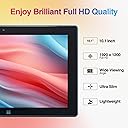
🚀 Elevate your mobile workspace with Fusion5’s sleek power-packed tablet!
The Fusion5 10.1" Windows 11 Tablet PC combines cutting-edge Intel 13th Gen quad-core processing with 8GB RAM and a stunning Full HD display, all wrapped in an ultra-slim design. Featuring 5G WiFi, Bluetooth 4.4, USB 3.0, and Micro HDMI ports, it offers versatile connectivity for professionals on the move. Perfect for multitasking, streaming, and productivity, this tablet delivers a premium Windows 11 experience backed by a 12-month US warranty.


| ASIN | B07HY8X46F |
| Age Range Description | Adult |
| Aspect Ratio | 16:10 |
| Battery Average Life | 6 Hours |
| Battery Capacity | 18 Watt Hours |
| Battery Cell Type | Lithium Polymer |
| Battery Power | 18 Watt Hours |
| Best Sellers Rank | #34,785 in Electronics ( See Top 100 in Electronics ) #669 in Computer Tablets |
| Brand | Fusion5 |
| Built-In Media | Tablet, USB 3.0 cable, micro HDMI cable, charger, manual/warranty card (if applicable) |
| CPU Model Number | N series |
| CPU Model Speed Maximum | 1.8 GHz |
| Camera Description | Front, Rear |
| Cellular Technology | 5G |
| Color | Black |
| Compatible Devices | Various Windows 11 compatible devices (e.g. keyboard, mouse, speaker, headphones) |
| Connectivity Technology | Bluetooth, USB |
| Customer Reviews | 4.0 out of 5 stars 5,825 Reviews |
| Display Resolution Maximum | 1920*1200 Pixels |
| Display Type | LCD |
| Front Photo Sensor Resolution | 2 MP |
| Generation | 4th Generation |
| Graphics Coprocessor | Broadwell GPU (Intel Gen8) |
| Graphics Description | Integrated |
| Hardware Interface | Micro-HDMI, USB 3.0 |
| Headphones Jack | 3.5 mm |
| Human-Interface Input | Microphone |
| Item Dimensions L x W x Thickness | 10.24"L x 0.67"W x 0.39"Th |
| Item Weight | 0.69 Kilograms |
| Lithium-Battery Energy Content | 18 Watt Hours |
| Manufacturer | Fusion5 |
| Memory Slots Available | 1 |
| Memory Storage Capacity | 64 GB |
| Model Name | FWIN232 PLUS S1 |
| Model Number | FWIN232+ |
| Model Year | 2018 |
| Native Resolution | 1920 x 1200 pixels |
| Number of Rear Facing Cameras | 1 |
| Operating System | Windows |
| Other Special Features of the Product | Expandable Storage |
| Photo Sensor Resolution | 5 MP |
| Processor Brand | Intel |
| Processor Description | Intel Quad-Core |
| RAM Memory Installed | 8 GB |
| Rear Facing Camera Photo Sensor Resolution | 2 MP |
| Screen Size | 10.1 Inches |
| Supported Audio Format | MP3 |
| Total Usb Ports | 1 |
| Video Capture Resolution | Native FHD 1080p |
| Video Processor | Intel |
| Warranty Type | Limited |
| Wireless Compability | 802.11ac |
| Wireless Technology | Bluetooth, Wi-Fi |
A**R
⭐⭐⭐⭐⭐ Perfect Tablet for Musicians and Performers!
I am absolutely thrilled with my Fusion5 Windows 11 tablet! As a singer, I use it to display sheet music and lyrics during performances, and it has exceeded all my expectations. The screen is bright and clear, making it easy to read in various lighting conditions, and the responsiveness is fantastic—no lag or glitches at all! What I love most is how seamlessly it works with all the applications I rely on. Unlike Apple devices, which often have compatibility limitations, this tablet runs everything I need effortlessly. Setting it up was a breeze, and the Windows 11 experience is smooth and intuitive. The battery life is great, the build quality feels solid, and it's lightweight enough to carry anywhere. Whether you’re a musician, student, or professional looking for a reliable and affordable tablet, this is an outstanding choice! I highly recommend it!
D**N
Great Budget-Friendly Tablet
I was looking for a small Windows-based tablet to replace an Android tablet that died. This was to sit beside my recliner for Internet searches, email, YouTube, and other light weight needs. The Fusion5 fills the bill excellently. All Windows features are working well. For a 10" display, it is easy to read and viewing videos is conformable. Having a touch screen is a necessary feature that some competitors lack. I have two external additions from mt previous unit that I have found helpful: a Bluetooth keyboard and a stylus. The Fusion5 on-screen keyboard is easy to use and quite responsive. I just like touch-typing. The touchscreen works just fine but I have large fingers and I just like a stylus. These may enhance your experience as well but definitely are not required. As far as performance, the Fusion5 is powerful enough to handle all me needs. It even runs Microsoft Office applications well. I fully recommend this tablet. UPDATE 02/28/2025 This workhorse of a tablet has greatly benefitted me both personally and professionally. It is so easy to have a Windows-based tablet with me when in the field meeting with customers and having the same experience I have with my home computer. I use an external keyboard so I recommend considering the docking station for this tablet. I use a passive/active touchscreen pen so I do recommend a screen protector (as should be used for all touchscreens).
D**K
A Nice Device for a Good Price
Fusion 5 10.1" Windows 10 Tablet I picked up this tablet as an upgrade to my Kindle Fire 8". Overall, I'd say it was a good choice. Initially, I began shopping for a 10" version of my same tablet, but I thought, why not upgrade a bit in the process? Since most of my other equipment is in the Microsoft ecosystem, I chose to go with a Windows tablet. That way, I can sync easily between my desktop, phone, and tablet, having all my data available from any device. When I first started shopping, my gut instinct was to pick up the MS Surface Go, which is a 10" Windows 10 tablet. The down side is that Windows is running in S Mode. Windows 10 in S Mode is a more limited, locked-down Windows operating system. In S Mode, you can only install apps from the Store, and you can only browse the web with Microsoft Edge. I didn't want to be limited, and I began looking around for another solution, eventually deciding on the Fusion5. Order the device through Amazon was simple and painless, as most Amazon transactions are. The device was shipped promptly, and arrived when it was supposed to. I've been using the tablet for a few weeks now, so I think I might be able to relay my experience with it. Screen The screen is great, on par with other high end tablets. The resolution of the 10.1" (diagonally measured) display makes for a nice crisp display, with good color and brightness. Touch sensitive is good as well. I've had no problem with making selections for text fields, buttons, etc. Some other folks have commented about a problem with selecting a text field, and not having the on-screen keyboard pop up. I don't think this is a failing of the tablet itself, but rather the way Windows 10 works with touch. It's been an issue for the last several version of Windows, and 10 is no different. Putting Windows 10 into tablet mode alleviates the problem somewhat, but in some text fields you may need to double tap. Using the Inking function in Edge, OneNote, and other apps worked flawlessly. Using a stylus or your finger, you can highlight data on web pages or other places, or even include short notes. The only complaint I would have about the display is the inclusion of a less than stellar screen protector with the device, already installed. When I received mine, it was loose along the bottom bezel of the display. Further, the protector slightly hindered use of touch features. Once I removed the protector, touch sensitivity was much better. The downside if your remove the protector (and don't replace it) is the potential for scratches, as well as the mass of fingerprints that will collect on the display. Connectivity The only option for connectivity include with the device is WiFi. I've tested it by connecting to several different access points, public and private, and have had no issues. The only downside I can mention is the lack of high speed options with the on-board WiFi. In my testing, I was only able to connect with 802.11b, which is limited to 11 Mbps, so you're roughly getting 9.5-10 Mbps. I think a better option would be to use an 802.11 b/g/n chip for faster speeds. Even with the limited connectivity, I am able stream NetFlix, work on documents from OneDrive, and surf the internet with no issues. There is some slight buffering at the start of a NetFlix video, but my desktop does the exact same thing, so I don't see that as negative. The rest of the stream is fine, and displays in HD. Streaming from YouTube was a bit better, with a quicker start to viewing than with NetFlix. The device comes with a variety of ports on the side, including a full size USB port, mini HDMI, USB-C and a power port. Charging via the power port *or* USB-C worked fine. I wasn't able to test USB-C peripherals, as I don't have any. Using the standard USB port, I connected a wired mouse, and it worked with no issue. also tried a USB keyboard, headset, and game controller. All worked with problem. As long as Windows has or can find the correct driver for the device, most should work with the tablet. One cool thing I was able to do is connect the tablet to my KVM switch. A KVM switch (with KVM being an abbreviation for "keyboard, video and mouse") is a hardware device that allows a user to control multiple computers from one keyboard, monitor, and mouse. Using the KVM, I was able to use my full size equipment at my desk. The device found the peripherals with no issues, and I happily surfed the web and am actually writing this review using the tablet now, using the big screen. Document editing is much easier with full size equipment, and the Fusion5 had no problems allowing me to use my regular gear. Bluetooth connectivity is good, and I tried a couple of different devices with the Fusion5, including my phone, a mouse, and two different sets of headphones. Range and functionality was good. Leaving the tablet in my home office, I was able to move up to 50 feet away, and the sound was still good in my headphones. Sound The tablet included two speakers, although they are not very good. At maximum volume, the sound is *just* audible. This doesn't bother me, however, as I use a bluetooth headset when I am streaming video, using Skype, etc. I haven't use the on-board microphone, but I imagine you would be better served getting a good bluetooth headset for Skype calls, or perhaps a wired headset connected to the USB port. Storage The version of the device I purchased included 4 GB of RAM, as well as 64 GB of storage on-board. While 4 GB of RAM won't give you enough "oomph" to run things like MySQL or Doom, it is more than enough to edit documents in Word, spreadsheets in Excel, surf the net with multiple tabs open (but no too many!), and play some lighter games like Asphalt Airborne and the like. Mass storage of the device is a seemingly huge 64 GB. However, keep in mind that Windows 10 takes a large chunk of this space for itself. The device does include an SD card slot, with which you can use to expand the storage. With this in mind, I did purchase a 128 GB SD card. I inserted the card, and it worked straight away. The first thing I did is set my OneDrive folder to the new drive, to keep things of the system drive. That way, you're not cluttering up the system drive with your random cat pictures and crossword puzzles. Operating System The Fusion5 comes with Windows 10 Home Edition, 32-bit. This is not a watered down version of Windows, nor is it Windows running in S mode. This is the full version of Windows 10 Home Edition. What this means is that anything that you can run on your home machine, you can run on your tablet, provided that it fits in to the requirements of the software. For example, I am a hobbyist software developer. I write applications and utilities for use by people all over the world. On this device, I was able to install and use a Win32 application that I built on my desktop machine. No errors, no missing drivers. It just worked. Where all this leads is if there is something you want to connect to this tablet, or some software you want to install, the only questions you need to ask are "Is it compatible with Windows 10?" and "Does my hardware meet the requirements?" Battery Life The claimed battery life is around eight hours, and I have no dispute with that. I charge the device once per week, and have yet to have an unexpected shutdown due to battery problems. I imagine with some power management like dimming the display and throttling the CPU a bit (both available by tapping on the battery icon in the system tray), you could stretch it out to ten hours. Summary I'm pretty happy with this purchase. I use the Fusion5 for reading ebooks, watching streaming video, and some light web surfing. While it won't replace my desktop or my full laptop (it's a beast!), it is great for use on airplanes, laying in bed at night, riding the bus, etc. Besides the few minor items I pointed out previously, I would make one more ask for this device. The tablet includes no recovery media with it. It would be nice to have the option of performing a clean install of Windows 10 from media, if the need arises. As it sits, I'm not sure it can be booted from USB, but than may be an option, provided I can find the product key. Overall, if you are in the market for an inexpensive Windows 10 device, I would recommend the Fusion5 10.1" Windows 10 tablet. At just under $200, it's a pretty great buy.
M**.
Runs Win11 "S" mode by default; Only runs items downloaded from MS AppStore, unless...
...you disable it. Contacted the Vendor, and they never mentioned it could be disabled. One star given because of the hours and frustration involved due to the lack proper information regarding the device during the purchasing process and the minimal support after the purchase. Now, the rest of the story: Issues: Yes, I am a very biased user. I have UNIX, Linux, and MS OS administration experience. If you want an inexpensive "entertainment toy" that only runs stuff from the Microsoft App store(including their browser and their version of word, spreadsheet, and), and you don't mind being REQUIRED to have a "Microsoft on-line account" or being forced to pay the subscription for O365 (and, dare I say it, soon for the operating system itself?), you'll probably love it. You will need a keyboard and a mouse to use it effectively for any of the supplied office product (e.g. PowerPoint, Word, Excel). So count on spending another $40USD to $80USD. The OS on the tablet is associated with your Microsoft account...not sure what that might mean later with respect to giving it to someone (family member, etc.), donating, or selling it. The new "owner" Might be required to purchase a new OS. Just something to consider if these are some of your thoughts regarding the purchase. My Needs and Interaction with Fusion5 I simply needed a device with physical USB and HDMI ports and run a simple stage timer program that I purchased many years ago - and no, there was no equivalent in the MS App store. I didn't need a network connection or anything. That being stated, if you want it for non-mind numbing purposes, you have two choices. Get something with a full operating system (or an Apple device) or disable the "S" mode. There are several videos on line that discuss how to do this. I spent HOURS trying to get a "non-verified" program to work on this thing as the inexpensive tablet I was using and it wasn't until I ran a command shell window that the OS finally stated that it was in S mode. I contacted the folks at Fusion5, explained exactly what I needed to do with the tablet, and ended with, "If I can't do this, the unit useless to me" and I'll need to return it. How do I reset to factory settings". Resetting didn't even work as the OS requested the source OS installation files! What I Ultimately Found I was fiddling with it today to figure out how to clear it (was on the verge of using the format command) and stumbled on a way to turn off the "S" mode and finally got the program I needed to run for a business conference last weekend(yes, AFTER I needed it) to work. Questions So, my question to the folks at Fusion5, why don't you document somewhere that the tablet CAN be taken out of S mode? And Amazon, why isn't it in the description that this is intended for entertainment purposes or, if you purchase the subscription to O365 (monthly charges) and that ONLY Microsoft Verified (e.g. locked to the MS-App store) can be run? Two questions of a somewhat legal perspective come to my mind; Anti-trust violations on the OS part(although, they do give themselves an "out" with the ability turn S mode off...but...; "Bait and switch" (e.g. states Windows 11, but neglects to make the full statement that it has "restrictions" on the Amazon description side (although, I do understand that Amazon takes boiler plate from the vendors - Maybe vendor descriptions should be vetted more appropriately). If you have gotten this far, I sincerely hope you see this as a fair assessment given the reason for my purchase in the first place. If you are Amazon or Fusion5, in the future, please pay more attention to the product descriptions (by the way, I see information lacking on many products here on Amazon and affiliated vendor websites) especially when a product advertises something Windows 11, as one expects the full product, not a product with reduced features or capabilities.
J**K
Excellent Performance at a Low Price
I got this tablet for internet browsing, casual digital art, and some light gaming, and it accomplishes all of these tasks quite well! The only minor complaints I have are with the touchscreen/mobile capabilities of Windows, which are not the fault of the tablet itself. Internet browsing For typical internet browsing, there are no real performance concerns. Everything is pretty much as fast and responsive as you would expect on a typical modern computer. You might have some trouble with more performance-heavy situations, like having lots of tabs open or playing games in the browser. But these are not the reason I purchased the device. Digital art apps My kindergartener often uses this device to use the free art software TuxPaint. It works surprisingly well for this, especially considering the app was not designed for touchscreens! I have not tried more “serious” apps in this area like Photoshop or Krita. Light gaming This device has no trouble with simple 2D games like mazes, solitaire, etc. It even manages to provide a decent experience (20-30 FPS) with simple 3D games, like Cat Simulator and Minecraft, if you turn down some graphical settings. This is a big plus for the device, considering the price. Minor complaints It seems like Windows 11 still doesn’t quite have the touchscreen-only experience figured out. If you go fullscreen with a web app in the browser, the only way to exit fullscreen seems to be using a keyboard. While playing a fullscreen game, the only way to switch to another app seems to be swiping up from the bottom to reveal the taskbar, and sometimes this fails to work. And some apps get very confused and messed up when you change the device orientation. But again, these complaints have more to do with Windows and specific apps than with the device. If you’re looking for a heavy gaming device, look elsewhere. But if you’re looking for a lot of value packed into a VERY low price point, this might be perfect for you! Oh, and it does come with S mode enabled, but the Windows Store app makes it easy to disable that forever when you try to install an app that isn’t compatible with it.
K**L
Great Tablet Value
For the price this is an excellent tablet. The touch screen is responsive. The model purchased has 8GB of memory and 256GB of storage which provides support for running multiple applications simultaneously and enough storage for Windows and all of my installed apps. Adding a wireless keyboard/case makes this tablet almost equivalent to a full laptop. Battery life seems adequate for about a half day of continuous use so if you need all day battery life this is not the tablet for you, or just keep the charger handy. Bottom line I am very satisfied with this computer.
W**H
Versatile and Capable Tablet
The fusion 5 tablet is good at what it is designed for. I personally use it for photo editing when I don’t have ready access to my PC. It is fully capable of handling most of the commercial photo editing software I use to include image stackers and video compression software. It’s extremely portable and fits nicely in my photographers backpack. While this is an excellent alternative to more expensive units, it does have a small but worth mentioning shortcoming. Battery life. On a full charge, I can get an average 12 hours of use without being tethered to an external battery pack or wall outlet. In truth 12 hours is more than adequate for most trips, however, there have been times when the battery life has been a detriment to field work requiring an external battery source, which creates additional weight on hikes to photograph landscapes, wildlife, and even my favorite Astro photography. All in all, this is a great tablet that performs well, is easy to set up and use, and isn’t cost prohibitive. If you are looking for bang for the Buck, the Fusion 5 is the answer!
G**D
DO NOT USE Chat support - otherwise it is a 5 star tablet
Let me start with the chat comment - whatever company Fusion contracted with for live chat support is terrible. After a one hour chat session the very first question I asked, "If I switch out of S mode to Pro (as the popup screen calls it) what challenges can I expect? The answer - none at all. That would have taken less than 2 minutes...it was a frustrating 1 hour plus with canned scripts being posted from their script DB all call centers use. The final answer from support, after me nearly sending a great tablet back to Fusion and leaving a 2 star review? No, there' s no challenges at all!!! SIMPLE but their chat contracted company has one of the worst training and development departments ever. Poor Neil, he finally admitted he did not know software....only apps. Can you imagine any customer care company actually putting poor Neil on the Fusion contract team? He tried his best but finally broke down and got James. After saying he read the script, he asked what my question is specifically. "You read the script right? It is the VERY FIRST thing on top of what you read, are there any challenges I should know if I switch out of S Mode to download LaserGRBL (the software we use for engraver). James was good, don't get me wrong, but they trained him to say he read the chat text BUT only scanned for details and did what people always do, asked an obvious question right off the bat, really built my trust. Again, I did not blame James, he was trained by a company run by humans and clueless about human nature... Okay, enough rant, what about the product, Gary? 3 minutes after getting off the chat session, LaserGRBL was up and running. I'm no gamer and stream far more music than video. What we do is laser engraving using LaserGRBL. With this excellent processor and expandable 128k RAM (can add 256k more) the rendering times are amazing, compared to our HP all-in-one, Acer laptop, or any other computer or tablet we had in our home. Although our HP did okay, speed is the name of the game and rendering is the difference between running a marathon bare foot, with sandals, dress shoes, or new running shoes. Which would you choose to race in? Exactly! Fusion5 is the best developed running shoes currently on the market. Imaging the space savings when I took out the MUCH slower computer and set this next to the laser and plugged it in. Yeah, slick setup that packs and goes quickly!! LaserGRBL runs GREAT! (Remember, if you are adding any Software (like Word, Excel, PowerPoint -not an app) Simply get the free app to disable and reenable S Mode. I disabled, downloaded and installed and THEN turned S Mode back on (I really like the added features of S Mode besides this one glitch). Without the live chat support TRAIN WRECK, this is a 5.5 star tablet all day long. Build quality, packaging, and more puts it easily 5 stars. The company, Fusion, simply needs to cancel the contract with whatever company they are using (I will be sending their Chief Training Officer the text and my recommendation). They ALMOST lost me completely and I would never have looked at another Fusion product. I was fully prepared to give a 2 star rating, copy & paste the text so all could see the poorly trained flopping around Neil and James had devolved to, and this GREAT tablet would have been returned and - yepper, back to square one). Instead, I'm thrilled with everything Fusion5 has (EXCEPT - micro usb still? Really????) going for it. It is going to save us many hours every week because it was built to be a processing monster...it delivers!! S Mode only allows Apps, not software.
Trustpilot
5 days ago
2 weeks ago