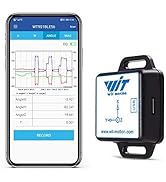
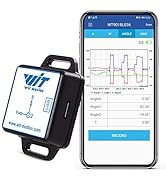
![[Arduino Accelerometer Sensor+Inclinometer] WT901 High-Accuracy 3-axis Acceleration+Gyroscope+Tilt Angle +Magnetometer with Kalman Filtering, 9-axis MPU9250 USB 200Hz IMU Raspberry Pi AHRS Module](https://m.media-amazon.com/images/I/51k3AjMwOYL._AC_SL3840_.jpg)

Buy anything from 5,000+ international stores. One checkout price. No surprise fees. Join 2M+ shoppers on Desertcart.
Desertcart purchases this item on your behalf and handles shipping, customs, and support to KUWAIT.
🚀 Elevate your projects with pinpoint motion sensing mastery!
The WITMOTION WT901 is a compact, high-precision 9-axis IMU sensor module combining accelerometer, gyroscope, magnetometer, and inclinometer data with advanced Kalman filtering. Operating at up to 200Hz, it delivers ultra-stable, low-noise measurements with 0.05° accuracy, featuring dual I2C and UART interfaces for seamless integration with Arduino, Raspberry Pi, and other platforms. Backed by professional-grade support and comprehensive tutorials, it’s the go-to choice for engineers and makers demanding reliable motion sensing in compact form.


| ASIN | B07GBRTB5K |
| Additional Features | High-Precision 9-Axis Accelerometer Sensor, Robust Design, Low Power Wake-Up, Easy Integration |
| Aspect Ratio | 16:9 |
| Best Sellers Rank | #108,540 in Industrial & Scientific ( See Top 100 in Industrial & Scientific ) #33 in Acceleration Sensors |
| Brand | WITMOTION |
| Built-In Media | Monitor |
| CPU Model Number | WT901 |
| Color | Black |
| Compatible Devices | USB-connected devices |
| Connectivity Technology | USB |
| Cooling Method | Water |
| Customer Reviews | 4.1 4.1 out of 5 stars (54) |
| Display Resolution Maximum | 60x60 |
| Display Type | LED |
| Graphics Card Interface | Integrated |
| Graphics Coprocessor | Integrated Graphics |
| Graphics Description | Dedicated |
| Graphics Ram Type | Shared |
| Hard Disk Description | HDD |
| Hard Disk Interface | PCIE x 4 |
| Hardware Interface | USB |
| Human-Interface Input | Buttons |
| Item Dimensions | 0.6 x 0.08 x 0.6 inches |
| Keyboard Layout | QWERTY |
| Manufacturer | WitMotion |
| Memory Storage Capacity | 1 TB |
| Model Name | WT901 |
| Model Number | WT901 |
| Model Year | 2014 |
| Native Resolution | 12-bit |
| Number of Component Outputs | 1 |
| Operating System | Windows |
| Personal Computer Design Type | Barebone |
| Power Plug Type | No Plug |
| Processor Brand | Intel or AMD |
| Processor Count | 1 |
| Processor Series | 68000 |
| Processor Socket | LGA 1151, AM4 |
| Processor Speed | 1 GHz |
| RAM Memory Installed | 1 GB |
| RAM Memory Technology | DDR4 |
| RAM Type | DDR SDRAM |
| Ram Memory Maximum Size | 16 GB |
| Resolution | 12bit |
| Specific Uses For Product | Professional |
| Style Name | Minimalist |
| Total Expansion Slots Quantity | 4 |
| Total Usb Ports | 1 |
| UPC | 756040155933 713752278114 |
| Video Output | HDMI |
| Video Output Interface | USB |
| Video Processor | TDK Corporation |
| Wireless Compability | Bluetooth |
| Wireless Network Technology | Wi-Fi |
| Wireless Technology | Bluetooth |
M**.
Ease of use
Excellent job on how these guys have made such a complicated device so easy to use. There is a lot going on with the fusion algorithms that go into this and having done this myself with all the code that is involved in getting this to work, these guys have removed a lot of the complexity and provided a fairly easy-to-use interface. Very good documentation (assuming you can find it all) and good videos made it fairly straight forward to get it to work OOB (out-of-the-box) and calibrate it. From what I have seen from using competing devices, this by far is the easiest to use and get working - I highly recommend it! Having an I2C and a UART interface is a huge plus - doesn't take long to get it up and running and providing meaningful results.
A**R
Very nice module with good software
The device works very well. Software is easy to use and reports everything with good resolution and fast response time. The support team is also very quick and helpful. I had an issue getting an external GPS to connect but once I set the baud rate (both GPS and module) to 115200 per their suggestion it worked perfectly. They got back to me within an hour with exactly the info I needed. Planning to use this for telemetry on an RC car. Highly recommended!
S**N
Budget Friendly IMU
I used UART. The software they recommend is very good and almost a must to easily configure the device, with a USB to UART cable. Amazing accuracy for the price, but very difficult to interface with. Their online code samples are not good at all, but you can make your own or find things on github. For Python I would recommend the pywitmotion library on GitHub. All the heavy lifting has been done and its easy to implement.
R**Y
Nice sensor, iffy documentation
This sensor works like is says on the tin. Working with the example code was a good way to come up to speed on how to communicate with the device and try out a few of the functions before I went into my own code. The documentation was as would expect with these types of sensors; a bit vague at times but once I figure out what it is calling out it makes sense. I wouldn't necessarily put this into production quantities but the short is it is a fairly inexpensive sensor that let me prototype up a design idea to see if it merited further investigation. For that, or for other hobbiest projects I think this is a great sensor to get your feet wet.
M**E
Source code has Chinese comments and text all over, very hard to use
The accelerometer seems to work fine, but the provided documentation is pretty bad, and the source code found on GitHub to get a head start has a ton of text and comments in Chinese, as an example: def FiledCalibration(device): device.BeginFiledCalibration() if input("请分别绕XYZ轴慢速转动一圈,三轴转圈完成后,结束校准(Y/N)?").lower()=="y": device.EndFiledCalibration() print("结束磁场校准") I'm not sure what this will do to the unit, and I'm not about to translate every single comment and string to English using e.g. Google Translate... willing to change the rating if the vendor fixes this, and provides all documentation and source examples in English.
J**N
Good example code and documentaion.
I find the reviews of this very confusing. Some say that the promised example code doesn't exist or that they weren't able to interface with the device due to lack of documentation. All of that is just plain wrong. If you actually read the manual it will point you to a github page that has been there since at least 2020. It has example code, instruction manuals, and all the interface information required to get these boards working. I took the example arduino code and copy and pasted it into a new sketch and it immediately worked, zero effort. I like this little board and especially the M0 ARM that you communicate with (instead of directly talking to the sensors). I talk to it via I2C but serial is also a good option if that fits your application better. The example Arudino code shows the registers in I2C to read for each available measurment.
W**N
Non existent product support
My intended use was with an Arduino. My expectation was to have access to the reported rock solid fusion data. The closest thing I could find was an integrated gyro output that suffered from long term drift errors. I sent numerous questions to product support, but unfortunately the language barrier seemed to be too much. I never really received an answer to any of my questions. I returned it, and wrote my own fusion algorithm with a raw 9 axis gyro accelerometer magnetometer. This required adding another processor for that processing which is what I was trying to avoid with this device.
T**I
Easy to setup + professional support
This product is very easy to use and has multiple ways to access its function, by PC Apps, Smartphones, and embedded programming. Two communication protocols are available: Serial and I2C. I'm using it for a capstone project so we use the serial portal to connect to the Arduino board. There are numerous tutorials and they even got YouTube video demos! The support staff is quick and helpful. Just email them and they will promptly answer your questions (with more documents provided). Please understand that the company is based in Asia so you should expect some reasonable delay due to time zones. Overall, very good experience developing it.
J**R
Works great! Very easy to get going. Just gave the manual to Claude Code or Codex to write the code. Was up and working in a couple of hours on an ESP32-S3. It's very accurate, low power and the form factor is amazing. Will buy again.
J**Y
I have now connected the device to a PC through the 6:1 USB adapter and the Witmotion PC software shows me the attitude of the sensor which is promising. I would now like to use the device with an Arduino MCU board and the Arduino IDE but so far I have not been able to find any suitable Arduino example software. I have found Arduino software for the WT901JY (6 axis version), this does not seem to compile, a library file seems to be missing. If I can eventually get this working I will update this review.
Trustpilot
2 weeks ago
1 month ago