Buy anything from 5,000+ international stores. One checkout price. No surprise fees. Join 2M+ shoppers on Desertcart.
Desertcart purchases this item on your behalf and handles shipping, customs, and support to KUWAIT.
⚡ Print smarter, faster, and greener — because your ideas deserve the best!
The HP M148fdw LaserJet Pro is a high-speed monochrome multifunction printer delivering sharp 1200x1200 DPI prints at up to 28 pages per minute. Featuring automatic duplex printing, wireless connectivity including mobile device support via the HP Smart app, and an initial 1,000-page toner cartridge, it’s designed for professionals seeking efficient, reliable, and eco-friendly document management in a compact footprint.


| ASIN | B07HB4V132 |
| Additional Printer Functions | All In One |
| B&W Pages per Minute | 30 ppm |
| Best Sellers Rank | 214,071 in Computers & Accessories ( See Top 100 in Computers & Accessories ) 310 in Laser Printers |
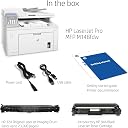
| Box Contents | 1 x Printer |
| Brand | HP |
| Brand Name | HP |
| Color Depth | 24 |
| Colour | White |
| Compatible Cartridge | Compatible Black Laser Toner Cartridges |
| Compatible Devices | Smartphones |
| Connectivity technology | 1 Hi-Speed USB 2.0, 1 Ethernet 10/100Base-TX, 1 phone line (in), 1 phone line (out) |
| Control Method | Touch |
| Controller Type | Android |
| Customer Reviews | 4.4 out of 5 stars 2,980 Reviews |
| Display Type | LED |
| Dual-sided printing | Yes |
| Duplex | Automatic |
| EU Spare Part Availability Duration | 2 Years |
| Global Trade Identification Number | 00192545884501, 00192545884525 |
| Hardware Interface | Ethernet, USB 2.0 |
| Ink Colour | Black |
| Is Electric | Yes |
| Item Dimensions D x W x H | 15.9D x 16W x 12.3H centimetres |
| Item Type Name | Laser Printer |
| Item Weight | 9.07 kg |
| Manufacturer | HP |
| Maximum Copies Per Run | 260 |
| Maximum Copy Resolution Black and White | 1200 x 1200 DPI |
| Maximum Copy Resolution Color | 28 ppp |
| Maximum Copy Speed Black and White | 30 ppm |
| Maximum Print Resolution Black and White | 1200 x 1200 DPI |
| Maximum Sheet Capacity | 250 |
| Maximum Supported Paper Size | 8.5 x 11 inch |
| Maximum print Resolution Color | 1200 x 1200 dpi |
| Model Name | Laserjet Pro |
| Model Number | 4PA42A#BGJ |
| Model Series | Serie 100 |
| Model name | Laserjet Pro |
| Network Connectivity Technology | 1 Hi-Speed USB 2.0, 1 Ethernet 10/100Base-TX, 1 phone line (in), 1 phone line (out) |
| Number of Drivers | 2 |
| Number of Ethernet Ports | 1 |
| Number of Trays | 1 |
| Other Special Features of the Product | Print Functionality |
| Output sheet capacity | 250 |
| Paper Size | 210 x 297 |
| Power Consumption Size | 10 |
| Print media | Card stock, Envelopes, Glossy photo paper, Labels, Paper (plain) |
| Printer Output Type | Monochrome |
| Printer Type | Laser |
| Printing technology | Laser |
| Product Warranty | 1 Year |
| Resolution | 1200 x 1200 |
| Scanner Type | Sheetfed |
| Series Number | 44551 |
| Special feature | Print Functionality |
| Specific Uses For Product | Office/Documents |
| Total USB Ports | 1 |
| UPC | 192545884518 192545884495 192545884532 192545884488 192545884501 192545884525 192545884549 |
| Warranty Type | limited warranty |
| Wattage | 475 watts |
A**R
Excellent value for money printer
The wireless features were the main draw in buying this printer, as we'd struggled with another non-wireless multifunction colour laser printer which wasn't easy to use with smartphones and tablets. This black and white multifunction wireless laser printer has exceeded expectations by being high quality, quick and versatile. Wireless setup was not straightforward but as we knew this we were prepared, it entailed lots of user accounts created, new software and apps to download and updates to apply - very off-putting to IT newbies I would think. Once setup it works well and it even offers printing from emails, with an email address you can email documents to. There's hardly any waiting time, less than 10 seconds for a page to print, and text is crisp and has good contrast. Graphics are a little blocky, but by no means bad and not what this printer is all about. The ability to scan is useful but you need to use a separate program and it is well featured. It occupies quite a small footprint so is handy for when space is at a premium. A replacement toner cartridge is around £85 for the genuine HP one. All in all, a good, value for money device.
J**E
Very Very Good.
I like very aspect of the Printer, both sides, copying, scanning are just absolutely fine ! I have had a many printers over the years and this seems to be the best and the easiest to set up. Jane
M**D
Good value but difficult to set up as a wireless printer.
Print quality is excellent and it’s duplex function very useful. It was very difficult to set up as a wireless network printer and finally I had to connect it to the Router with a Network Cable. The toner cartridge is also fiddly and difficult to replace.
A**W
Game changer vs inkjet
Absolute game changer vs inkjet printers I’ve had in the past... couldn’t be happier with this purchase. Printed pages come through incredibly fast, print quality is crisp and looks great, I’m able to print from phone via AirPrint or computer, really like the 2-sided printing. Saw some reviews about difficulty setting up, but tbh - I had no problems at all. Granted, I am a bit techie, but I followed a couple step instruction to connect my phone to it, put in the WiFi pw (via phone), and then it set itself up beyond that. It works exactly as was hoping for. What I’m looking forward to: I only have a need to print once a month or something - and the endless hours I’ve taken in my life mucking about with a rubbish inkjet printer with dry cartridges, 5-rounds of nozzle cleaning to get a simple Amazon return barcode printed, I hope are at an end. My old inkjet cost about a third of this laserjet, but I worked out I’d spent about £400 on ink in the last 6-7 years as the cartridges would dry out and need replacing. The toner cartridge that comes with this has about 1000 pages on it - which should take me through to retirement! I don’t print photos or anything like that. Just text docs and the odd barcode mentioned before - so grayscale / non-colour works perfect by me. In that the print quality of text on this is brilliant.
M**N
Super easy to use
This was so easy to set up. Literally plugged in the two cables and it printed the pagea i wanted. Very impressive
L**E
Excellent compact printer that does it all
Used in a small busy office. Excellent speed and quality. Scanning is very good too. Highly recommend this printer. Hp has never let me down.
A**N
If you're an IT expert, might be a decent buy, if not give it a very wide berth.
I have owned this printer for a couple of months. It generally prints well and quickly is easy to use and well priced. However, it has on occasion thrown a wobbly and not printed or scanned pages or parts of them. It was very difficult to set up - the printer refused to connect to my wireless network and the instructions / online help were of no use whatsoever. I ended up connecting the printer with a USB cable which finally got the computer, router and printer talking to each other and I was then able to remove the USB and use the printer wirelessly, for a couple of months. Yesterday the printer stopped working. After 3 hours on the phone to an IT consultant who remoted into my computer, me connecting the printer to the router with a network cable and interminable faffing the printer now works again. I have no idea why it stopped working or grasp of how the IT consultant fixed it. He set up a MAC address apparently. It is a printer. It shouldn't require 3 hours of anybody's time to get it working. It should just work. If you are an IT expert, it is probably a decent buy. If you aren't, I'd avoid this printer and any other HP wireless printer like the plague. Update. Now had this 6 months and connectivity problems have proliferated. This printer is just awful. A massive pile of ordure. Another update. Printer now 7 months old. It developed a clicking sound when printing. This got progressively louder. Then the door on the top kept popping open and an error message appeared. The reason the door popped open was the toner cartridge kept becoming dislodged- it had been fine hitherto and was not a new cartridge. Reinserting, turning off and on etc all failed to cure the problem. More clicking, cartridge popping loose, door open, printing a distant dream. My previous description of this as "a massive pile of ordure" is incorrect. It's worse than that. On the plus side Amazon have agreed to replace it. Sadly, I'm due the same model.
R**Y
Printer itself is brilliant
I want to give this printer 5* as some of the reviews seem alittle harsh. It seems well built and the print quality for any family home is just fantastic. The fact my router is downstairs and printer is upstairs its fantastic. However.......... Wireless set up is harder than finding fairydust in a parallel universe. This is the only problem I have had so far and I think its more the app and software that is the pain more than the printer as there seems to be no clear instructions anywhere. HP you need to fix your hardware and one product one instruction sheet.! But once connected fantastic
L**.
Good for personal or small business.
Enjoying the quick setup and web interface that provides a good balance between consumer and enterprise grade (security) features.
K**I
Schnell installiert auf Windows 10 oder Android.
Der Drucker hat eine kurze Anlaufzeit, druckt ebenfalls sehr sehr schnell und das noch in angenehmer Geräuschlage. Scanner mit Einzug oder über das Einlegen in das Scannerbett funktioniert tadellos, jedoch nur mit maximal 300ppi Auflösung (in Farbe). Reicht für die meisten Anwendungen und die Geschwindigkeit des ist dafür auch schnell. Fax wird von mir nicht verwendet, daher kann ich dazu nichts sagen. Ich habe den Drucker über ein Lan-Kabel in mein Netzwerk angeschlossen. Bezüglich der Installation unter Windows 10 muss ich gestehen, dass das schwierigste direkt am Anfang beginnt -> die passende Treiber-Software auswählen. Auf der HP-Seite werden etliche unterschiedliche Software-Pakete angeboten (HP Easy Start, HP Full-Software Solution, HP Basic-Software Solution, HP Smart, ect.). Im Handbuch wird auf HP Easy Start verwiesen, aber da wüsste ich bereits nicht, was damit installiert werden soll, da die Angaben auf der Website ebenso wenig helfen. Also kurzerhand die HP-Full-Software Solution heruntergeladen (alternative auch Basic-Software Solution), im ersten Fenster die beiden vorgeschlagenen Programme abgewählt, da ich beides nicht benötige. Einmal der generellen Vereinbarung zustimmen, dreimal den Rest ablehnen (Online Drucken, Statistik und andere Statistik). Anschließend wird der Treiber und Scanner installiert und eine Verknüpfung für den Scanner auf eurem Desktop erstellt. Dann kommt ein Verweis auf die Installation von HP Smart. Brauch kein Mensch, also das Installations-Fenster geschlossen. Drucker funktioniert, Scanner funktioniert - beides ohne Anmeldung (,da kein HP Smart). -> HP Smart wird übrigens im Windows Store automatisch eurer Bibliothek hinzugefügt, falls es sich automatisch installiert, einfach rechtsklick im Startmenü -> Deinstallieren. Installation auf Android, drucken OHNE Anmeldung bei HP: Im Playstore nach "HP Druckerdienst Plugin" suchen, installieren. Im Drucker WLAN von "aus" auf "an" stellen! Ein Dokument oder Bild öffnen, "Drucken" auswählen, oben den Drucker auswählen, oder die Netzwerk-Adresse des Druckers eingeben (diese wird auf der Display meines Druckers ab und an eingeblendet: 162.9.3.... usw.). -> Drucken ohne Anmeldung auf Android möglich, trotz Meldung "Bitte bei HP anmelden". Nervige Benachrichtung, also kurzerhand die Berechtigung für Statusnachrichten der "HP Druckerdienst Plugin"-App entzogen, und das "Problem" ist "gelöst". Installation auf Android, Scannen NUR MIT Anmeldung bei HP: Im Playstore nach "HP Smart" suchen, installieren und der App-Einrichtung folgen. Anschließend Konto erstellen (die einzigen verlangten Angaben waren Vor-/Nachname, eMail, Passwort), Drucker hinzufügen und fertig. Scannen ist jetzt ebenfalls über die HP Smart-App möglich. Leider jedoch nicht in Verbindung mit dem Dokumenten-Einzug! Anderes ist ebenfalls hierüber möglich z.B. Drucken, aber warum den komplizierten Weg über eine App gehen, wenn man es direkt z.B. im pdf-Dokument auswählen kann. Bereits auf drei Windows Geräten und zwei Android Geräten problemlos eingerichtet, verstehe daher manche andere Bewertungen nicht. Vor allem hab ich noch nie vorher einen Drucker auf Android eingerichtet, angenehm einfach. Frage mich wo die anderen Käufer hier in ein Abo gelaufen sind (vllt beim "Online Drucken"?). Hoffe das hilft eventuell irgendwem weiter, wenn man nicht weiterkommt. Kann den Drucker bestens empfehlen!
P**N
ENTIEREMENT SATISFAITE
Imprimante paramétrée en quelques minutes, facile d'utilisation et entièrement neuve. Je recommande +++
M**0
la mia stampante
La HP LaserJet Pro M148fdw è una stampante multifunzione compatta ed efficiente, ideale per uffici di piccole e medie dimensioni. La qualità di stampa è eccellente, con testi nitidi e precisi, e la velocità di stampa è notevole, riducendo significativamente i tempi di attesa. La funzione di stampa fronte e retro automatica è un grande vantaggio, rendendo il processo più rapido e riducendo il consumo di carta. La connettività wireless è un altro punto di forza, poiché consente di stampare facilmente da smartphone, tablet o computer senza bisogno di cavi. Il display intuitivo facilita la gestione delle funzioni, e l'installazione è rapida. Tuttavia, la funzione di scansione potrebbe essere un po' più veloce, e alcune operazioni potrebbero richiedere una maggiore attenzione durante l'uso. Complessivamente, è un'ottima scelta per chi cerca una stampante versatile e affidabile a un prezzo competitivo.
M**7
Great Laser Printer - Connection Tip
This printer/scanner has worked great for me during isolation due to Covid. I am a teacher and was able to scan in color assignments for my student as I taught online from March-June 2019. Print quality is also excellent, just in black and white, of course. The fax machine feature is worthless unless you have an old-style wired home phone line -- even a digital home phone service through your cable company will not work, and most people use cell phones only these days. I only purchased the model with fax included because it was cheaper than the other model, and that didn't make sense to me, but here's what I learned: The model WITHOUT the useless fax included is probably more expensive because it includes a touchscreen display on the printer. This will be very helpful if you have any problems with connectivity and need to troubleshoot or reset your printer. I have had my printer become disconnected from my wiFi network twice now, and it has been a complete NIGHTMARE trying to do research on the internet and figure out how to fix the problem. However, I think I finally figured it out the last time, after spending all day on mostly fruitless efforts: **If you are using a WiFi extender in your home, unplug it or turn it off whenever you are setting up your printer or trying to reconnect it to your wireless network. As soon as I unplugged my WiFi extender, the blue WiFi light on my printer stopped flashing and was again reconnected to the system. I wish I had been able to find this tip online somewhere before I'd tried literally everything else to fix my issue! Apparently, the printer can become confused because the extender and router both have the same network name. So just unplug the extender, let your printer reconnect, and then you can plug the extender back in and continue work as usual.
Trustpilot
2 months ago
2 weeks ago