

🎛️ Elevate your home studio game with pro sound that fits in your backpack!
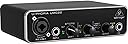
The Behringer UMC22 is a compact 2x2 USB audio interface featuring a professional-grade Midas mic preamp, 48 kHz recording resolution, and versatile inputs for microphones and instruments. Designed for seamless integration with popular DAWs, it offers zero-latency direct monitoring and USB-powered portability, making it an ideal budget-friendly choice for solo musicians and content creators seeking high-quality recordings on the go.


| ASIN | B00FFIGZF6 |
| Batteries | 1 Lithium Polymer batteries required. |
| Best Sellers Rank | #6,859 in Musical Instruments ( See Top 100 in Musical Instruments ) #57 in Computer Recording Audio Interfaces |
| Compatible Devices | Laptop, Personal Computer |
| Customer Reviews | 4.5 4.5 out of 5 stars (12,367) |
| Date First Available | August 2, 2013 |
| Hardware Interface | USB 2.0 |
| Is Discontinued By Manufacturer | No |
| Item Weight | 1 pounds |
| Item model number | UMC22 |
| Operating System | Windows |
| Product Dimensions | 9.61 x 6.14 x 3.46 inches |
| Size | Small |
| Supported Software | Production software |
A**R
Gets the job done on a budget.
Like just about everything Behringer makes at this price point, the UMC22 is chiefly one thing: cost-effective. You don't get best-in-class sound quality. You don't get a flashy brand name. You don't get the most features. What you do get is an audio interface that works, and honestly does a surprisingly good job. Setup is easy. Plug it into your computer. USB2 is fine. Plug in your headphones. Plug in your monitors. Plug in your mics/instruments. Done. Drivers aren't obscure or finicky. Don't worry about it. Outputs in the rear need two 1/4" TR cables for left and right channel. Output in the front needs a 1/4" TRS cable. Make sure you've got semi-decent studio headphones and/or monitors, too - an audio setup is only as strong as its weakest link, and if you're looking up 1/4" adapters for your Beats or whatever, maybe skip this and invest in better headphones instead. Craftsmanship's okay. It's a Behringer audio interface, not an SM-58. I wouldn't go throwing it down flights of stairs for fun. You have two audio inputs - the XLR/TRS hybrid jack going through the Midas preamp, and the second TRS jack that goes through a Xenyx preamp. Neither are particularly touted for their sound quality (the Midas is better than the Xenyx by far, though), but it's miles above motherboard-integrated stuff. Both can record at 48KHz tops - as far as I'm concerned, if you're looking at this interface instead of something higher-end, that's plenty. The "direct monitor" button you see on the front ducks your computer sound output and lets you listen to your connected inputs through the hardware, which has its uses. The interface outputs to headphones and to external monitors by means of 1/4" TRS and TR cables, respectively. Sound is clean - mind you, my ears aren't well trained to that sort of thing, and if yours aren't either then the sound quality should be fine. It's important to note that it will always output to both headphones and monitors - if you want to listen to just headphones or just monitors on-the-fly, this won't provide a convenient solution to that. It does, however, eliminate the need to go through your OS's sound system, which can be useful when working with ASIO or CoreAudio exclusive modes to reduce latency. If you want the best and have the money to back up your needs, consider looking elsewhere. Again - an audio setup is only as strong as its weakest link. But if you want the pretty solid, and you're on the kind of budget that has you saving up for purchases like these, I think you can't go wrong with the UMC22, or the U-PHORIA series in general. TL;DR: It's cheap. It's fine. If you need it, get it.
H**R
Does what it's supposed to
As an audio engineer and musician for well over three decades I have learned two things in my journey: 1) That more complicated audio interfaces are not necessarily better sounding nor easier to contend with than less expensive ones, especially when their drivers create an ongoing nightmare, turning your recording sessions into a saga of hardware issues, crashes and annoyance. And 2) Simplicity truly is the art of invention. Having said that, I'd been using a Saffire Pro40 for the past several years. First downside was FIREWIRE. Ugh! I'm running Windows 10 and Pro Tools 11 and things worked okay but Windows doesn't like old Firewire cards too much and drivers were a problem. Also, the Pro40 was problematic all its own, with having to turn it off and on after it got hung up for some unknown reason, and it's native mixer/controller interface was a nightmare. Got to the point where I just didn't want to mess with recording anymore, so I took a break. After several months abstaining from recording, I decided to see if I could get PT11 working with my standard Windows audio, the build-in sound on my Asus Sabertooth X99 board, and with the help of ASIO4ALL bingo! That worked nicely, but then I didn't have any way to get an XLR studio mic into my machine. Should I put dig the Pro40 out and hook it up? Heck no! What to do... I shopped around for a USB audio interface and the Behringer UMC22 looked really promising. I was looking for something with one XLR-in for a mic, but the 1/4" Instrument input is nice to have as well. All I needed to do in PT was go into the setup and open the ASIO4ALL control panel and select the "generic USB audio device" (or something along those lines) and wala! It works great! I really appreciate the "Live Monitoring" button option as there is a bit of latency without it, but that might be something I can iron out, though it's not a problem really, and far, far less a problem than having to deal with a futzy Firewire-based one. I don't hate Firewire by the way, just not happy at all with the Pro40. They sound amazing, when they're working properly, but... anyway... I used an SM57 as my first test mic and that sounded very good. Then I switched to a Sennheiser E935 and it sounds great! Crisp highs, solid mids and good lows. Sweet! I have not tried anything requiring phantom power yet, but I'm sure it'll sound fine. I have not tried recording anything thru the instrument input, but I'm sure it sounds fine. This thing is great. Get one! It works very well and while it may not have quite the lushness of more expensive mic pre's, it's as simple as plug in the cable and go. Not bad! Metal case. Decent buttons and switches. Taken care of it should last some good years. Hope this was helpful. Jam on!
S**L
Nice entry level interface.
Very good interface for its price range. Great midas pre amps, always reliable. a little bit too much noise floor is a bit too high for my liking. but overall, as i said, for the price, it is awesome! even better than focusrite ones. This one, believe me, it will not give you headaches with drivers or anything like that, feels great overall, works great. The only downside i see, is that it can only work at 16 bits of depth, which could be a big drawback for you, or not...
L**S
Great quality plug-and-play usb audio interface for the price.
Absolutely amazing low-price audio interface. Perfect for people who want to have a headphone and microphone setup for their PC's. Lightweight, nice volume controls on the device separate from the volume on the PC so you can mix the sounds yourself. No software required and easy to use. Plug and play pretty much.
A**X
Great quality for the price, Definitely buy if on sale
This thing is amazing for the price. It works with mics that need phantom power, the dials feel great and very sturdy, the thing itself feels high quality without being extremely heavy/bulky, it looks pretty simple and stays out of the way when you're not using it, and it passes through audio signal great. I'm not a fan of the USB-B port for connectivity, but if you really don't want to keep that included cable around, get yourself a USB-C to USB-B adapter and you'll be good to go, because I tested that, and it worked for me too.
A**R
Works Great on Linux
So far, it has been great. I plugged a NW-700 mic in with XLR, switched on the Phantom Power switch on the back, plugged it in, and it worked. I get very good audio quality out of it compared to what I had before. I'm using it on Debian Testing (from ~April 2018), Linux kernel 4.14. The box was plug-and-play. Pulse and ALSA both seem to accept it just fine. I've used it as a mic input on Audacity, Steam, and TF2 with no problems. The box appears as a stereo duplex to Pulse, with one input per channel (XLR combo port is one channel, instrument input is the other). You can fix this easily, if it is undesired behavior, by changing it to Analog Stereo Output + Analog Mono Input using an application like Pulse Audio Volume Control (pavucontrol). I will update if I have any troubles going forwards that are caused by the UMC22 itself. UPDATE October 2018: I'm now up to Linux Kernel 4.18, with few to no problems. It works great with my Philips SHP 9500S headphones, and I'm still using it with the same NW-700 mic. Still works great. My only complaint is that after some period of time (24-48 hours), the audio output will get a hiss in the right channel. Rebooting the computer or just unplugging and replugging the UMC22 works fine, so I'm not going to dock any stars for it; as it is likely a software issue or could be caused by the USB hub I have it plugged into. Other than that relatively minor issue, I have had no issues. The UMC22 has been powered on nearly 24/7 since I got it and has had basically zero problems.
J**.
It's a Behringer! For very cheap
I've been using a Behringer UMC202HD for 5 years now. I was currently in the market to get another audio interface for my home studio and I found that there is this model with essentially all you need to get audio on your computer for veeeery cheap. It's got two inputs, one with the EXCELLENT Midas preamplifier that makes Mic recordings great! It also still has the chance to connect headphones and monitor the sound directly from the interface (play the input audio directly to the output instead of going through the PC's output choice). If you are in the market and intend to use it for podcasts, or voiceovers or music recording this is the best choice for beginners I'd say. Behringer has proven to be great quality for me. P.S. It comes very well packaged and is premium built with metal. I purchased this unit for $70. It's a no brainer really.
A**8
Does the job but could be better quality.
A great brand that I’ve loved for a long time. It does its job for the price point. I wasn’t happy with the sound quality as it delivered a muddy, flat recording. If quality isn’t your biggest concern, it’s a good purchase. I now upgraded to the focusrite Solo (I think I paid $150?) paired with the yeti blue condenser mic and my recordings are some of the best I’ve ever had. I would advise spending the extras money for the upgrade.
Trustpilot
2 weeks ago
1 week ago