
DOWNLOAD THE APP


Customer Services
Copyright © 2025 Desertcart Holdings Limited
DOWNLOAD THE APP

💼 Elevate your workstation with the ultimate all-in-one card reader—because your workflow deserves no compromises.
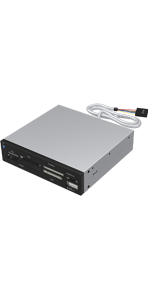
The SABRENT 74-in-1 Internal Flash Media Card Reader/Writer is a versatile 3.5-inch bay device supporting 74 memory card formats and featuring an internal power connector for stable USB hub operation. Compatible with Windows, Mac, and Linux, it offers quick, driver-free setup and includes an additional USB 2.0 port for expanded connectivity. Designed for easy card insertion and removal, it’s a reliable, professional-grade solution for managing diverse flash media with convenience and speed.





| ASIN | B00GAKX34E |
| Best Sellers Rank | #293 in Computer Memory Card Readers |
| Brand | SABRENT |
| Color | Black,Silver |
| Customer Reviews | 3.9 3.9 out of 5 stars (4,388) |
| Date First Available | October 30, 2013 |
| Is Discontinued By Manufacturer | No |
| Item Dimensions LxWxH | 6.5 x 2.25 x 4.4 inches |
| Item Weight | 5.6 ounces |
| Item model number | CR-USNT |
| Manufacturer | SABRENT |
| Operating System | Mac OS X and Higher |
| Product Dimensions | 6.5 x 2.25 x 4.4 inches |
| Series | 3 Slot USB 3.0 SuperSpeed Memory Card Reader with Card Storage Box |
N**T
High quality and very functional card reader for a great price
Very good quality for this price point. I installed the unit in under 10 minutes including the time to locate an unused usb header on the motherboard. You can simply trace the cables of any existing front usb ports to the motherboard and most of the time the usb headers are next to each other. The unit has worked perfectly with all the memory cards I have tried so far and I really like that you don't have to pus the cards all the way in for them to work. Some units make you sink the card into the slot so far that getting it out is a pain but with this unit the card pushes in just far enough to be stable but still very easy to remove. The device was immediately recognized by Windows (Win7) and the drivers installed automatically. The only minor complaint i have is that the blue power indicator led is simply too bright and really not necessary at all. It lights up the whole room at night and it stays on the entire time the computer is on. I fixed the problem by using a bit of dark colored nail polish to cover all but a small portion of the led. The unit also has a single usb port to read flash drives and also supports other usb devices so it effectively adds an additional front usb port to your computer.
J**Y
ENABLE ErP to Extinguish Light
NOTE: To disable the power light when computer is off you must go into BIOS and ENABLE ErP Support. This may be called something similar like EUP--which again you would ENABLE. Some BIOS may have something like "USB Charge Technology"--which you would want to DISABLE. Also disable wake by mouse, wake by keyboard, wake by LAN and similar. REVIEW: I'm fond of the Sabrent brand, having used a number of their products over the years with positive results. I physically tested the usb, memory stick, sd card, and micro sd card slots and all worked. In addition, BIOS recognized and reported all adapters, and even allows me to boot from them if I choose. This product is compatible with the StarTech 3.5 to 5.25 bay adapter. You will need longer screws than what's provided. It has motherboard thread pitch--the standard mobo screws with the larger hexagonal/philips head will work. Even then they're juuuust long enough. [The StarTech adapter comes with a grab bag of different screws you can use.] Some say with the StarTech bay adapter you get a little gap, and while that's true if your eye is three inches away generally it is not noticeable--this coming from someone very OCD about these things. The other complaint I've seen is a microSD slot that goes bad. In general, microSD slots are fragile and so this doesn't surprise me. When they fail it generally comes down to user error vs a fault in the port. For mSD I'll continue to use my mSD to SD adapter, and only use the native microSD slot if the adapter breaks or goes missing. The power LED is extraordinarily bright, as others have said. I applied two coats of testor's flat black model paint *carefully* with a toothpick after *carefully* roughing up the LED lens with 1000 grit sandpaper (as best I could given the recess). Result is good, no shine through, however the LED is so bright it actually shines dimly through the adjacent access LED lens, which incidentally gives you a power indicator that isn't distracting. I took a picture of this in a very bright room--bare in mind the camera picked up the blue a bit more readily than your eye does. In a bright room you'd only notice it if looking for it, however in normal or dim conditions you can see the glow clearly. The access light itself is also quite bright and a different color, so it's obvious when you're looking at power (blue) vs access (white). The power cable could have been longer for more mounting flexibility, and again they could've included more useful screws. Other than that and working around the light I'm happy, for about the cost of a happy meal. Product fills the niche for 2.0, and seems reliable if not abused.
S**T
Very Happy, a bit bright though
I purchased this to add a card reader on an older 2007 model desktop computer that is still a workhorse with a few minor upgrades. The traditional motherboard connector that connects most USB 2.0 devices on DDR2 motherboards is well built and durable. The card reader slots work well (tested the microSD and SDcard slots as well as the USB 2.0 slot. The enclosure is well-built as well. My only gripe about this product is that blue LED light. It's "always on" when the computer is powered on and in dim lighting is can be very annoying if trying to play a game or watch a video on a computer screen. However, my desktop is about a foot and a half from me to the right and the 3 1/2" bay it's seated in is recessed by one of those 5 1/4 bay sliding door things I can shut if not using it so It's not that big of a deal. I may consider purchasing the same type of enclosure but one with a USB 3.0 port on it with the single 19-pin connector thingy plug for the increased transfer rate of the USB port simply because I do transfer large files frequent enough. All in all, with exception of the bright blue LED light, it's a great addition to anyone just wanting the ability to pop in microSD card from their cell phone to backup photos or transfer ripped audio cd's from the desktop to the microSD card to play on your phone. I may not get the USB one because I can wait a few extra minutes for transferring data, but my ripped audio CD library in mp3 format is hitting near 15GB so yeah, for that simple reason, I may get the card reader with the USB 3.0 port and one of those PCIe USB 3.0 cards that has the 19-pin connector on it because my motherboard does not. Excellent product but the LED light could have been a bit dimmer. Happy it matches the blue illumination of my desktop tower though - it would look weird to me with a red led on the card reader and blue lighting on the original tower. Maybe I'm a bit anal about all that color matching crap though.
Y**A
La carte compactflach et les connecteur usb sont monté inversé de 180°, ce qui oblige de retourner la carte pour le branchement. voit photo. la lumière de la led bleu est gênante car trop forte à mon goût. LA qualité de l'assemblage laisse à désirer. Par exemple la led blanche est trop enfoncée. Je ne recommande pas cet article. Et je rajoute: après 8 mois d'utilisation, il y a des pins qui se sont pliées sur l'emplacement de la compact flach, cela provient d'un décalage de la carte électronique vis à vis des ouvertures de la face avant. J'ai réussi à les redresser, il fonctionne à nouveau. Non je n'achèterais plus jamais ce produit.
J**C
Works great, super easy installation, good quality piece of hardware.
M**I
Good
P**.
After a few days, the card reader does not work. Only the USB port...
M**2
Eccellente lettore di card. Legge velocemente sia Microsd che SD che pen drive. Si installa molto comodamente. Lo super consiglio
Trustpilot
2 months ago
2 months ago