We remain fully operational. Our teams are working around the clock to ensure your deliveries continue safely.

DOWNLOAD THE APP


Customer Services
Copyright © 2025 Desertcart Holdings Limited
DOWNLOAD THE APP
🎬 Edit like a pro, work like a boss.
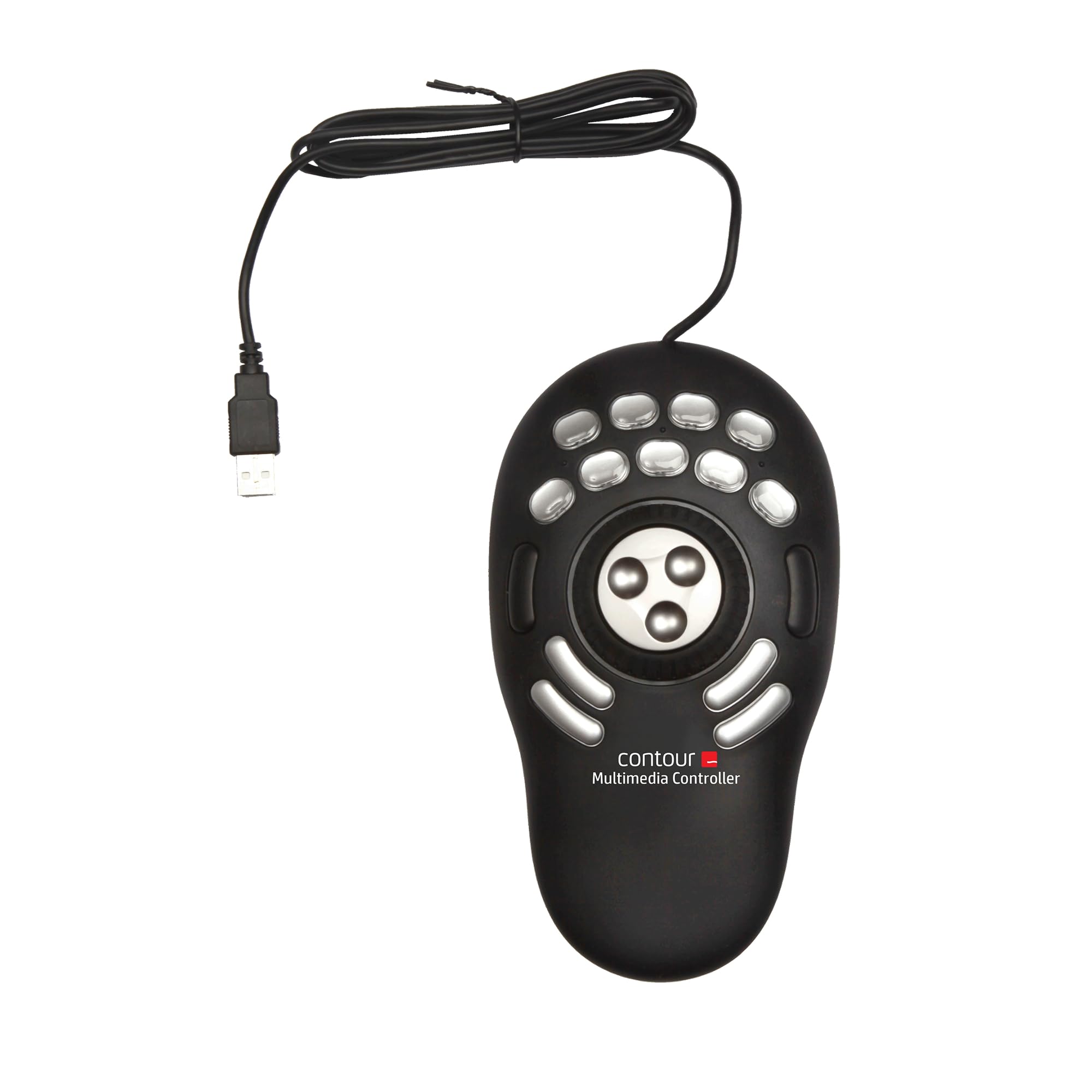
The Contour Design ShuttlePRO v2 is a compact, corded multimedia controller featuring a spring-loaded jog wheel, shuttle dial, and 15 programmable buttons. Designed for professional video, audio, and photo editors, it offers smart app detection for automatic profile switching and supports over 100 pre-configured applications on both Mac and PC platforms. This device streamlines complex editing workflows, significantly boosting efficiency and precision.


| ASIN | B0032XQP1K |
| Best Sellers Rank | #629 in Computer Keyboards |
| Brand | Contour |
| Color | Black |
| Customer Reviews | 3.9 3.9 out of 5 stars (732) |
| Date First Available | December 19, 2005 |
| Hardware Platform | PC |
| Is Discontinued By Manufacturer | No |
| Item Dimensions LxWxH | 9.25 x 5.25 x 2 inches |
| Item Weight | 9.2 ounces |
| Item model number | Shuttle Pro V.2 |
| Manufacturer | Contour Design, Inc. |
| Operating System | Macintosh |
| Power Source | Corded Electric |
| Product Dimensions | 9.25 x 5.25 x 2 inches |
| Series | Shuttle Pro V2 |
P**D
How did I live before the Shuttle Pro v2? Macros are incredible!
Best $99 bucks I have spent in years! I do a lot of audio editing, and the ability to swap out keystroke short cuts for the press of one button has cut my editing time probably by half. The real power of the shuttle pro v2 is the Key Composer, a way to create macros that can be assigned to buttons. Simple example: when I want to paste some room tone over a breath, I used to tap a key to find the zero crossing before Ctrl+V. Now I have a macro that fires off zero crossing and then it pastes. I assigned this paste macro to a button on the shuttle pro. Now instead of two actions, I only do 1. Add to this the fact that my mouse never leaves the right hand and the shuttle pro is always on the left hand, so there is no jumping from the mouse to the keyboard and back each time I want to execute a command. That is far more then a 50% increase in efficiency! Long example: I've created several macros called Special Processing [client name] that contains all of the special effects processing needed depending on client. With one press of a button, the macro fires off high pass filter, noise gate, compressor, eq, and normalization. Boom! I don't have to remember, let alone execute, a complex set of commands once I set up the macro. It's cool that the shuttle pro knows what application I am in so has the commands available right away. Yes, there are preset button assignments for a ton of applications, but I ended up re-assigning all the buttons to my habits and workflow anyway (most assigned to macros, even Delete needs zero crossing as a first step.) HIGHLY recommended.
M**O
Wish I had found this a long time ago!
This works like magic. I use it on my MacMini, and windows 10 Desktop. Works with different software with tons of built in presets. You can also create your own custom key settings. I use it on software such as Final cut, photoshop, lightroom, 3shape design, autocad, etc. This is a life saver and not to mention its easy on your wallet too. Best value out there for anything in its class. I've seen it outperform some products 3X its price! This has saved me hours of my editing time. I would highly recommend this to anyone looking for a great editing companion.
A**A
The Brand Doesn't Care - Stay Away!!
Okay, I've been holding off writing this review because I wanted to provide the seller an opportunity to stand up and redeem themselves. Since they show no intention of standing by their product (nor the quality of their own sale), I guess it's time for me to share my experience with the rest of the world. TL;DR: I pay full-price, get an open-box, used item and the seller blames some mythical distributor for poor product-delivery quality and then disappears. In this day and age, any brand is only as good as the unit that reaches the customer. In my experience the product is useless for the purpose it is being marketed, and the brand is NOT worth the experiment. Longer version: I am a professional photographer and I run through 500-1,500 photos to edit every fortnight. Hence I purchased the Shuttle Pro V.2 with the intent of benefiting from the various buttons and the multi-functional jog dial - in order to hasten the photo selection and subsequently, the photo editing process. I considered the Wacom Intuos Pro and other options, but decided to buy the Shuttle given the more tactile workflow that physical buttons promised. I also went against the grain by taking a punt on a comparably unknown brand and decided to rely on a younger, more hungry brand's.... hunger. Bad idea! As a product, with it's 15 buttons and the jog-dial & ring + the customisability, it has the potential to be a time saver. But either the brand or the seller is out to con the customer. 1. The box I received was already opened and resealed. The circular tape seal at the bottom of the box was ripped open and not even sticking to the box. The box itself bore marks of age and being tossed about (I initially attributed that to poor handling on the part of Amazon - which I now know was not the case). 2. Opening the box, I found that the "brand new" Shuttle Pro unit itself had several fingerprints, and quite a few minor dings. 3. I was dismayed to find some buttons being less “clicky” than the others - example: Buttons 5 and 8 are more spongy (like they’d get after a few months of use) while others are far more firm and tactile. They don't click as definitely as the others do, and hence sometimes don't actually work. So I have to recheck my work and then reach for the keyboard and manually hit the keyboard shortcuts on Lightroom 4. The biggest issue though, is with the Jog Dial - when you first turn it (clockwise or counter-clockwise, both), it does NOT move the selection or the slider to the next/previous item, as it should (I have it universally set up to scroll one line/item in Finder, Excel, Lightroom etc.). The cursor just sits there... blinking stupidly. Turning it a second or third time, the cursor moves. Simply described - It’s like the gears turning under the jog dial are so WORN OUT that they just don’t engage on the first turn. The problem is though - I bought this specifically for Lightroom - where the hardware needs to work precisely and reliably for me to be able to use it as a work tool. As all of you would appreciate, edits and slider progression have to accurately execute your instructions. Any jumpy or unpredictable behaviour only makes one double check every step, makes you more cautious and thus really…. belies the very basis of the purchase. If there's no benefit of speed, worse if there's no reliability, then the product is truly worthless for any precise work!! I cannot express how disappointed I am - it was a huge leap of faith to buy the Shuttle over the Wacom alternatives. The biggest disappointment though, was the let-down that I received a used product. I paid full price - and I expected a sealed, untouched, shiny new tool that would last me a couple of years (at least), of reliable service. What's even more unsettling is that I pointed this out to the OWNER of the seller store, within a fortnight of personally receiving the unit (he was very prompt in asking me for a positive post-purchase review); but when he realised there was a problem with the product he blamed some external distributor and offered me a piddly "partial refund". I declined any "rebates" and requested for a replacement unit instead (because I really did want to use the product, and to enjoy its benefits to my own work). No response. It's been a month and a half. Several email reminders. Nothing. Nada. Silence. Irony of the situation is that in the past I've bought used products from Amazon that were in better condition, than the "new" Shuttle Pro V.2!! Summary: If you want a product you can be sure of being new - look for a different seller. And if you want/hope/desire any service/post-sales support, DEFINITELY look elsewhere. This seller doesn't care. From a product standpoint, Wacom will probably be more reliable, given that they run their own store and manage brand presence on Amazon, and ... their 35 years’ legacy.
K**D
It makes editing EASIER and FASTER!
Simple and intuitive, ergonomic and worth every cent. Plug it in, download and install the driver from the Contour company website, and spend a few minutes customizing it EXACTLY how you want it to work for you. I don't care if you're like me and edit videos for YouTube from the couch, or if you're sitting at your fancy desk job where you edit video for a living. It will save you time and effort...constantly. I use it with Adobe Premiere Pro CC on my laptop right alongside my track ball and it is very rapidly becoming second nature to me and very comfortable to use. The buttons, the shuttle, the dial...all have a good, smooth and sturdy feel to them. The device itself feels well made and has a reasonable footprint considering how much use I get out of it. This is one of those "shut-up-and-take-my-money" products that I will recommend to anyone with a desire to edit video. Even if you're one of those people who have all the hot-keys memorized and can mash them out without looking at the keyboard, the shuttle-dial combination with the five buttons above it for navigation (in the default setting) is worth it. Add on that it also has ten other buttons and ALL FIFTEEN buttons AND the shuttle AND the dial are all fully programmable, and now you're cooking with fire! If you're on the fence about buying one, go ahead get one. It's worth it.
D**.
nothing to dislike, I use this with Software Defined Radio application SDRuno RSPDX and makes using this application a breeze.
K**A
Wow. Only had this for a day and really impressed. Once the software is downloaded it works with most programs out of the box effectively. The software detects the current software in use and automatically maps the keys according to presets. I use for Davinci Resolve 16 and its brilliant. There are pre-named button labels included and also blanks so you can name them yourself. It has really speeded up my editing in Davinci already and i'm not used to it so looking good for the future.
M**Z
Empujado por la experiencia de un amigo con un dispositivo destinado al mismo fin, me decidí por éste, al ser directamente dedicado para la función. Todo un acierto. La experiencia ha sido tan satisfactoria que solicité otra unidad para casa. La ergonomía, en mi caso,la encuentro sobresaliente, mucho más favorable que con los teclados gaming que se dedican a estas tareas mediante Paddy. Los materiales son de calidad pero el acabado en gris de una de las unidades, no está tan bien rematado por la parte que se apoya en la mesa y la superficie de contacto con la mano, es más delicada y proclive a sufrir algún arañazo.De hecho,la segunda unidad que solicité, en color gris, llegó con un par de arañazos en esa zona debido seguramente al contacto con el cartón protector, que lo inmoviliza perfectamente pero parece resultar demasiado duro y contundente para el fin que se le supone. La funcionalidad y configuración posible, me ahorra muchos minutos en la ejecución de lotes de procesado en LH, tareas en PS, video con Vegas, y operaciones con el explorador de archivos de Windows. Al principio, es un poco engorroso de programar pero una vez lo realizas, todo se facilita y aceleran las operaciones de una manera notable. Totalmente recomendable.
R**I
Thank Amazon and seller, product is original and working perfect, price is higher from local market, but all ok. Packing and all is fine. 100% recommend. M use this for vmix reply, it's working great. Very easy to use.
J**N
使いやすいデザイン! キー割付設定はちょっと…(英語マニュアルなので…) 動画編集がすごく楽でイチオシアイテムです。
Trustpilot
2 weeks ago
2 months ago