
DOWNLOAD THE APP


Customer Services
Copyright © 2025 Desertcart Holdings Limited
DOWNLOAD THE APP
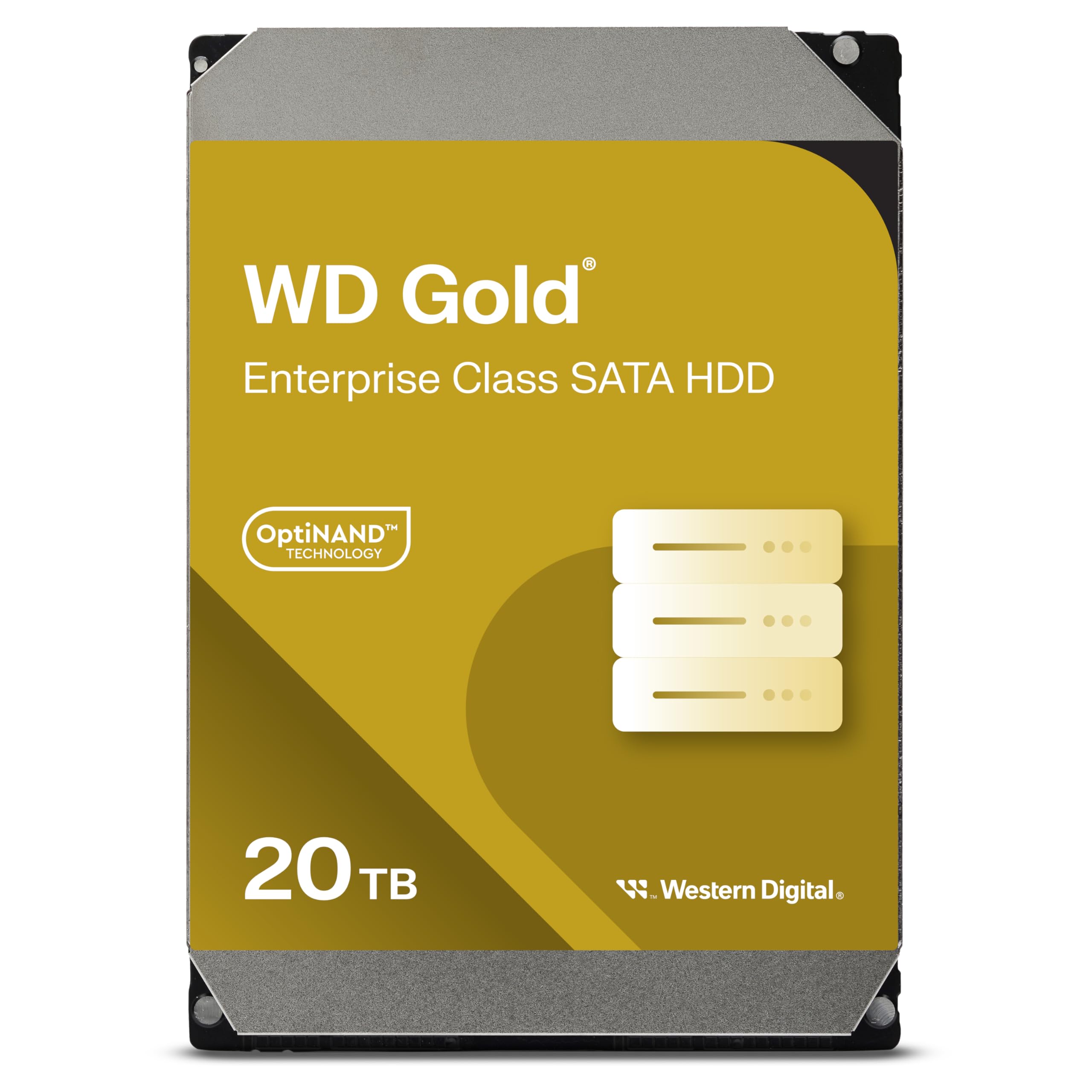


🚀 Power your data empire with WD Gold — where speed meets legendary reliability!
The Western Digital 4TB WD Gold is an enterprise-class internal hard drive designed for demanding business environments. Featuring a 7200 RPM spindle speed, SATA 6 Gb/s interface, and a large 256MB cache, it delivers blistering performance and robust endurance with workload capacity up to 550TB per year. HelioSeal technology ensures energy efficiency and cooler operation, while vibration protection guarantees stability in multi-drive setups. Backed by a 5-year warranty, this 3.5-inch drive is ideal for data centers, content creators, and professionals who demand speed, reliability, and longevity.





| ASIN | B07XDD6GD3 |
| Additional Features | Portable |
| Best Sellers Rank | #300 in Internal Hard Drives |
| Brand | Western Digital |
| Cache Memory Installed Size | 256 |
| Color | Gold |
| Compatible Devices | Server, Storage System |
| Connectivity Technology | SATA |
| Customer Reviews | 4.6 out of 5 stars 1,545 Reviews |
| Data Transfer Rate | 255 Megabits Per Second |
| Digital Storage Capacity | 4000 GB |
| Enclosure Material | Information Not Available |
| Form Factor | 3.5-inch |
| Global Trade Identification Number | 00718037858098 |
| Hard Disk Description | Mechanical Hard Disk |
| Hard Disk Form Factor | 3.5 Inches |
| Hard Disk Interface | Serial ATA |
| Hard Disk Rotational Speed | 7200 RPM |
| Hard-Drive Size | 4 TB |
| Hardware Connectivity | SATA 6.0 Gb/s |
| Installation Type | Internal Hard Drive |
| Item Dimensions L x W x Thickness | 5.79"L x 4"W x 1.03"Th |
| Item Type Name | Hard Drive |
| Item Weight | 680 Grams |
| Manufacturer | Western Digital |
| Media Speed | 6 Gigabytes Per Second |
| Model Name | Gold |
| Model Number | WD4003FRYZ-SPF0DB0 |
| Number of Items | 1 |
| Read Speed | 6 Gigabytes Per Second |
| Special Feature | Portable |
| Specific Uses For Product | Business |
| UPC | 718037858098 |
| Unit Count | 1.0 Count |
| Warranty Description | 5 years |
P**F
Shockingly fast, quiet, and cool. You've found your solution. Just buy it.
I've been lamenting the death of the Raptor line for some time now; but I think I know what happened to that firmware after buying this. It's not running at 10,000 RPM, but it sure performs like it does, and it's very quiet. You will likely have to initialize this the old fashioned way, which I did. It's not going to be just "plug and play" in the modern sense; more "plug and play" in the 2002 sense; but that's fine. It's easy to do and takes less than a minute. In that process, you know precisely how it's set up, which is a rarity with modern components. Don't worry, anyone can do this. It's not a headache; it's just something a new generation may never have done before. Performance is absolute insanity. I never thought a 7200RPM drive would shunt data around like this. I wouldn't have believed it if you told me. It's stupid fast. It's fast enough to edit 4K 10bit without moving the data to solid state. Edit right off the HDD if you want. Gaming? Absolutely. Watch those load times drop, and have a drive that will last a long time. Enterprise drives (the Raptor line was indeed enterprise) last a long time. I've got drives that are forty years old and still moving data. I've got similar WD drives that are twenty years old and have never been parked. The first Velociraptor drive ever released is ten feet from me right now and happily doing it's thing; clear top and all. I stood in the front of the line AT the release event AT the convention and and purchased it right there when the clock ticked over to release date. It still works. This thing feels like a refined Raptor (the improved 2.5 version of the Velociraptor) in use. It's not just for data centers and office complexes. This is for whoever wants a blisteringly fast hard drive that's got a long warranty and legendary reliability and longevity. Gamers, content creators, editors, archivists... Whoever you are, if you're looking at this and wondering if you should do it... Here's your answer: Just click "Add to cart" right now and get it over with. You'll end up with one eventually anyway, so just save the cash and buy it now before you have to buy it to replace a poor decision. Your computing life will thank you.
B**B
Good Choice for Large Amount of Storage
I've been using it for a couple of years, and it is indeed very reliable. Sure it's not so fast as SSDs in terms of speed, but it is worth the price.
C**R
Pretty good but loud.
Got it in 2022, registered it and the warranty lasts till 2027. Works pretty fast, on par with the black edition from what I can tell. But it’s not silent by any stretch of the imagination and it actually pretty loud. But the gold edition isn’t meant for basic desktop usage but for heavy server usage from what I have read where the noise isn’t an issue. If you are buying this for a NAS server or something like that, should be fine overall. But if you are buying it for desktop usage, I recommend you use it as a storage drive and not a boot drive. Definitely worth the money I got it for given the abuse it can take and keep the speed up. Using this to hold videos, pictures and small games that don’t need to load a lot won’t be an issue, but if you use it for big games or stuff that requires a lot of hard drive activity and it will let you know it if you are anywhere in the same room with it.
A**A
Fast, Quiet, Reliable, and Cool
This is my 6th WD Gold Hard Drive. I love them. I have many dozens of hard drives. I know what it's like to suffer a hard drive failure. Even with backups it's a pain. WD Gold drives make that situation unlikely because they are the most reliable drive in the business. I recommend ALL users buy these enterprise class drives and to avoid so-called consumer drives. These will likely serve you with much less trouble since they have by far the best MTBF (Mean Time Between Failure) figures on the market today. It's worth the few extra $$$. This drive also runs extremely cool. Unlike my WD Black drives, which are very HOT to the touch, these Gold drives even when being written too 100% of the time run very cool. I dumped nearly 9TB onto this drive in one fell swoop and the drive never exceeded 100°F and under normal heavy usage runs at 95°F and at idle about 90°F. This is in a room with a constant ambient temp of 77°F. I've used at least a hundred drives over the last decade. The first enterprise class drives I bought 10 years ago and which run at 10,000rpm have been running 24/7/365 and are still running to this day. These WD Gold drives have a MTBF 2.5 times higher than those early drives. I place a high value on reliability. ADDED Nov 9, 2020 I should mention that you should make sure you are buying retail drive and not an OEM. Western Digital will not warranty an OEM drive. OEM drives are usually cheaper, but getting support if you have an issue is entirely dependent on the seller's inclination to replace a defective drive. To ensure you get a retail drive on Amazon make sure the "seller" or "Sold by" and "shipped by" are both "Amazon".
J**E
WD Gold 10TB
I have a pool of 4 of these drives in software raid5 on a home server. Sequential reads are around 600-700 MB/s on the array which is REFS formatted windows 10. Write performance thanks to the large cache pool is 1.3 GB/s for about 10 seconds then it will drop to around 120 MB/s. Perfect for media streaming. Been running this set up for a total of 5 years now. Had 1 drive failure during that time, amazing warranty support from WD. Had another one right away no questions asked. Couldn’t be happier. HDD sentinel reports 0 bad sectors on any of these drives, 3 of which have been running 24-7 for 5 years. And also to be fair, the one drive I did loose was due to a power outage that caused seek errors and windows storage spaces dropped it from the array to maintain data integrity. Had I done my diligence and been running a UPS I do not believe that drive would have failed. January 2026 update- same set up, same configuration, 24-7 usage. No issues, disk performance remains the same. well done WD.
C**I
Super fast and quiet for enterprise level HDD; "Clicking sound"
I'm a photographer and while I require a lot of storage space, I was also looking for speed - not SSD level but fast enough so that when I move my photos from my SD card or edit photos in Lightroom and scroll through hundreds and thousands of photos, they load at a more reasonable speed. With that, I originaly was going to go with an 8TB 2.5" SSD for around $650. But I struggled with spending that much and "only" getting 8TB considering I'd use that up in less than 2 years. So my other option was going with an old style spinners (HDDs) and search for the following: speed and reliability and it narrowed down to the WD Gold HDDs. I originally purchased a single drive but when I realized how fast and quiet it was, I purchased a second drive and decided to run them in a RAID 0 environment, and wow is it fast! While the single drive was pushing the read/write to around 250mbs, under RAID 0 with the two drives combined into a single volume, I am now getting slightly MORE than double the read/write speeds. Note: For anyone deciding on RAID 0 - keep in mind that if a single drive within your RAID 0 fail, both disks will fail since the data is distributed evenly across the multiple drives. With that said, have a proper backup system in place. For example, my setup is this: WD Gold RAID 0 as my primary, a separate desktop hard drive that backs up the primary, and then a cloud-based backup that backs up the back up of the primary. Update: There are a few folks that are complaining about a "clicking sound" that is heard about every 5 to 6 seconds. Please note that there is nothing wrong with the drives. This clicking sound is the result of a feature called “Preventive Wear Leveling” or "PWL". It’s a periodic head sweep to distribute lubricant and prevent wear in a particular place if lubricant were to build up in one spot. Keep in mind these are enterprise-level hard drives which mean they are supposed to last very very long. With that, there are some quirks like this PWL feature that are supposed to enhance reliability. Reliability is certainly a priority and I really do not want to purchase replacements in years to come so hearing a clicking sound every few seconds is not a big deal to me.
B**N
My new Cloud
I ordered x2 - 4TB drives to act as my local backup drives. I keep redundant copies on each drive. These replaced x2 - WD Blue 1TB drives that were approaching 7 years old. These are not running 24/7. I only boot up my Server once a month so they should last a very very long time. They are "loud" but not enough to hear with a TV or Fan running. These are plugged into a SATA II interface and achieved 124+mb/s speeds when I did my first few large copies. I like how I can view folders with 1000s of photos and the drive doesn't lag like the old WD Blues did.
H**C
Noisy from the start and failed in 14 months
I have over 100 WD drives that I have filled and archived since 2007. They sit on the shelf right in front of me and all but 2 or 3 of them are WD Blue. I have never had a WD drive fail until I bought a WD Gold. When I built a 8 bay Raid 14 months ago I splurged and bought all WD Gold 8tb drives. From the beginning I could hear loud grinding noises coming out of the enclosure and it made me nervous because it sounded like a drive was going to mechanically self destruct. It was impossible to find out which drive was the cause so I put up with an new enclosure that made a loud grinding noise whenever it spun up. Now 14 months later I have a failed drive and am replacing it but I wish I had used WD Blue which in my case has proven to be the more reliable product.
Trustpilot
3 weeks ago
2 weeks ago