


🚀 Power your productivity with style and speed — the Samsung Chromebook 4+ is your sleek, unstoppable sidekick.
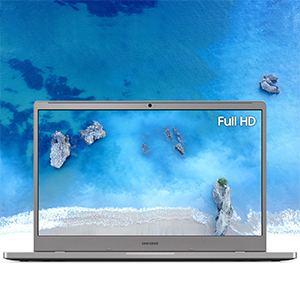
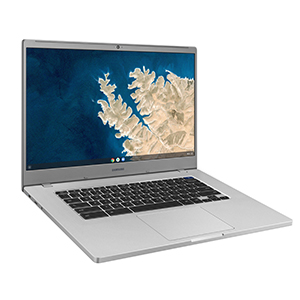
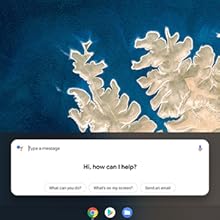
The Samsung Chromebook 4+ combines a spacious 15.6-inch Full HD display with a robust Intel Celeron N4000 processor, 6GB DDR4 RAM, and 64GB eMMC storage. Designed for professionals on the move, it offers military-grade durability, up to 12 hours of battery life, and ultra-fast Gigabit Wi-Fi connectivity. Running Chrome OS, it ensures secure, seamless access to Google’s ecosystem with built-in virus protection and Google Assistant support, making it an ideal lightweight laptop for work, streaming, and everyday multitasking.



| ASIN | B07XL4JDQW |
| Audio-out Ports (#) | 1 |
| Average Battery Life (in hours) | 12 Hours |
| Batteries | 1 Lithium Polymer batteries required. (included) |
| Best Sellers Rank | #19,139 in Computers & Accessories ( See Top 100 in Computers & Accessories ) #2,735 in Traditional Laptop Computers |
| Brand | Samsung |
| Card Description | Integrated |
| Chipset Brand | Intel |
| Color | Silver |
| Computer Memory Type | DDR4 SDRAM |
| Customer Reviews | 4.3 4.3 out of 5 stars (3,455) |
| Date First Available | October 7, 2019 |
| Graphics Card Ram Size | 6 GB |
| Graphics Coprocessor | Intel UHD Graphics 600 |
| Hard Drive | 64 GB Embedded MultiMediaCard |
| Hardware Platform | PC |
| Item Dimensions LxWxH | 14.16 x 9.64 x 0.65 inches |
| Item Weight | 3.1 pounds |
| Item model number | XE350XBA-K03US |
| Max Screen Resolution | 1366x768 |
| Memory Speed | 2133 GHz |
| National Stock Number | XE350XBA-K03US |
| Number of Processors | 1 |
| Number of USB 3.0 Ports | 2 |
| Operating System | Chrome OS |
| Optical Drive Type | No Optical Drive |
| Power Source | Battery Powered |
| Processor | 1.1 GHz celeron_n3450 |
| Processor Brand | Intel |
| Product Dimensions | 14.16 x 9.64 x 0.65 inches |
| RAM | 6 GB DDR4 |
| Screen Resolution | 1920 x 1080 pixels |
| Series | Chromebook 4+ |
| Standing screen display size | 15.6 Inches |
| Voltage | 5 Volts |
| Wireless Type | 801.11ac |
B**N
Good Chromebook
I bought this version for my father after he complained about viruses and antivirus software and all those persistent companies that put them on your computer to sell you the cure, I then liked it so I bought a more beefed up version for myself. So I'll write what he liked about this version. No worries about updates interrupting your use, no malware or antivirus pop-ups. It is super fast! The touchpad is super sensitive and 'clicks' items all the time when you're simply trying to scroll. You have to use two fingers to do so since there is no buttons to right click or left click. you can drag by pressing down on the touchpad though. Chromebooks can be tricky when finding printers that'll work with them so keep that in mind. The advertisement makes it out like the screen will blow your mind when you see it. It looks like a normal screen and there's nothing impressive whatsoever about it, although it is the advertised size.
R**B
Perfect for the price!
First off, the price is right so I after I bought mine, I got one for my husband. The batter life is fantastic. One plus is the reversible plug USB Type-C cable charger, can also be used for your newer smart phone or tablets with the same outlet. It is a fast charger for either device. The screen is not perfect for video but when you go full screen it is good. I have been watching shows on it and the sound is fantastic. It is super fast, when you are doing regular browsing, social media, etc. I don't like that there is no delete key or cap lock but I figured it out. My printer didn't work with it, a Canon 2522 but my new HP prisma worked immediately. I love the big screen and it is very light weight. It has an ear phone jack and USB printer outlet and an extra one on the other side to charge your phone if you have an extra one. It does not come with any USB cables for printers, so keep your old one.
M**A
Great Performance at a good price
Great screen size and great performance is the headline for this Chromebook. This is used mainly for streaming content. At this it exceeds all expectations. It doesn't seem to get overly warm and the battery life has been above average to average, with a larger screen I expected this. This isn't touchscreen and is not a reversible keyboard but screen size was paramount here not tablet ability. It's quick and responsive, I'll admit I'm still a PC user and as such I keep trying to right and left click on the touch pad and that's a no go as it's single button so no copy and paste from the touchpad which is unfortunate for me as I prefer that to key combos. Regardless of this small niggle everything else is good and I'm expecting to get a good few years out of this then repurpose it after that! Having to do again I think I'd opt for touchscreen and a reversible keyboard. But for what this is, it's a great product. The screen is quite thin so be careful!
W**H
I got this system to unleash ChromeOS
The system using Linux is fast as the specs on this system are better than the minimum specs needed for a Chromebook. I have without much difficulty, (I'm leaving the Microsoft camp so my experience level with linus is limited) got inkscape, rawtherapee (photo editing), Krita, Hugin with dcraw, pencil2d, kdenlive, LMMS, Audacity, Filezilla up without to much trouble. And it out preforms the desktop which has better specs but slow because of how Windows handles drivers for video, photo, audio, et la. I've not yet done a build of a github program, I've considered OBS but the build in capture to video from desktop or webcam may be all I need on this system. The learning curve to unleash OBS on a virtual linux might take some effort. But since FFMpeg runs so fast to convert video, (ffmpeg inputfile outputfile) I quickly make a video, convert it, and edit it in kden. In fact because of this system I've created a USB live version of Ubuntu to be able to use on the desktop and Installed Apache and SSH server onto it. I tried svftpd but did not get the user file permissions correct and youtube videos using SSH (which also supports sftp) were better at the process. The ChromeOS unleashed Chrome creates a virtual machine to run linux in. The good part of this is it helps in preventing you from breaking it, or unknowing opening up ports to the outside world. You must specifically open ports within the chromeOS setup. But you can for example access linux from your system itself ... IE within terminal enter "ip addr" locate the IP address being given to the VM by chrome in my case 100.115.92.197 enter that into the browser and you can see the apache webserver on your chromebook, Yes it is included in the linux build. But to get other machines to see your webserver is going to take some work. Chromebook leashed. Leashed the chromebook has all the functionality of a browser and phone with all the applications in playstore and webstore which are growing. Battery life Using it as a Chromebook the battery lasts forever. But when I have http, php, et la services running in linux the power usage is a lot higher. Unleashed battery is about 5 hours, and as a chromebook I think its well over 8 hours, maybe even 12 if I take a break. Touch Screen This unit does not have a touch screen or the finger prints associated with a touch screen.
D**C
Easy To Setup and Works Well
I bought four of these recently for clients and family members. All set up in flash. None of the nonsense and hoops you have to jump though with Windows these day. Wish they had a 128G SSD but just plugged in a Samsung 128G micro SD and problem solved. It would also be nice if it had 2 USB 3.0s instead of one but that was easy enough to fix as well. I have really come to appreciate Chrome OS over the last couple of years. I not only recommend to clients but I have moved my personal data needs to it as well. My Windows 10 computer has been relegated to some legacy stuff I occasionally need to access.
C**R
Computer quality chromebook.
Very useful android type device that allows applications from small android phone to be put on a big screen. Some limitations in what programs can be added, but anything with android usefulness can be used. Good price, and shipment was quick after initial order was damaged in mail and returnedTo seller.
2**8
Ottima soluzione per svago il portatile si presenta in perfetto stato senza neanche un graffio, con lcd mi trovo bene come colori e risoluzione, ottimo anche l'audio... Lo utilizzo durante la pausa pranzo per vedere amazon prime video utilizzando lo smartphone come routter...
K**R
For the price I was thoroughly shocked at the size and quality. If you are looking for easy browsing, studies and light leisure then this is the best option. The screen quality is great. It runs smoothly, easy set up. Please note, this isn't a gaming laptop nor does it have a lot of storage so don't expect a lot. I'm grateful for this chromebook because I'm on a budget. NOT A TOUCH SCREEN (I knew this by looking at the reviews before buying but regardless worth every penny)
M**L
Súper bonita buen material calidad precio y fácil de usar llego 1 día antes.
S**O
Not too good
A**R
This Samsung Chromebook is a great replacement laptop from my 10yr old computer. I am very happy with it and I really love how fast it is. We have all Samsung products in our home and have never had any problems. I am totally satisfied
Trustpilot
4 days ago
3 weeks ago



