
DOWNLOAD THE APP


Customer Services
Copyright © 2025 Desertcart Holdings Limited
DOWNLOAD THE APP
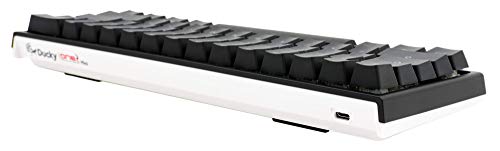
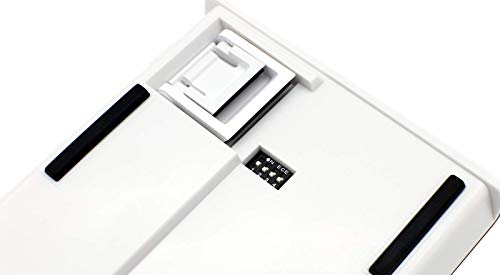
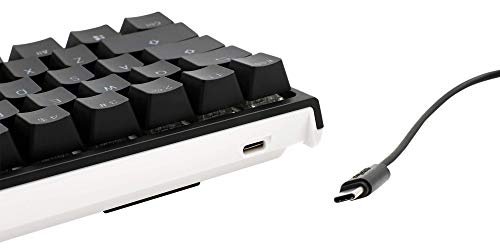
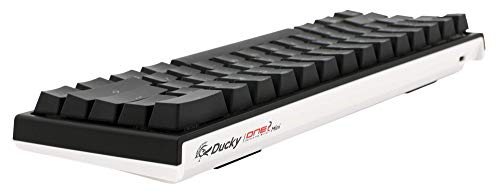
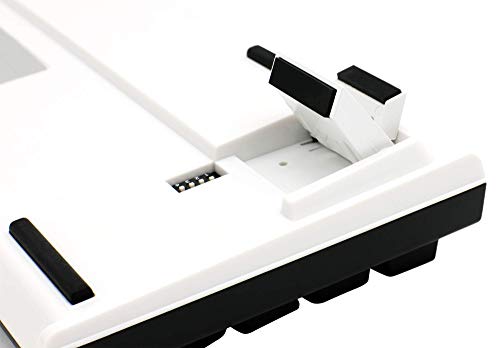
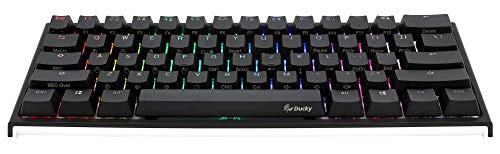


⌨️ Light up your workflow with the Ducky One 2 Mini – where compact meets colorful!
The Ducky One 2 Mini is a 60% mechanical keyboard featuring smooth red switches and durable double-shot PBT keycaps. Its compact ANSI layout and vibrant RGB LED lighting make it a stylish, space-saving choice for professionals and gamers alike. With full USB-C compatibility across Windows, Mac, and Linux, it delivers seamless connectivity and a premium typing experience in a sleek black and white chassis.
| ASIN | B07NPWTP3N |
| Best Sellers Rank | #21,474 in Videogames ( See Top 100 in Videogames ) #901 in PC Gaming Keyboards |
| Customer reviews | 3.9 3.9 out of 5 stars (115) |
| Item model number | DKON1861ST |
| Product Dimensions | 29.21 x 10.79 x 3.81 cm; 866 g |
Y**Z
Thanx
Thanx
O**R
Much recommended.
This is a really good keyboard for gaming especially it arrived earlier than expected and it’s a really durable keyboard.
O**R
Doesn't work after and damaged
wrong product not like in the picture, broken and does not work on any computer DO NOT ORDER
M**B
S
I ordered cherry mx red but instead i got sliver but its okay
R**D
A must have for gamers
Fantastic quality and nice led light.
M**H
Great keyboard
My son is very happy with the keyboard.
F**D
bes keyboard ever
i recommend it for every single persom
A**M
It’s light
Very ggood keyboard comes quick and easy
A**O
La tastiera è di ottima qualità, si scrive che è una meraviglia. la dimensione ridotta permette di avere molto più spazio per il mouse, cosa graditissima, e devo riconoscere che la mancanza fisica di parecchi tasti non si fa sentire dopo qualche giorno di utilizzo costante, infatti le funzioni principali sono comunque integrate nei tasti presenti con l'ausilio del tasto "Fn". Comoda la chicca dei tasti WASD che permettono anche di pilotare il mouse. La retroillimuniazione è potente, super customizzabile e con una resa notevole, peccato non esista un software per la gestione di queste configurazioni, per cui manuale inglese alla mano e via, anche qui con una certa pratica si impara tutto a memoria e diventa molto rapido fare qualsiasi cosa. Unico neo della mia esperienza è che mi è arrivata erroneamente la versione con switch blue (stupendi come esperienza ma troppo rumorosi) per cui ho dovuto fare un reso per prenderne una con switch Brown, che consiglio per esperienza mista Gaming/Scrituttura, mentre i blue sono ottimi più per la scrittura e sopratutto se non si condivide la stanza con nessuno...
A**R
جيده جدا وعمليه
L**D
Die Tastatur ist super! Alles so wie erwartet / in anderen Rezensionen gesehen. Habe die US-Layout-Variante bestellt. Vorsicht! Für mich persönlich ist es letzten Endes nicht schlimm gewesen, aber ich habe die Tastatur mit MX cherry blue bekommen statt red, wie es da stand. Wahrscheinlich gab es von den US-Varianten nicht mehr viele.
O**E
Tres bom clavier
J**N
The keyboard came two weeks earlier than expected. Four stars because I had to pay 20€ cash for taxes and duty. (delivery to Germany). Nevertheless, I am glad that it arrived. Everything looks new and works fine. So far I have nothing to complain about. * Now, two years later, the keyboard ist still perfectly working and it is one of the best investments in my life. For the past two years, I have been using this keyboard multiple hours per day. I am a heavy gamer and university student. I can attest that this keyboard is durable. The cherry mx red switches have a reputation to be very reliable and long lasting. That together with my experience over the past two years makes it hard for me to understand why some other reviews are so negative. Technically, there is not much that can break on a keyboard. You might get a single faulty switch but even that is very unlikely because quality control checks every switch and faulty ones are replaced in production. The two other more likely issues are the USB connector which might lose connection to the PCB when there is a high force applied to a plugged in cable or the solder connection is faulty (which is unlikely) and the third mature one would be a problem with the circuitry if a liquid finds a way onto the PCB. Well, I am digressing here... I also want to share some small details about the keyboard which could be worth mentioning. 1. I would not recommend using the macro function for too complicated things. The macro function stops recording your inputs after a certain time but and it is not really clear when the macro does not record anymore. I have no need for the function so I have not experimented much with it. It is fine if you need to rebind a key, like when you press A, the keyboard pressed B. So far, I have never needed this function. 2. LED things. There are some fancy LED things you can do. I recommend you to watch a video about it if you care about the LED functionality. Personally, I always leave them turned off. Back when I bought thr keyboard, I swapped the keycaps for all black keycaps without labels and I am still using those because I really like the look (I have added a picture). 3. This is the one thing that I like the absolute most about the ducky keyboard and I cannot emphasize enough how nice and convenient this is. However, this is only for people who use 10 finger typing. I always hated it when I was typing, eyes focused on the screen and I had to use the arrow keys. At first, you look down, move your finger to the arrow keys, look up again and go to the position in a text where you want to go. Then you go back to your F and J and continue typing. Over time, you move your hand over without looking and you just let your hand find the arrow keys. I found that annoying and inefficient over time and the ducky keyboard has a great solution. The arrow keys are accessible by pressing FN + J, K, L, I - respectively. You can simply use the edge of your right hand to hold the FN - key and useyour fingers to navigate just like the arrow keys. No movement of the entire hand, no searching of keys. It is just perfect. This might depend a bit on hand size, my hands are fairly small but I think, even with big hands, you should be able to do it. Some final words: For young people who know how to use their mobile and a computer, this keyboard is very good. Is needs some time to figure out the shortcuts... well with the standard keycaps you don't need to memorize them anyway. I would definitely buy it again if mine broke down. If you buy this keyboard, maybe mainly due to my review, I hope you enjoy it as much as I do. If you are not happy with the keyboard and you are thinking to yourself that I have overhyped the keyboard with this review, I am sorry. But I stand to what I have written. I have written my full honest opinion and experience. Maybe, in a few years I will update this review again, hopefully still fully satisfied. But I have no doubts, that that will be the case.
Trustpilot
2 months ago
4 days ago