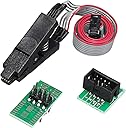
⚡ Unlock your tech’s potential with the ultimate BIOS lifesaver!
The AITRIP EEPROM BIOS USB Programmer CH341A kit is a professional-grade tool designed for fast, reliable programming and recovery of 24 and 25 series flash memory chips. Featuring a high-speed CH341A USB interface, precision SOIC8 clip for in-circuit programming without soldering, and versatile adapters, it empowers tech-savvy professionals and enthusiasts to effortlessly erase, backup, and reprogram BIOS and EEPROM chips across a wide range of devices.
| ASIN | B07VNVVXW6 |
| Are Batteries Included | No |
| Best Sellers Rank | 44,885 in Business, Industry & Science ( See Top 100 in Business, Industry & Science ) 12 in Communication Integrated Circuits |
| Brand | AITRIP |
| Colour | USB Programmer Set |
| Customer Reviews | 4.4 4.4 out of 5 stars (468) |
| Date First Available | 27 Aug. 2019 |
| Guaranteed software updates until | unknown |
| Hard Drive Interface | USB |
| Item Weight | 66 g |
| Manufacturer | AITRIP |
| Package Dimensions | 12.5 x 8.8 x 4.3 cm; 66 g |
| Power Source | Corded Electric |
J**Y
Got the job done.
This one follows the flawed design where the IC woukd be exposed to 5v regardless of the jumper position. I had to mod it so that the power and data lines are now at 3.3v. Once done, it worked just fine. The clip takes a bit of fiddling around before it would give a proper connection. Once you get a knack of it, it works everything. Can't fault at all, except for the design around voltage limiting.
C**R
This saved my pc after installing the wrong bios!
So I installed wrong bios update and bricked my old pc (no 2nd bios chip or USB bios port either). PC was fully dead, one second power loops.. removed my bios chip from the motherboard (as I couldn't get the clip on since the bios chip was right next to a sata port) then placed it in the adapter that fitted the winbond 25 series chip and plugged that into the programmer. Instantly read contents and directly reprogrammed correct file. Resoldered chip back onto my motherboard. PC came to life! Very happy
M**.
Steam deck bricking saviour!
I’m a bit of a tech tinkerer. Trying to get the most out of my steam deck. Unfortunately, trial and error is a big part of figuring out how to push a steam deck and it turns out it’s quite easy to push it too far and end up bricking the thing! A guy on YouTube I follow called DIY Papi recommended this to directly connect on to the BIOS chip and reprogram (flash it) to an older version. Pro: This tool (and a bit of patience) saved my steam deck and saved me over £100 in sending it off to Valve to fix. Con: the power supply LED wasn’t soldered on to the mainboard - so I thought it wasn’t working for a while. Quality control probably needs a bit of work. Only bit of advice, take your time getting the pins to line up on the chip.
S**E
Great product
Worked as expected. Checked voltages first based on previous reviews and all was well. Managed to save a dead X370 motherboard thanks to this.
J**N
Does the job
Good product. Does the job as described.
J**N
Arrived broken
It is an extremely poor quality product. First of all it is arrived in a bag without any proper protection. The pins bend on the parts. I can’t close the clip if I put a module to the socket as it is keeps opening. The USB port keeps playing and bad connection. Honestly I don’t know what quality control allowed this device to be sent out.
V**3
Poor quality
Not so the best programmer
O**.
Clipper doesn't always work
In my experience, the clipper just would not clip onto my BIOS chip. I ended up having to buy a separate clip with jumper cables.
A**I
Working perfect
C**Z
I'm reviewing the Black CH341A EEPROM & BIOS USB programmer bundle, with 1.8v adapter. I needed this for a BIOS flashing I had to do, but the tool I'd normally use was no where near me nor did I have the ability to go drive a couple hours to get it. That is a TL866II Plus. This tool, for the price alone, is amazing. I was quite skeptical just because it's incredibly inexpensive, but quite a powerful tool. Some of the observations I've made.... For the construction, there is no case, so you NEED to be extremely careful when using it. That the area where the tool sits isn't conductive or that nothing conductive falls on it. Because there's no case, I can clearly see the solder joints are well made, the board is a nice thickness with 2 conductive layers. There are 2 LEDs that allow a user to see power to the board (red LED) and another to alert the user when it's writing or reading (green LED). There's 2 functional sides to the board, 1 with the spring tensioned clamp, and the other with solderable traces for at least 2 different style or size chips. The smaller of the 2 fitting a Winbond BIOS 25Q64FV chip (5.30mm wide), which just happened to be the chip I needed to flash. Once I downloaded the appropriate software & drivers, this tool was quite simple to use. I'm not very techy, but do mess around with all sorts of electronics. I'm more advanced than a beginner, but I can't say I'm that experienced with flashing BIOS chips very often... I'm more comfortable with the automotive side, with modules and EEPROM chips, but still not a pro there either. I'm stating this so that a reader can understand where I'm coming from better, and make a better judgment. It's not "so easy for you because you do this all the time" type of deal. Be aware, anytime you're dealing with tools, you need to know there limitations. It's not "which is the best BIOS tool?" or "this tool will do anything you need", no. Some tools can do some chips better than others, just make sure that BOTH the tool AND the software have the capability before purchasing any tool for a specific job. I've only used the tool a handful of times on 2 different BIOS chip series, with one being the chip I mentioned above and the other was a MX25L12873F. I'm also including pics with the tool in use. I think you get a nice bang for your buck on this purchase. I just may purchase a 2nd one, because it just works!
P**A
Needed to resurrect an airgapped 15 yr old HP notebook running a special software that is not available anymore. Dead battery, blank screen and flashing LEDs indicated that something was wrong. Tried several tips and tricks including a fresh battery and key combinations to attempt to POST into a BIOS copy on a USB stick. Nothing worked and I was frustrated. Chasing this problem on YouTube, came across multiple channels with videos using the CH341 programmer to flash the BIOS. I am fairly adept at DIY and can test/fix common electronic/electrical issues. Decided to embark on the attempt to flash the BIOS chip using this platform and a programming s/w (AsProgrammer and NeoProgrammer). Day 1 thro Day 3, went in circles and a learning journey. The first CH341 I bought was defective so ended up ordering a second one. This one worked flawlessly. I was done in 15 minutes and the laptop came back to life. The product is well put together and came with plenty of accessories including the 1.8v adapter. Also, I didn't need to do the 5V to 3.3V conversion but the internet community thinks that completing the bypass hack will correct the defect of 5V supply instead of the 3.3v the SPI Chip expects. Not needed. There were no documentation so one must be willing to go through a learning journey. Otherwise, this hardware tool works flawlessly. I didn't have any problems with this item.
Z**K
Brought solely for the purpose of flashing motherboards without using a CPU because I had so many cases of CPUs requiring an update-to-date bios to post on some systems. I'm just sick of hoping motherboards ship with the latest bios or forced to use an older gen CPU. This thing works perfectly for the peace of mind, the build quality is a little shoddy but I'm giving a mostly satisfied rating cause within 1-2 clips it fit snug on as a bug on the chip and flashed the latest version without a hitch. I recommend being comfortable with flashing chips and firmware before purchasing this item, this makes an amazing purchase for computer tech and repair shops, it's handy!
A**.
Work very simply with flashrom on linux. No problems, it help me flash my backup bios binary to the spi manually. I was confused because gigabyte left my SPI in manufacurer mode, so you could read and write to it from the OS. This is a bad idea since the intel ME regions of the SPI are protected and wont tell you cant read them. So my first backup of my bios from the internal os was BAD because of it dont make that mistake. Always use a manual SPI dump from a programmer like this one, its the only way to get a 1:1 backup. Luckily my mb is a DualBios and has a second "backup" spi i jacked into and cloned with this tool and reflashed to the main SPI chip. Long story short: you cant flip the HAP bit on the z370 hd3 rev 1 motherboard, the PCH has to have a fuse blown to permanently make the intel boot guard follow the HAP bit. Another way intel makes you PAY for features ALREADY BUILT INTO YOUR CHIPSET. Love/hate intel.
Trustpilot
4 days ago
1 month ago