⚡ Elevate your workspace with the RK84: compact, customizable, and always connected.
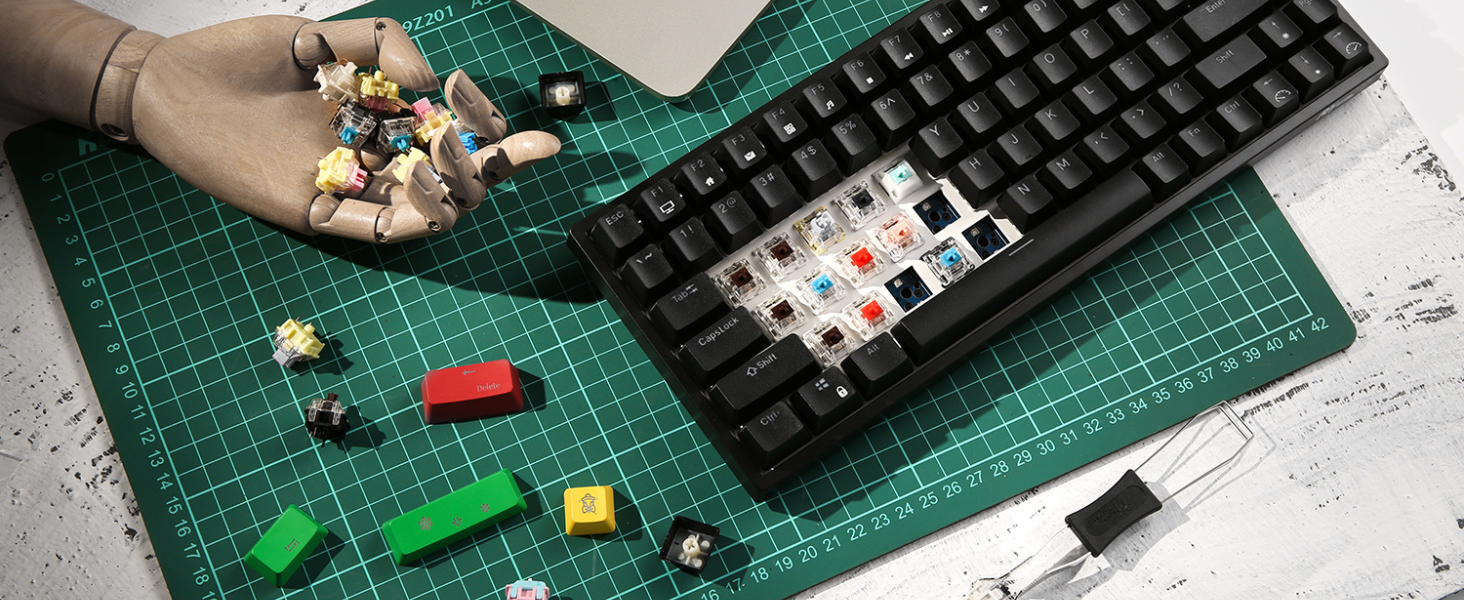
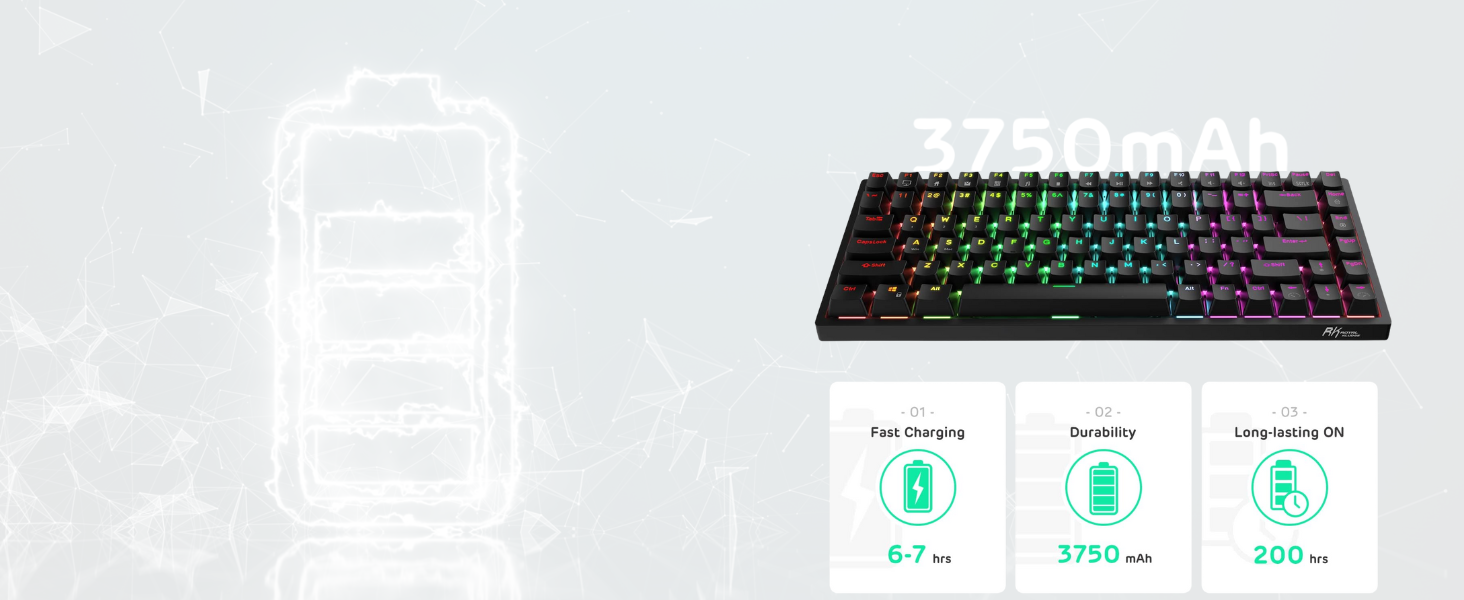
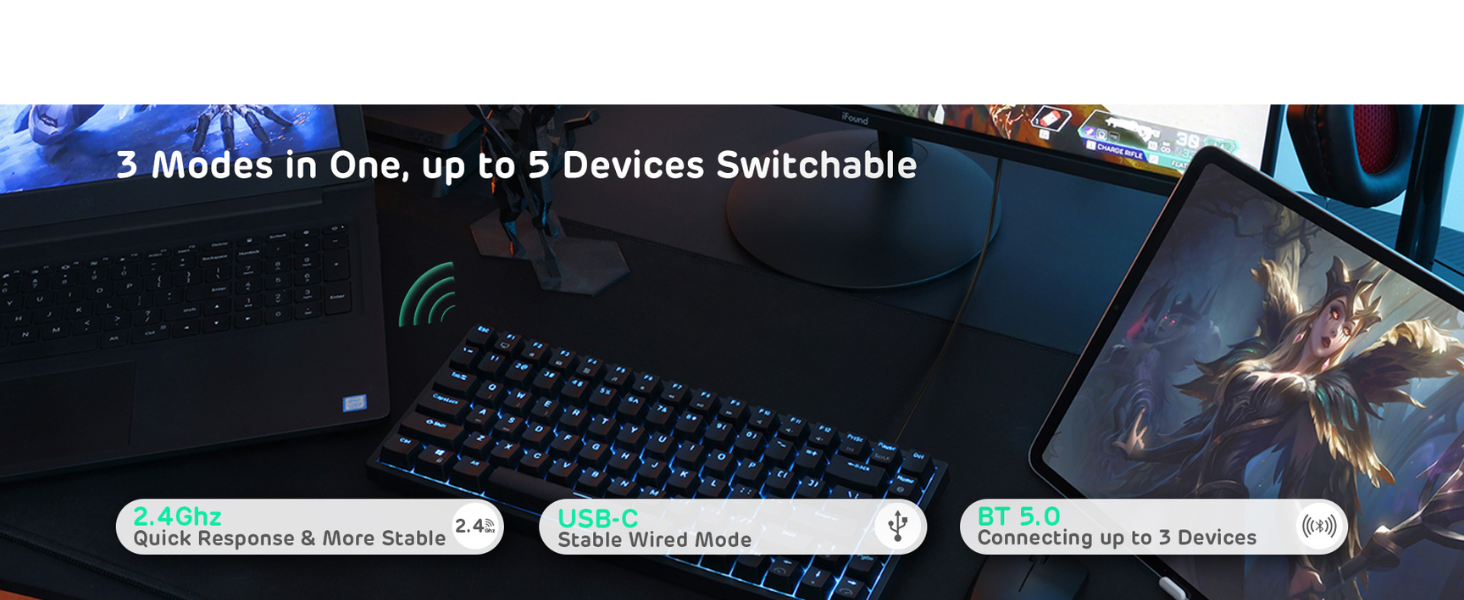
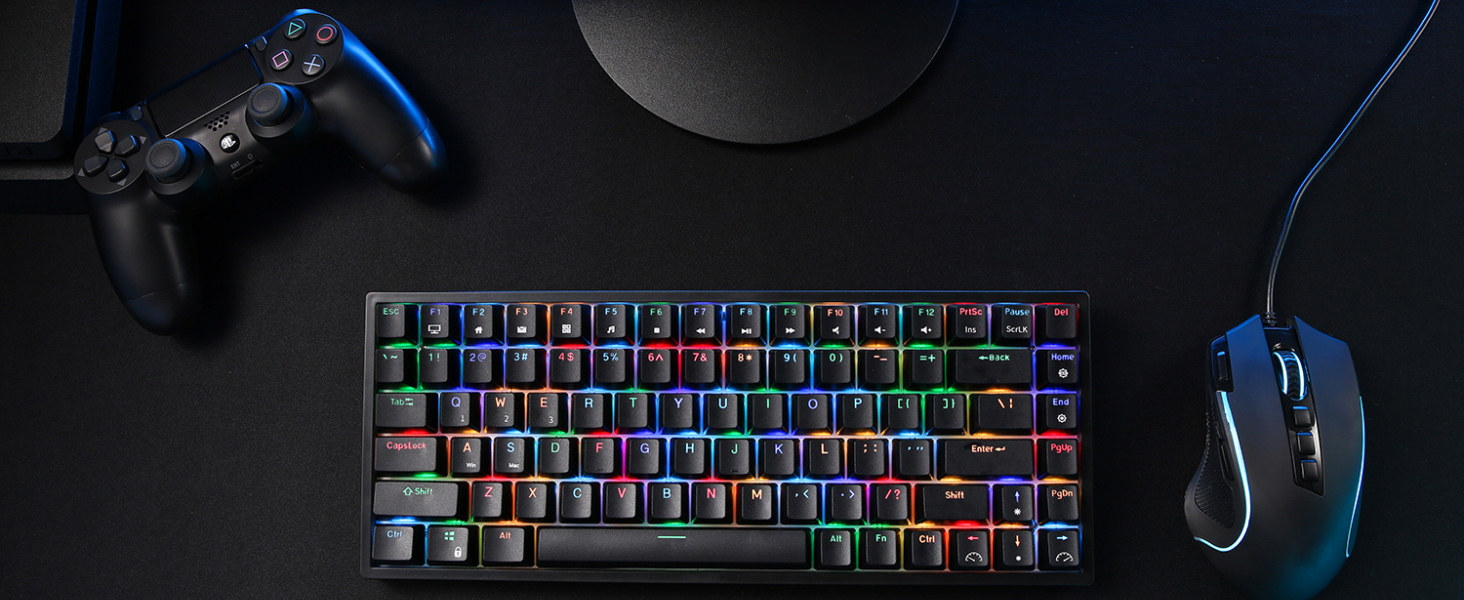
The RK ROYAL KLUDGE RK84 is a premium 75% mechanical keyboard featuring tactile brown switches, triple-mode wireless connectivity (Bluetooth 5.0, 2.4GHz dongle, and USB-C), and a hot-swappable PCB compatible with multiple switch brands. Designed for professionals and gamers, it offers up to 200 hours of battery life, RGB backlighting, and integrated USB pass-through ports, combining versatility, durability, and customization in a sleek, space-saving design.


| ASIN | B098Q6CF65 |
| Additional Features | Backlit, Hotkeys and Media Keys, Integrated Stand, Rechargeable |
| Antenna Location | Business |
| Best Sellers Rank | #3,315 in Video Games ( See Top 100 in Video Games ) #40 in Mac Gaming Keyboards #276 in PC Gaming Keyboards |
| Brand | RK ROYAL KLUDGE |
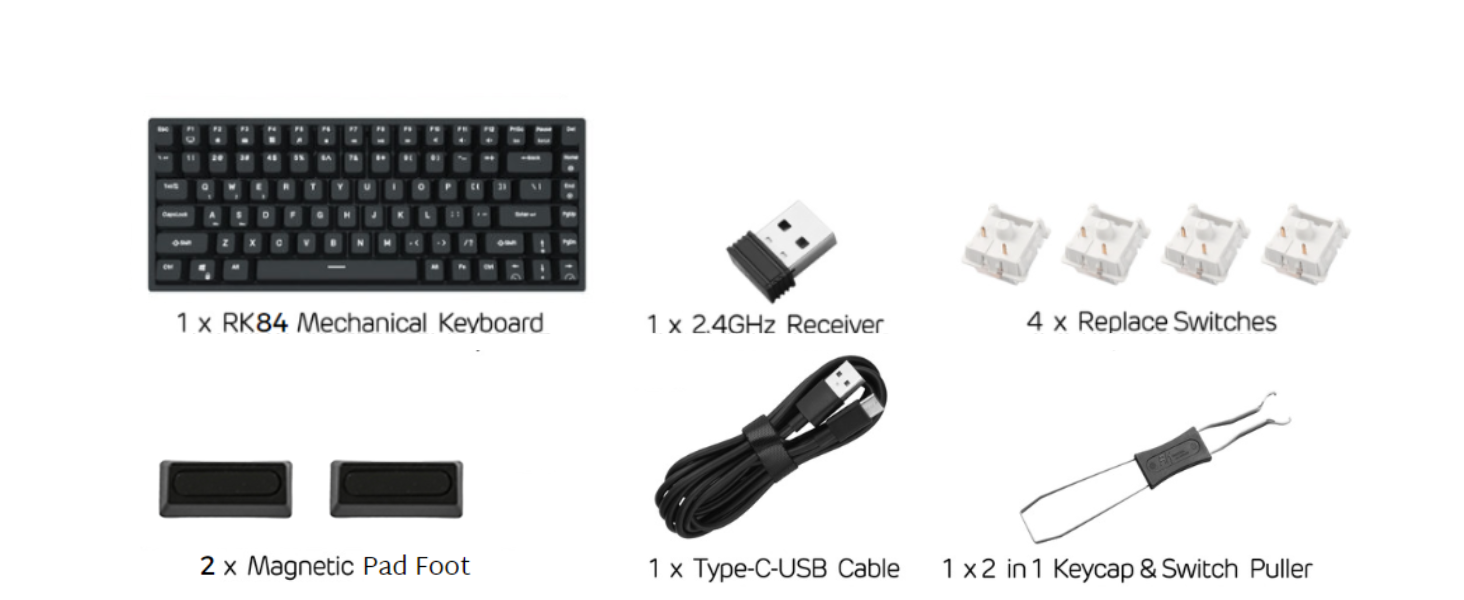
| Built-In Media | Keycap Puller, Type-C/USB-A Cable |
| Button Quantity | 84 |
| Color | Black |
| Compatible Devices | Laptop, PC, Smartphone, Tablet |
| Connectivity Technology | RF |
| Customer Reviews | 4.5 out of 5 stars 3,636 Reviews |
| Enclosure Material | Acrylonitrile Butadiene Styrene |
| Hand Orientation | Ambidextrous |
| Item Dimensions L x W x H | 12.4"L x 4.9"W x 1.6"H |
| Item Height | 5.5 centimeters |
| Keyboard Backlighting Color Support | RGB |
| Keyboard Description | Mechanical |
| Keyboard Layout | QWERTY |
| Manufacturer | RK ROYAL KLUDGE |
| Model Name | RK84 |
| Model Number | WLE-N1-108 |
| Number of Batteries Required | 1 |
| Number of Keys | 84 |
| Number of Sections | 5 |
| Power Source | Battery Powered |
| Recommended Uses For Product | Business |
| Series Number | 108 |
| Special Feature | Backlit, Hotkeys and Media Keys , Integrated Stand, Rechargeable |
| Style Name | Contemporary |
| Switch Type | Tactile |
| Theme | gaming |
| Unit Count | 1.0 Count |
| Warranty Description | 1 Year Warranty |
P**R
Second finest keyboard I’ve found in 60 years
Update 7/27/25: spilled something into the keyboard at some point which sat in the foam backing and did not evaporate, several keys got corroded pins and pin sockets and the color backlights went crazy. Completely disassembled and cleaned everything including using tiny wire brushes to remove corrosion. Nothing helped until I probed around with a continuity buzzer and suddenly the backlights were ok. However after reassembling now the bottom row of keys has a different color than the rest - when blue backlighting the bottom row is red, etc, etc. Ordered a new one but with brown switches instead of red. Update 5/3/25: after using it a while I find I do not like the short stroke red keys. I just can’t break the old muscle memory from using tons of long-stroke keyboards all of my career and I get false keystrokes due to my own fault. Update 7/23/24: replacement keyboard arrived today, charging as it should. I had to revert to my old Keychron K2A1 with the brown switches for the interval and now this feels like the stroke is shorter. Same quiet operation, silky feel, just a shorter stroke similar to the rkh81 that I liked so much. Update ~ 7/15/24: after a couple of days using it I realize it’s not charging. The battery capacity started out at 60% and I plugged it in and left it but never checked the charge current with a usb power meter. I did not notice the battery kept dropping until tonight when it hit 10%. When I plug it into a power meter the space bar blinks 3 times indicating it’s charging but it’s only taking enough power to light the backlights which work as expected. When I turn those off the power drops to 0ma. When I unplug it the backlights go out and the Fn+Enter doesn’t even light the 1 key indicating 10% charge remaining, I think that’s an energy conserving mode but the bluetooth connection works and the keyboard functions, at least for now. The charger in it must be defective, the battery certainly works, the wired power connection works, just no charging is going on and never has.. It’s being powered by a charging hub that has no problem supplying power to other devices, the power meter shows the supply voltage is 5.1v and zero amps. original ~ 7/10/24: With Red switches this is the second best keyboard I’ve ever used. The best keyboard is the RK-H81 with silver switches, it’s layout is slightly different and more exact to my muscle memory and the shorter throw of the silver switches I liked a lot but it has south facing leds which make shine-through keycaps unusable. Seems like a very stupid design decision and it wasn’t expressed anywhere in the listing. So an RK84 it had to be. I’m a retired programmer, I took typing in the 1960’s because it seemed like an easy class. Turned out to the be most important one I ever took. I became a teletype operator and then a programmer. The HP2621 terminal from the 80’s is my reference point, its keyboard is my ideal - the perfect reach, travel and spring pressure. And the RK-H81 came sooo close to improving on it, if not for the leds….. The RK84 layout is fine, I guess, but the keys are packed in for space’ sake rather than for the typist like the H81. I doubt the H81 designers were thinking of fast typists though, its south facing leds produce slightly nicer colored wave patterns so if that’s important then maximizing typing comfort probably isn’t. This RK84 is a solid, very useable keyboard. The RK-H81 is a mystery.
T**N
Royal Kludge RK84 - A Good Stock 75% Keyboard, Modded To Be Even Better
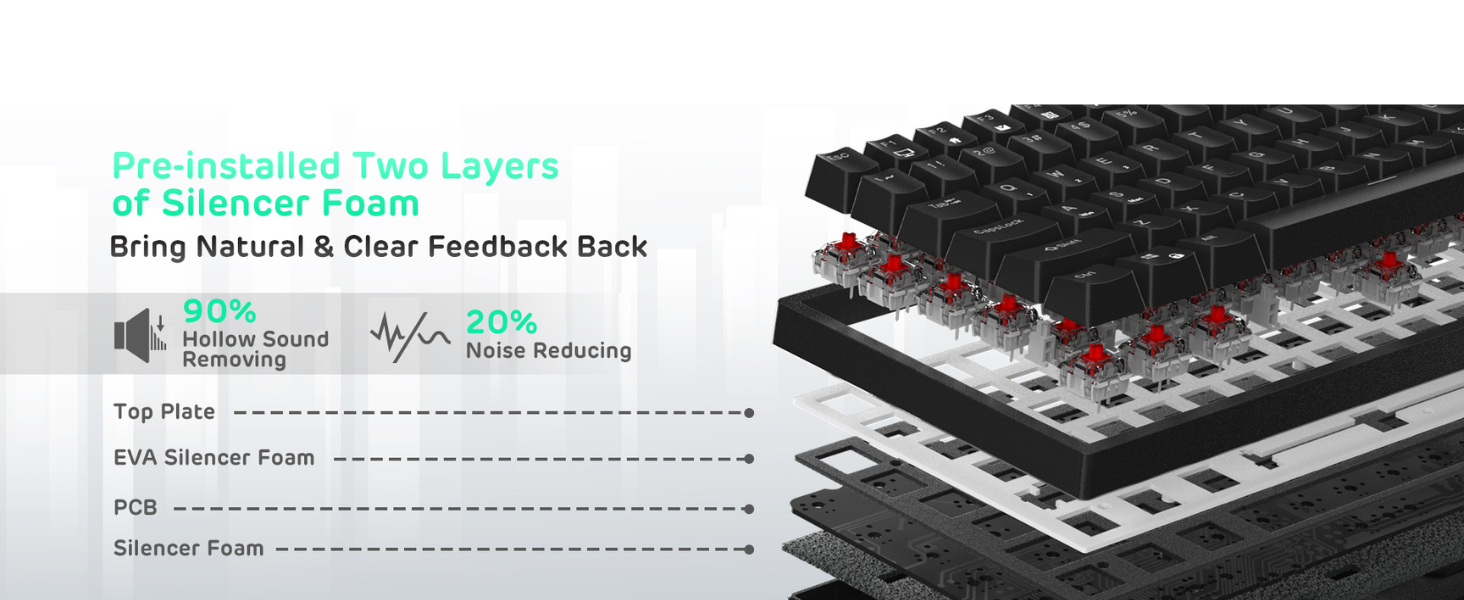
I am going to start by saying that I am typing out this whole review with this keyboard (but the keyboard is fully modded, but I will get to that detail later). Let's start with the basic features of this keyboard. I mainly use all of my keyboards with the USB-C cable connected (for competitive gaming reasons) but the wireless connectivity options are a plus. Tested the 2.4 GHz USB Reciever mode. The mode does not have the best low latency input but it is a minor latency. The range for the USB Reciever Dongle is not usable at a long distance. Definitely must use close-range for optimal usage. The Bluetooth connectivity is a bit better than the USB Reciever for sure. But basically for everyday usage and single-player gaming is fine, but I would not use this keyboard in its wireless modes for fast First-Person-Shooter game though. As for its built quality, I would say the RK84 is decently fine. Every stock components about it (as in its plastic build, its switches, its stabilizers, and its keycaps) are roughly the same in feel and sound as any other basic mechanical keyboard out there. So the switches are relatively audible and scratchy when typing and the stabilizer in the large keys (as in the Spacebar key, Left Shift key, Back key, and Enter key) can rattle quite a bit. But for most regular consumers, that might not be too noticeable or become a problem in everyday usage. Other than that, the stock RK84 itself is great for everyday consumers and the stock keyboard is sturdy and surprisingly a bit heavy for a plastic build (which is good as the keyboard won't move around as much). Everything about the keyboard works as intended. Now for the "fully modded" part that I mentioned at the beginning of this review. I recently started getting into the world of custom mechanical keyboards but I am by no means a pro keyboard enthusiast (yet). However, I do mod and upgrade all of my keyboards to make them feel smoother and sound better (it is not recommended to disassemble a keyboard if you don't know what you're doing without watching some videos first). I have 2 other keyboards that are also fully modded as well; my secondary budget keyboard: Redragon K530 and my daily driver high-end keyboard: Glorious GMMK Pro. I got this keyboard because of the "budget" recommendation from a few pro keyboard enthusiasts on YouTube. I say "budget" but $80 is still relatively high for a keyboard to regular consumers. I guess it is "budget" when compared to other custom mechanical keyboards that are $100+ for just being a barebone kit like my Glorious GMMK Pro. Anyway, I digress. I would highly recommend this keyboard over any other "budget" keyboard because it has the correct hot-swappable feature for anyone looking to dip their toes a bit into the world of custom mechanical keyboards and modding them in the future. I say "correct hot-swappable" because this keyboard's PCB actually can support numerous brands of switches like: - Gateron switches - Cherry switches - Durock switches - Novelkeys switches - Kailh switches - and etc. Unlike other budget keyboards that only support one type of hot-swappable switches. An example would be my Redragon keyboard that is technically hot-swappable but only hot-swappable with the same brand of Outemu Switches or something similar like Akko Switches. Some of the modifications I ended up doing to the RK84 were: - Adding 2 layers of PE Foam (roughly 1.5-1.6 mm or 1/16 inches thick each layer) to the bottom inside of the plastic case. - Adding 2 layers of Masking Tape to the bottom of the PCB (as shown in the picture). - Adding a Keyboard Switch Sound Dampener Foam (84 key layouts) between the PCB and the metal plate (as shown in the picture). - Taped down a single layer of PE Foam (roughly 1.5-1.6 mm or 1/16 inches thick) between the PCB and where the stabilizer would hit the PCB to dampen the sound of impact. - Switched the stock stabilizers with Durock Plate Mount Stabilizers (Clipped and Lubed with Krytox 205g0). - Hot-swapped out the stock TTC Red Switches with Gateron Ink V2 Black Switches (Lubed with Krytox 205g0 + added Deskeys Switch Film)(as shown in the picture). - Switching out the stock keycaps with Glorious Aura V2 Keycaps. After hours of modding the keyboard to its fullest potential, I managed to make this keyboard feel smoother and sound thockier than it ever has before (as shown in the video). The mods I made to this keyboard made it so much better that I replace my budget Redragon K530 (which is also similarly modded) with this fully modded RK84 to be my secondary keyboard. Couple of minor things to note: - The advertisement for the keyboard stated that it is an 80% keyboard. This is not true. Although 75% and 80% are similar, the key layout of the RK84 is that of a 75% keyboard. For a more detailed difference between what a 75% or 80% keyboard is, you can Google search that for yourself. - While it is no major deal-breaker, I wish the keyboard has brighter RGB lighting. I have a Glorious GMMK Pro keyboard with the same switches and keycaps and it is a lot brighter than the RK84. - The RGB LED on this keyboard is north-facing so there might be some keycap interference (depending on what kind of keycaps you're using. The Glorious Aura V2 Keycaps that I use for this build has no interference issue at all.) - I know the RK84 Pro has it but I wish this regular RK84 comes with the aluminum frame as well. It would have made this board feel even more high quality. (I would get the RK84 Pro but I like the 2 USB pass-through ports that this regular RK84 has). - To fully mod this board, as I did with mine, would cost you an additional $100-150.
C**R
Works on Mac! Way more than a budget mech.
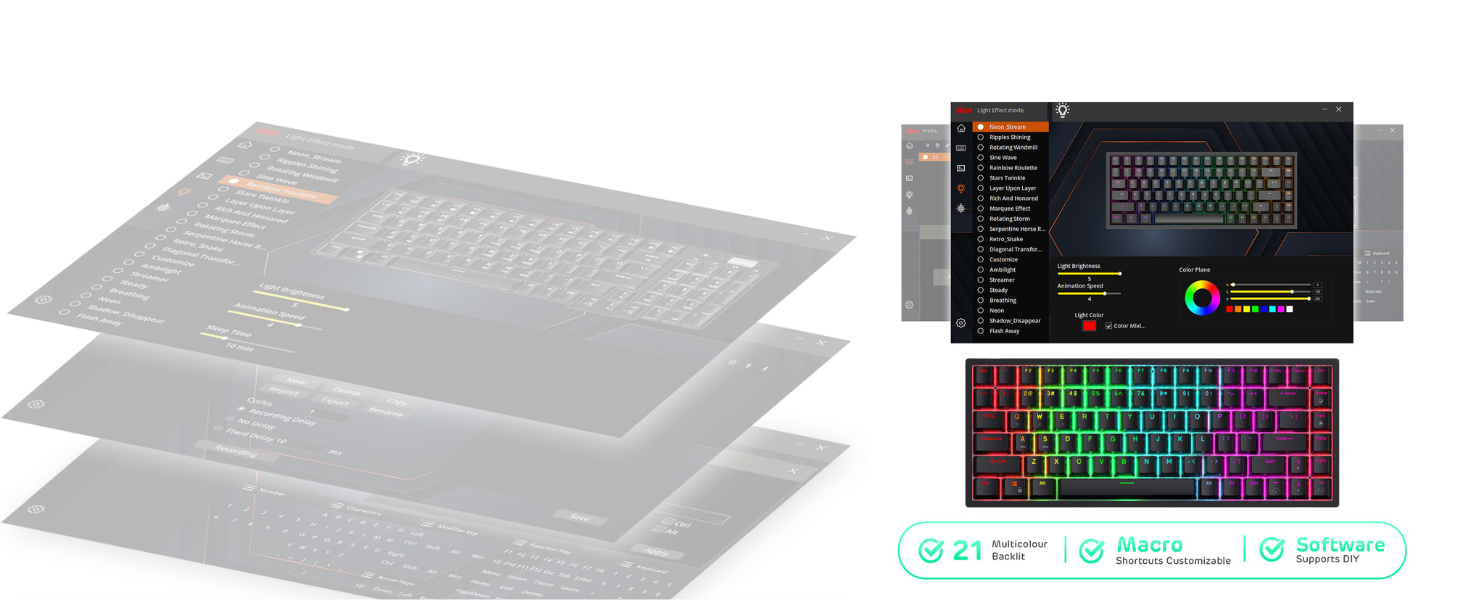
RK84 80% With linear red switches. For starters - YES, this keyboard works on Mac! It even says so in the description AND user manual. It has a Mac mode and a Windows mode right on the keys! I can’t speak for the software - I imagine that may only be usable on windows - but it is swappable, and it is compatible with both! I own both and use it on both so I promise you that it is. You can even swap the windows key with the alt key to where the command key normally is on a Mac when you switch the keyboard to Mac mode if you’d like. Much more comfortable! That said - here is my review: While this Mechanical keyboard is considered to fall under the “budget” end of mechanical keyboards for its size - this keyboard is a great value. Hot-swappable switches, swappable keys, works both wired via USB-C, or wireless via any of its 3 different Bluetooth channels or it’s 2.4ghz USB, and even has two pass-through USB (type A) ports on the back for added convenience. It comes pre-built (although u would’ve loved to assemble it), is compatible with Windows AND Mac, and it even has software! All for under $90? That’s hard to beat. I’ll be honest — this is my first mechanical keyboard, so take that for what you will. However, believe you me when I tell you that I did my research (and a lot of it) before purchasing this one. Seriously, it’s been months. This Royal Kludge RK84 met all of my criteria for a starter keyboard and then some. Has all the keys I really need (including a couple for convenience), could connect to two computers (but not at the same time), has red linear switches, is hot swappable, had decent battery life, adjustable RGB backlight, USB-C, and doesn’t break the budget (around $100 since this is my first mechanical keyboard). I also wanted it to show up the next day, so keep in mind that these thoughts also include that I searched primarily on Amazon (which may or may not have limited me here, although I didn’t feel that it did based on the options I found on YouTube and other forums as well). The selection on Amazon is quite decent for boards in this price range. I digress. Being a budget pre-built, and despite watching video after video on this mech (let alone probably 15-20 other keyboards), I was super unsure of what to expect after opening the box. I was nervous that it would feel super chintzy. I almost expected it to. I was worried it would rattle and clunk, it would be lightweight, and that it would feel cheap. More so, I was worried that I would be disappointed. However, that was not the case at all. I am currently blown away at the features and quality of this board (and I’m a picky guy). Considering I could’ve spent double for a keyboard with the same (or even fewer) features that this bird has, confirms to me that this is a great starter levied for me, or for just about anybody who wants to affordably ‘dip their toes’ into the mech world. I can’t speak much for longevity, but I am confident in saying that this is an awesome option among the many in its price range (at least on Amazon). I’ll upload a video of it completely stock later, but there isn’t all that much rattle considering that things are minimally lubed from the factory - if at all. Now, no decent review is complete without an honest list of cons. After using it for a few hours this afternoon I have come upon a few things that are less desirable - but to be expected. - The user manual could be considered somewhat confusing at parts. Not that bad, but it’s mostly just pictures so some things are left to the imagination. For instance, the P button blinks indefinitely until you either pair it with the 2.4ghz USB dongle included, or switch the keyboard into Bluetooth mode and connect it. - There is some rattle in the stabs — but again this is to be expected and isn’t severe enough that it can’t be fixed fairly easily. - The case does sound a bit hollow/cheap — also an easy fix. It doesn’t feel cheap though (as a reminder). - The brightness could be slightly more adjustable, although there is enough adjustability for me to be content. All things considered, this is a great keyboard. I would recommend it to anybody who thinks they might be interested in the enthusiast-side of mechanical keyboards. Easy 5 stars from me.
K**.
Great budget keyboard, but has some connection issues
It's been a great keyboard. Not sure if it's my setup, but there are a lot of times where the keyboard does not work when coming back to my computer. It'll light up when you push something, but then go off after a second. The only way for me to fix it is to unplug and plug it back in and it'll start working like normal. Also, the connection point for the usb-c is not very stable; it is able to wiggle up and down slightly, which doesn't seem right. It's a good budget keyboard, but I think I'm going to look for something new eventually.
S**H
One of the most perfect keyboards I've used
So I've been through a lot of keyboards - brands, layouts, switches, etc. This one gets just about everything right. As I go through the months/years, I think I will add a bnit here and there about it. For now, some top mentions: Every special key is available at a single keystroke. For Admins/Old-school folks, PauseBreak and PrtScr. THis is exceedingly rare on modern layouts. (For those who don't know, Screenshot and System shortcuts in Win, as well as handy hotkey options for Lin or whatever you play in) Can't believe I have to even say this, but we have Home, End, PgUp and PagDn, plus Del - so many keyboards have an odd mix of only some of these - even in a similar # of keys. Thee keys mentioned above are in a lgical place - Del is int he corner, Home/End are vertically arranged - the only other valid layout of the last 4 are for End to be at the bottom, but the way it is here is fine also. Ins and ScrLk are the 2 casualties, placed in Fn-mode - which is fine. These are the 2 least-used ones of the bunch, even for old-schoolers. And they're not ignored - they're just shifted to an easily-accessible 2nd tier of Fn. Perfectly logical. The way they handled the Caps Lock light is marvelous. Another model from RK had LED lights on the front - kind of blinding, I always hated them. This one - the letters on CapsLock turn white when it's locked. IDK what happens if you use white lights on your KB (if you're such a monster) but for everyone else, this is unintrusive and the perfect way to do this IMO. This might be my fav design choice TBH. The keyboard is excellent, feels great, responsive. I don't notice any lag/delay whatsoever when typing very fast. I have not used it in anything other than Wired mode though, so grain of salt. This is actually my first Red switches. I'm a Browns kind of person typically. These Reds feel heavier than Cherries. Cherries are too soft for me, so this worked out. Turns out I can do OK without the tactility, I just need some more resistance than Cherry provides - this does the trick. I also feel that it's tighhter than a lot of others. Less jiggle. I feel like if you can live without a numpad, that this is the best layout. Very unobtrusive overall size while giving you every bit of input control you could need. People who oppose this layout tend to dislike the learning curve for special nav keys. I hear this, but honestly after using laptops of all shapoes and sizes I've learned to not take the traditional layout for granted, and have as a result transitioned to be more flex with Home/End/Pg keys. If you've laptopped on a non-15.6" size, you'll be fine. I also think that this layout is just logical. What I think I'm trying to say is that it's a very gentle leraning curve. I honestly didn't feel like there was much of one. I took to this far easier than I expected. If you do need a numpad, I strongly recommend the 85% layout with a numpad - as opposed to the 85% that doesn't. RK makes a greaty one of these and I think it's the 2nd-best KB I've used. That one is only 1 row wider than a regular 10-keyless, so bang for buck is ideal. However it has a couple of un-ideal key choices, amking the learning curve slightly steeper. I had to have a custom keycap printed and re-bind a couple of keys. This keyboard here I didn't feel like I needed to customize anything. At this point, other than when i do my taxes, the numpad is a rare need. I do have a mech USB numpad that sits pushed back, giving me the option when I do need it, but in general it's more and more rare. At any rate. if you are thinking about losing the numpad, and you have strong feelings about muscle memory and special keys, this keyboard here is a gem. I also think it's an excellent value and a good investment that will last. As far as porability - it can be wireless and can of course travel with you. Its weight is like that of any metal-based mech KB. It has weight. Personally, I find these to be inexpensive enough to where I prefer to have one at work and one at home, rather than lugging it around. But if I did need to carry it, I wouldn't be worried about the durability or anything. It's well-built.
J**.
Solid keyboard, but not much room to mod.
So this is replacing a Corsair K65 with cherryMX reds. Nothing wrong with that keyboard, but I wanted something different, thanks to Hipyotech (howdy hey). In the box came the keyboard, a user manual, a combo cap and switch puller, a USB A to USB C cable, and some extra swtiches. Not a lot of wasted room in the box, which is kinda nice. Wireless dongle is attached to the bottom of the keyboard, and was plug and play. It's got a bunch of RGB modes, colors, and settings. It's nice to be able to just play around with them at my whim. I know this isn't a huge feature on mechanical keyboards nowadays, but I'm coming from a board that didn't have any... let me have this! I went with tactile browns, as that was the first mechanical keyboard that I had. I think I prefer that style of switch, and these aren't aggressively tactile. The keyboard is surprisingly quiet, especially compared to the Corsair that I had. There was a bit of a springy ping when you hit the space bar a bit too hard. The fix was popping 6 screws out of the keyboard and painter's taping the bottom of the PCB. I did just a single layer, and it took care of the majority of the ping. I can still get it to ping, but I have to beat on the bar now. I also tossed some dense spacing foam I had from old lithium motorcycle batteries in the upper portion of the case to help mellow some of the sound out... sadly it was too thick to apply to the lower portion of the keyboard... sad. Less sad is the amount of space it takes up on the desk. It's pretty compact, so you're able to get the majority of a normal keyboard's function out of it in a smaller footprint than the K65. Nice! But also, not nice... more on that below. I haven't tested any sort of latency, bluetooth performance, or done much gaming with it, as life has been keeping me from doing a lot of gaming. That said, the typing experience has been very much a joy, and I'm getting used to a slightly higher than what I'm used to activation on the keys. That's causing me to jumble letters up as I'm typing. Just gotta get good. Speaking of getting good, it's not all sunshine and rainbows. Because of the form factor, the print screen, pause, delete, home, end, page up and down, and arrows are all scrunched in together. I'm not used to them being so close together, nor am I used to their non standard positions. This I think is just going to be a training issue with using the board... I won't lie though, there's a bit of frustration in having to look for a key that I've used for decades, and it not being where I was expecting. I'd love if the page up/down and home/end key positions were swapped. That would help me with the learning curve I think. Having the arrow keys surrounded by others is, likewise, very strange to me, as I'm unfamiliar and I can't hit them by simple touch anymore. Again, I think it's a training issue, but it's something to be aware of. I think the long and short of it is this is a keyboard that's nice to use if you need to free up some space on your desk. It's a pretty solid typing experience, and it's got a little space for modifying. On the downside, it's gonna take a little time getting used to key placement if you're used to blazing though spreadsheets and things like that. It's an affordable mechanical keyboard that lets you see where mechanical keyboards can go, especially if you're coming from a membrane style, or an older, much more difficult to modify keyboard.
C**R
Compact, Versatile, and Feature-Rich—Perfect for Work and Play
I’ve been using the Royal Kludge RK84 75% Wireless Mechanical Keyboard for several weeks, and it has quickly become a favorite in my setup. The compact 75% layout keeps all essential keys—like arrows and F-keys—yet dramatically reduces desk clutter and improves portability. MakeUseOf Enos Tech This keyboard offers triple-mode connectivity: seamless switching between Bluetooth 5.0, a 2.4 GHz wireless dongle, and USB-C wired mode, letting me effortlessly use the keyboard across devices. Amazon TechPP The hot-swappable switches are a game-changer—no soldering needed to customize my typing feel. Amazon Enos Tech It’s packed with extras: a 3,750 mAh battery promises long usage, RGB lighting with customizable effects, dual USB-A passthrough ports, and reliable build quality. Enos Tech RK Royal Kludge MakeUseOf Unboxing feels premium too, with accessories like switch and keycap pullers, magnetic feet, and extra switches. Ricky Spears TechPP Pros: Compact yet functional — tight 75% (84-key) layout keeps essentials without bulk. Enos Tech MakeUseOf Flexible connectivity — switch between Bluetooth 5.0, 2.4 GHz, or wired USB-C. Amazon TechPP Hot-swappable switches — great for customizing without any soldering. Amazon Enos Tech Long battery life — durable 3,750 mAh battery provides hours of use. Enos Tech RK Royal Kludge RGB lighting & USB hub — vibrant lighting plus USB-A passthrough adds convenience. MakeUseOf RK Royal Kludge Strong value — offers high-end features for a budget-friendly price. TechPP MakeUseOf Cons: 2.4 GHz connection issues — some users report interference and limited wireless range. Tom's Hardware Loose USB-C port — wired connection can feel a bit wobbly. Tom's Hardware No battery indicator — makes monitoring charge levels a bit tricky. Tom's Hardware Software limitations — the setup app is reportedly weak and in need of refinement. Tom's Hardware Bottom Line: The Royal Kludge RK84 delivers exceptional value with its compact, feature-packed design. It’s ideal for typists, gamers, and anyone seeking a versatile, customizable keyboard—just be mindful of minor wireless quirks and software imperfections.
D**E
(1/14/2022 UPDATE!) Great attempt. Great CS Rep. But too Broken For Me.
(1/14/2022 Update): I'm calling it quits on this board and going to a Keychron Q1. Off the bat, I want to make it clear that it's entirely possible I just got dealt a really unlucky hand with the board that was delivered to me. So many others have positive experiences, and the RK Rep Cassie I spoke to and her team reach out to me directly to try and troubleshoot issues with my board. Even after I had already gotten a refund. They put a lot of effort in and that should be acknowledged. So as previously stated, initially I had issues with the board taking over a minute+ to connect to my computer in wired mode every time I booted my computer. Now after a number of back and forth emails and firmware sent via a google drive, it still checks for a wireless connect first but then switches to wired after about 2-3 seconds. Much better. Then it would search for a wireless connection after shut down. (A letter will be flashing). Not great but I'm out of the room by then so didn't bother me too much. Still. This was after a LOT of back and forth emails. (Super pleasant ones mind you.) But yeah, I didn't get a keyboard to want to deal with its connection/software. When removing the keycaps, occasionally a switch will get pulled up with it. That's fine. However after it happened with my 1 key, I found that the node itself had come close in one corner. So I was no longer getting a signal from my 1 key since it was no longer inserted. I opened the case, figured the solder had come loose and when I went to solder it (that's flux in the picture) noticed the entire copper contact place had actually come loose all together. I reattached it the best I knew how. Reassembled the board, only to find it still no longer worked. So yeah, It's been months and there's just way too much that's come up with a board that I no longer even intend to use so I'm calling it quits. While I still have faith in Royal Kludge as a company. Partially because of Cassie and how much attention and effort she put in, I don't think I'll be revisiting their boards for the time. (However I do really dig the build. And if I did get another RK, I'd probably steer away from anything wireless). I emailed them my ending thoughts and issues so hopefully it can be used to better improve their boards down the line since I'd REALLY love to see them succeed and iron these out. I don't want dirt on their name if my board was just an unfortunately weak made one out of the hundreds of titans. I'm only providing this update and leaving a neutral 3 stars so as a buyer, you could look out and get ahead of these issues if you experience them as well. Ideally, if the first amazon rep I spoke to hadn't been a complete poop show, I might've just been open to replacing the board with anther RK84. But I'm pretty dang happy with my Q1. So I'd rather not have another board here going to waste. I wish RK the best! Hope Cassie and the others have a happy new year. And finally put a close to this chapter. (I got the RK84 with red switches. Running on a Desktop PC. Everything from the board to the USB cable is stock and in box. Unmoded. And was never opened up before the loose stem.) ----------The Original Review------------- So my board is having an issue where there's a long delay upon start up before my keyboard will connect with my PC and allow me to type. And upon shut down, the P key will flash continuously. (Presumably trying to pair) I'm currently working with the Royal Kludge reps to resolve this. ---In the mean time, here are some issues I've had and things I've learned-- 1. So AceGadgets is a authorized distributor for Royal Kludge. So that answers whether or not I got a real board I presume. Peace of mind there for me. However 2. Not really a fan of Aces return policy. If I were to do it again, I'd honestly probably purchase from Royal Kludges site directly. At least on their site, they appear to have a 30 day satisfaction guarantee. Ended up having to speak to 2 different amazon reps to process a refund for the bugged board I received. The first one is where all of my frustrations lie. Basically the rep tried to tell and force me to just eat the cost of the board that came bugged. That said, Royal Kludge reached out to me directly and have been putting in effort in trying to troubleshoot and resolve the issues of the connection delay and forced wireless searching(?) So it's nice knowing the company actually cares.
Trustpilot
2 weeks ago
2 months ago