


🚀 Elevate your MacBook storage game—because running out of space is so last year!
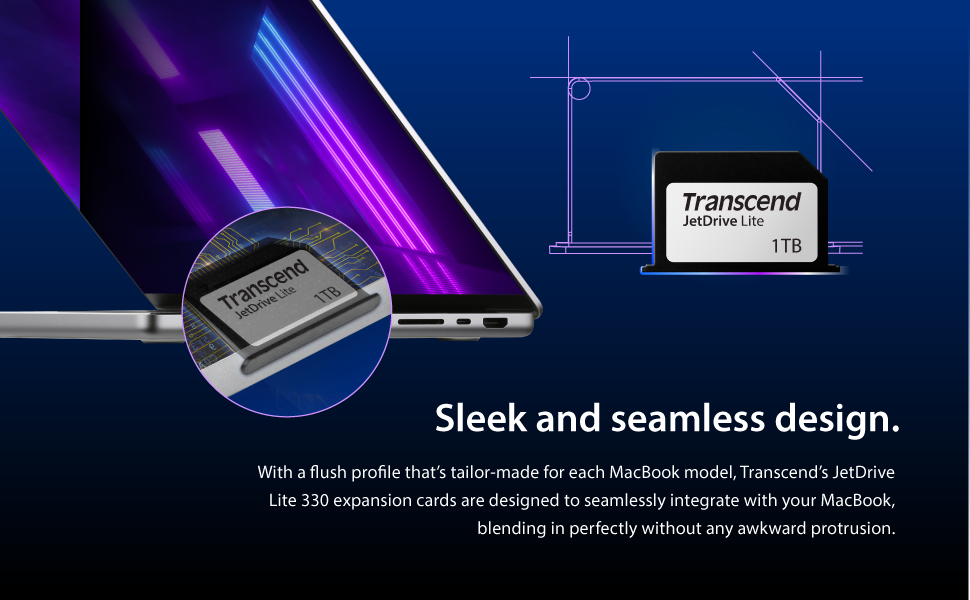
The Transcend JetDrive Lite 330 is a 1TB high-speed expansion card designed specifically for MacBook Pro models from 2012 to 2023. Offering up to 95 MB/s read and 75 MB/s write speeds, it provides a reliable, durable, and easy-to-install solution to seamlessly boost your laptop’s storage without the bulk of external drives.




| ASIN | B09WZDY7MM |
| Are Batteries Included | No |
| Best Sellers Rank | 13,874 in Computers & Accessories ( See Top 100 in Computers & Accessories ) 213 in Memory Cards |
| Colour | Grey |
| Customer Reviews | 4.1 4.1 out of 5 stars (6,321) |
| Date First Available | 31 Mar. 2022 |
| Graphics Card Interface | PCI Express |
| Guaranteed software updates until | unknown |
| Hard Drive Size | 1 TB |
| Hardware Platform | Mac, laptop |
| Hardware interface | USB 3.0 |
| Item Weight | 18 g |
| Item model number | TS1TJDL330 |
| Item weight | 18 Grams |
| Manufacturer | Transcend |
| Product Dimensions | 2.74 x 0.3 x 1.67 cm; 18 g |
| RAM Size | 64 GB |
| Read speed | 95 Megabytes Per Second |
| Secure digital association speed class | Class 6 |
| Special feature | Water Proof |
| UPC | 760557856238 |
| Warranty type | Limited |
| Write speed | Up to 75 MB/s |
R**H
A great, easy, cost effective way to expand your macbook storage
This is not my first of these - I previously owned the 128Gb model, but after realising that it was just too small, I upgraded to the 256Gb model, which is (obviously) twice the size. Speed on my 2015 13" macbook pro is very good considering it's essentially a cut down sd card. Blackmagic speed test rates it around 35MB/s write and an impressive 90MB/s read (see screenshot). Clearly not in SSD territory, but good enough to work well as a storage drive. I store most of my Steam library on it and games load quickly and take up no space on my internal drive. I used the software that comes with it initially to unmount the drive when sleeping and re-mount when waking, but I was having issues with battery drain, so I switched to using Jettison, which seems to drain the battery less. I do still experience a certain amount of battery drain (quite variable), but it's possible this is not due to the drive. A much much cheaper option that a) upgrading the SSD or b) buying a new macbook! Also much handier than an external ssd (been there too) - mine had a habit of getting knocked and dismounting. Only slight annoyance is that obviously you lose the sd card slot - easily remedied by buying an external USB3 card reader for a few pounds.
N**S
Slow but reliable
This card is slow but I do not need it for speed. I love how once in you can forget it's there as it's flush to the side of your Mac. A great way of extending your storage . Strange how not more of these are made by other companies.
M**K
If moving iTunes library reformat from FAT32 to Mac OS Extended (Journaled) as increases performance
Had a Nifty minidrive before, but they have had so many problems with the 2012/2013 15" Macbook Pro Retinas. Just wasn't reliable and kept unmounting itself and tried various things like bits of tape etc to get it to stay in place, with no joy. Nifty no longer sell for the 15" retina so must be having issues with the design. Saw this and liked the fact it states the Transcend JetDrive Lite 350 model is for the 2012 and 2013 15" Retina Macbooks. Slide in to the SD card nicely and mounted straight away. It's nearly flush in my Mid 2012 Retina. Sticks out about 2mm's. The nifty has a nice little cut away and removal key for easy removal from the slot. This doesn't have anything like that. Wondering if it's a patent issue with Nifty as it really should and removing this thing isn't going to be fun without some decent nails or tweezers to get a grip. So hence 4 stars over 5. *Update* Dropped to 3 stars as found speed of access having moved my iTunes media library to this card made the whole iTunes program run extremely slowly and unresponsively. Moved library back to the built in SSD and will have to re-think what to use this extra 128GB of storage for now... **Update 2** Increased back to 4 stars as after formatting to Mac OS Extended (Journaled) the performance greatly increased and it's very usable. So much so I have now upgraded to the 256GB Version. Great drive. Only slight gripe is it's awkward to remove if you have short fingernails like me.
M**E
Brilliant, put your trust in it and reap the benefits!
Having eyed up this product for several months, and with my Macbook HDD rapidly decreasing, I took the plunge and nought it. I'm extremely happy I did, now that I've moved my applications and pictures/movies (most were on an external HDD anyway), I've got plenty of free space so that I can run programmes without the fear of using up all my system memory. I've not noticed any slowness in applications, but instead an increase in the speed my Macbook operates. I'm concerned at the longevity of the device; however, I've had no reasons to worry yet. It fits flush to the Macbook, and I've had no issues with it not being recognised, or becoming dislodged in transit. If, like me, you have a new Macbook with limited internal HDD space, this product is a fantastically simple way of extending storage.
S**I
a waste
failed on me over and over again. useless. was great at first but lost all my data now.
L**N
Worth it - 2 years without issue and counting
I've had my original 1Tb one for 2 years now. Still working without an issue. Sometimes the speed transfer can be an issue if watching movie files from it but not enough to really be annoyed with it. Would 100% recommend. Have been checking every so often to see if they release one with more storage so I can upgrade .
D**S
A great addition to my laptop
I had the smaller version of this before (with no problems over the 2-3 years I'd been using it) , and as it was almost full I decided to upgrade to the larger one. And the price had come down since I last looked. These cards are very easy to use, and once plugged in I tend to forget that it's there. Obviously data access isn't as quick as the built in drive, but something like this is (IMO) really for storing less frequently used files. The card is fairly easy to remove when you want to change cards or use the port for something else, but I don't think that is something one would do very often. An excellent product.
B**A
Una scheda di memoria che si dimentica di averla. Entra completamente nel vano SSD del vostro macbook pro retina 15" Late 2013 (fate attenzione al modello del vostro mac prima di effettuare l'acquisto), e non influisce sull'estetica del portatile. La scheda di memoria al primo inserimento deve essere formattata nel formato Mac OS X Journaled, poiché arriva nel formato FAT32. La velocità in realtà non è quella dichiarata dalla Trascend, in scrittura raggiunge i 60 MB/s contro i 90 dichiarati, e il lettura circa 45 MB/s che sono delle prestazioni apprezzabili considerando che si tratta pur sempre di una scheda di memoria. La capacità da 128 GB consente di farne svariati usi, dal contenere file multimediali all'utilizzo come disco di backup. Personalmente la utilizzo con time machine come disco di backup portatile quando mi trovo fuori sede, e sono rimasto ampiamente soddisfatto dalle prestazioni di questa scheda di espansione. Unico appunto che mi sento di muovere, è il fatto che dopo l'inserimento non è semplicissima la rimozione della scheda, poiché aderisce talmente bene al bordo del Macbook che si deve utilizzare un oggetto affilato (tipo una lima) per fare leva se non si hanno le unghie abbastanza lunghe, sicuramente sarebbe stata più azzeccata la scelta di un accessorio di estrazione abbinato ovviamente ad una vano per l'inserimento dello stesso (Tipo il Nifty drive per intenderci). Nel complesso, si tratta di un ottimo prodotto che mi sento di consigliare a tutti i possessori di un portatile della Apple, avere un sostanzioso incremento della memoria interna con una scheda di espansione, la ritengo un'ottima scelta. PS Avevo acquistato questa scheda di memoria frettolosamente, sbagliando la compatibilità con il mio macbook pro retina che è il late 2013. Voglio dare altre 5 stelle al servizio resi di Amazon che è intuitivo e super veloce! Grandi come sempre! Amazon for life!
K**E
My MacBook (15" Retina Pro) has a 512GB SSD, which is blindingly fast but not quit large enough for my stuff, my photos AND my iTunes library. I used to store my iTunes library (or the bulk of it) on a separate USB drive which helped, but meant carrying the drive as well if I wanted to use it. Along comes Transcend's JetDrie Lite, 128GB of storage. "Perfect" I though, "I'll stick my photo library on there, and I can bring my iTunes library back to my SSD". The JetDrive itself is pretty small physically, and comes well packaged. Installation is easy, just slot it into the Card Reader slot. Removal is easy too, there is a black flange which presses flush with the side of the MacBook, and you can prise the drive out using a fingernail easily enough should you want to remove it - personally I like the fit-and-forget aspect, it's in there and I have no plans to remove it (until I sell this machine). The drive comes pre formatted but for MSDOS which means it is usable but for Macs you are better off reformatting it to native format. Which is fast and easy to do, and the JetDrive instructions tell you what to do if you are unsure of how to use Disk Utility. Formatting done, it was time to copy my photo library across (all 120GB of it), which took maybe 10-15 minutes but once done was done. I have to say, the drive is working well. Both iPhoto and Aperture use it with no problems, everything Just Works. As expected. Speed-wise, do NOT expect SSD or even HD performance! This is sat in a card reader and is rather slower. It did a comparison of performance using BlackMagic's Disk Speed Test on my internal SSD, an external USB3.0 had drive, a Thunderbolt external hard drive and the JetDrive, using the same settings for each, and got the following average results. Internal SSD write 280MB/s, read 395MB/s External USB write 90MB/s, read 90MB/s Thunderbolt write 115MB/s, read 125MB/s JetDrive write 5MB/s, read 50MB/s As you can see, it is a LOT slower than the others, especially at writing. At reading, it's just over half the speed of my external USB3.0 hard drive, which means it's certainly acceptable in terms of read performance. Write is not too bad if you are not doing it often. So for my application, using it to store my photo library, it's a great fit - the library is read FAR more often than written to, and reads are far larger than writes, so the performance is OK. And a lot more convenient than having to remember to carry round an external drive! Reliability is of course an important factor. When I first installed the drive and was copying files across, the drive suddenly disappeared. Remove it physically and reinstall it and all was well, and there's been no repeat of that one-off occurrence, which I put down to the physical connection (perhaps there was a bit of dust or something in the CF slot, as I do cart the laptop around some pretty strange places). Since then, it has been rock-solid, and I've been using it for just over a month so far. TimeMachine automatically picked it up and added it to its backups, which is helpful. Overall I'd definitely recommend the Transcend JetDrive Lite, it does the job, it is unobtrusive, performance is acceptable, and for me it is making use of a card reader slot which I never otherwise used.
J**E
Firstly, I am writing this review for my uses a professional fashion photographer; and am supremely happy with it thus far. Let me explain: Pros: 1. Slim form factor - absolutely no fear of it breaking in the Macbook's built in SD slot 2. Considerable space for files (and upgradable) 3. Reasonably priced 4. Performance prioritization (put things that do not require fast read/write speeds on the drive) Neutral: 1. Speed - read speed: competitive with SD peers (was getting 88 MB/s); write speed: was getting peaks near 60 MB/s (though, for most normal purposes expect a bit slower). This is nowhere near what you'd get from a SSD but for my purposes does not impede workflow (loading applications and for those rarely used documents or massive support data files). it's hard to compare an SD card with the latest in the macbook SSD lineup; they are simply two different tools with two different purposes. Cons: 1. Cross compatibility - this is very much designed for a purpose. While I don't see it being a problem for my uses, it would be tricky to get this work with an external flash reader given the form factor (though, fundamentally, the contact points are the same as an SD card). In my line of work, much is focused on workflow and especially so surrounding New York and Paris Fashion Week. Earlier in the summer I purchased a new Macbook Pro and went with one of the smaller hard drives. Sure, I could have gone larger but given that I shoot everything in RAW (25-30 MB/image) and a day of shooting runway can quickly stack up into thousands of images, it's important to establish off-machine storage and back-up. A key point in all this is the fact that Lightroom does some lovely trickery that allows the editing process to be done independent of connection to original files; though, this 'preview' file can get rather bloated (for me, currently 40GB for 80,000 photos). Being able to hop back and find images quickly from years ago is rather handy. Were something to happen to this file - no problem, just re-generate from the untouched originals. It is worth noting that it does take a little longer for Lightroom to load the file directories on initial application start-up, but once open performance lag is not apparent - loading of original files is just as fast as they are located on the laptop SSD (or external backup). All this to summarize why I'm so happy with this little drive: 1. everything could be lost on it and nothing, really, would be lost 2. it's not the fastest on the block but it frees up massive space for where I want top performance
J**O
Lo compré para ampliar espacio en mi MacBook Retina dado que sólo dispone de 128GB de SSD. Se ajusta perfectamente al borde del portátil y no se engancha a la funda cuando lo meto. Queda perfectamente metido. Respecto a la velocidad de procesamiento: recomiendo formatear en Mac Os Plus y no en NTFS o FAT32 dado que he comprobado la diferencia y se nota bastante. Hasta hace poco tenía mis fotos en RAW y mi catálogo de Lightroom en la SD pero ya se me ha quedado corta y las he pasado a un disco externo. Ahora tengo metidos plugins para Logic. Insisto en ello porque ambos tipos de información requieren velocidad y no he tenido ningún problema de ralentización. Recomiendo comprar un adaptador MicroSD/SD a USB para no tener que estar metiendo y sacando la tarjeta dado que para sacarla hay que meter la uña y no creo que sea aconsejable meter y sacar constantemente la SD. Una vez la metas déjala para siempre acoplada al portátil.
J**E
Permet d’ajouter de l’espace au Mac book pro afin de passé de 1 à 2 gb. La rapidité de la carte n’étant des plus folles , mais je le savais dès le début. Fait le taffe pour stocker les documents les moins utilisés mais qui doivent toujours être accessible.
Trustpilot
2 weeks ago
5 days ago



