
DOWNLOAD THE APP


Customer Services
Copyright © 2025 Desertcart Holdings Limited
DOWNLOAD THE APP
🔗 Keep your legacy tech alive with flawless connectivity!
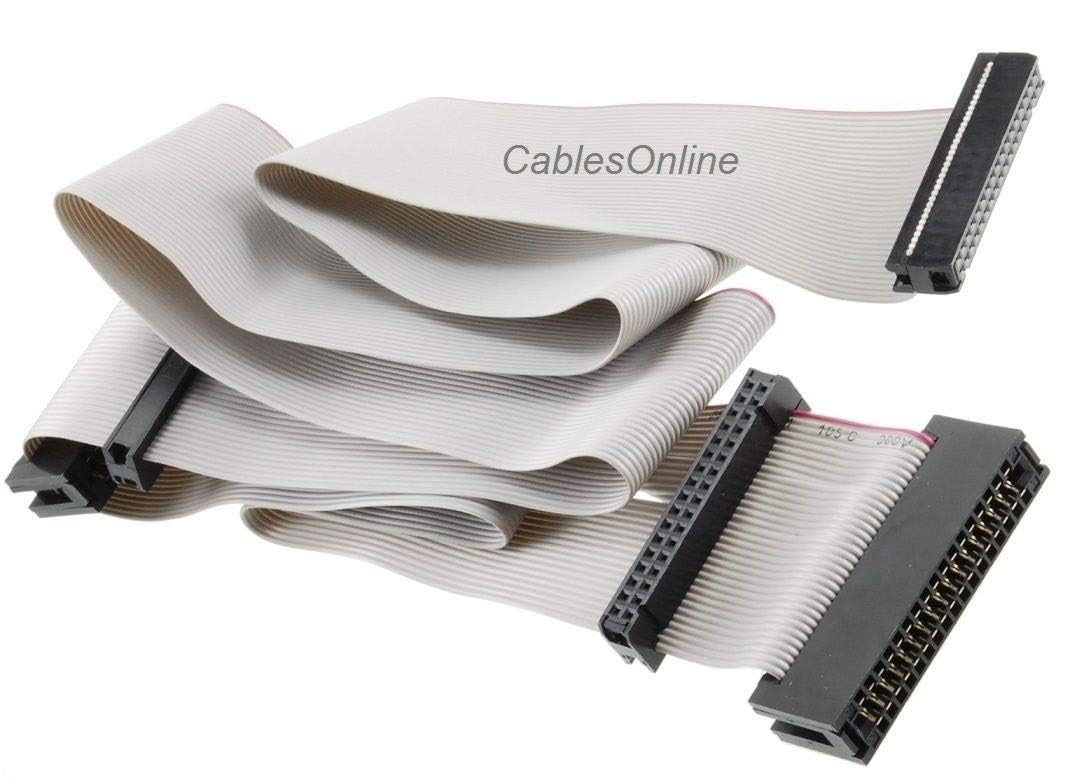
The CablesOnline 24-inch Universal Floppy Drive Ribbon Cable (FF-001) is a high-quality, UL-listed cable designed to connect 3.5" and 5.25" floppy drives. Featuring 3 IDC 34-pin female connectors and 2 card edge connectors with gold plated contacts and a durable nylon jacket, it ensures reliable data transfer and long-lasting performance for retro computing enthusiasts and professionals maintaining legacy systems.
| ASIN | B07KDJTMGP |
| Best Sellers Rank | #176,796 in Computers & Accessories ( See Top 100 in Computers & Accessories ) #676 in Flat Ribbon Cables (Computers & Accessories) |
| Brand | CablesOnline |
| Brand Name | CablesOnline |
| Cable Type | Ribbon Cable |
| Colour | Gold |
| Compatible Devices | Floppy Drives |
| Compatible Phone Models | No Compatible Phone Models |
| Connectivity Technology | IDC 34-Pin Female, Card Edge 34-Pin Female |
| Connector Gender | Male-to-Male |
| Connector Type | Idc |
| Customer Package Type | Flat Free Package |
| Customer Reviews | 4.4 out of 5 stars 124 Reviews |
| Indoor Outdoor Usage | Outdoor |
| Item Shape | Round |
| Item Weight | 0.05 Kilograms |
| Manufacturer | CablesOnline.com |
| Model Name | FF-001 |
| Model Number | 8541581158 |
| Number Of Pins | 170 |
| Number of Items | 1 |
| Other Special Features of the Product | Gold Plated |
| Outer Material Type | Nylon |
| Recommended Uses For Product | Connecting and replacing cables for 3.5in and 5.25in floppy drives |
| Special Feature | Gold Plated |
| Specification Met | UL |
| UPC | 030955278483 |
| Unit Count | 1.0 Count |
O**G
Great for retro PC
Good product. I managed for format a few hundreds floppies in both 5" 1/4 and 3" 1/2 formats. It worked like a charm with my Asus P2B board. You just need to know there's a specific drive letter you need to use in the bios, depending on where you plug your floppy drive. If it doesn't work or the drive doesn't show up, try the other plug or change the floppy drive letter to the other one.
S**O
Muy útil
Funcionó perfecto con una unidad TEAC de 5 1/4 muy vieja. Pude leer más de 300 Floppy Disc. Entró en el CPU y en la tarjeta de manera correcta. Solamente cuide que el hilo marcado en rojo vaya en la dirección correcta de la tarjeta y del disco (es el PIN 1)
C**K
This has non-keyed connectors - that's a good thing.
I needed this cable to test out a TEAC 3.5" drive with a manufacturing date back in 1991. That was before drive connectors were keyed in any way; you needed to read the silkscreening on the drive, and at the motherboard or floppy card, in order to see which way to plug in the ribbon cable. My drive has no pins omitted, and no notch in a molding around the pins, in order to help the user. The first ribbon cable I tried was keyed at both ends, with pin 3 blocked - it was therefore useless to me. By comparison, this ribbon cable was exactly what I needed and works well. ** If you're not familiar, the red edge of the ribbon cable aligns with Pin 1 at both your floppy drive and at the motherboard/floppy board header.** On my motherboard, there wasn't any marking for Pin 1, but the motherboard had a silkscreened thick line going around only that corner of the header to indicate it.
J**R
Good cable
Not much can be said a out a ribon cable. The cable was constricted nicely and like the origional cable for floppy drives it was made for both types of connectors used on them. I would buy this cable again.
C**N
Fonctionne avec Win98
Ce câble m’a permis de brancher un vieux lecteur de disquettes Panasonic JU-455-5 AAB 5 ¼ po modèle DFX-80D1BRA (double coté - double densité) dans un PC AT Intel Pentium III. La carte mère est une D815EEA qui a le connecteur de 34 positions. Toutefois, ce PC comporte 2 HD, un avec Win2K et une autre avec Win98. Seulement Win98 semble supporter ce lecteur double densité. Win2K voit le lecteur, mais je crois qu’il essaie de lire en haute densité, ce qui retourne toujours une erreur entrée-sortie. La seule combinaison qui fonctionne consiste à brancher le second « Edge connector » (donc celui après la torsion dans le câble) et à déplacer sur le lecteur le jumper DS et le mettre sur MX. J’ai aussi mis le jumper DS2, mais je crois qu‘avec MX, il ne sert plus. Avec Win98, j’arrive à lire des disquettes écrites depuis 1984. Pour une raison inconnue, la première commande « dir a: » retourne toujours une erreur, mais la reprise fonctionne. Aussi, la commande « format a : » retourne parfois : « Le lecteur est en cours d’utilisation… », mais re-soumettre la commande fonctionne.
Trustpilot
1 week ago
3 weeks ago