
DOWNLOAD THE APP


Customer Services
Copyright © 2025 Desertcart Holdings Limited
DOWNLOAD THE APP


🚀 Elevate your creative setup with powerhouse speed & storage — don’t get left behind!
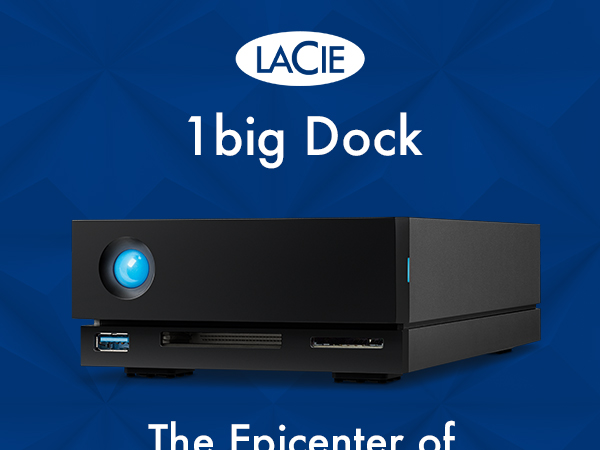
The LaCie 1big Dock 20TB combines a high-capacity Seagate IronWolf Pro HDD with a versatile 5-in-1 docking station featuring Thunderbolt 4, USB hubs, card readers, and DisplayPort 1.4. Designed for filmmakers and creative pros, it delivers ultra-fast 5000 MB/s transfer speeds, robust charging capabilities up to 70W, and includes a 5-year warranty with data recovery service for ultimate reliability.



| ASIN | B09QQQH2TS |
| Best Sellers Rank | 66,674 in Computers & Accessories ( See Top 100 in Computers & Accessories ) 245 in External Hard Drives |
| Box Contents | 1Big HDD 20TB, USB cable, The actual capacity may vary. |
| Brand | LaCie |
| Brand Name | LaCie |
| Cache Memory Installed Size | 20 |
| Color | 1big Dock |
| Compatible Devices | Desktop |
| Connectivity technology | USB |
| Customer Package Type | Standard packaging |
| Customer Reviews | 4.3 out of 5 stars 141 Reviews |
| Data Transfer Rate | 5000 Megabytes Per Second |
| Digital Storage Capacity | 20 TB |
| Digital storage capacity | 20 TB |
| Form Factor | 3.5-inch |
| Global Trade Identification Number | 08719706043212 |
| Hard Disk Description | Mechanical Hard Disk |
| Hard Disk Form Factor | 3.5 Inches |
| Hard Disk Interface | USB 3.2 |
| Hard Disk Rotational Speed | 7200 RPM |
| Hard disk form factor | 3.5 Inches |
| Hard disk interface | USB 3.2 |
| Hard-Drive Size | 20 TB |
| Hardware Connectivity | DisplayPort, Thunderbolt, USB, USB 3.0, USB Type C |
| Installation Type | External Hard Drive |
| Item Type Name | 1BigDock |
| Item Weight | 1.7 Kilograms |
| Item height | 21.7 centimetres |
| Manufacturer | Lacie |
| Model Name | 1BigDock |
| Model Number | STHS20000800 |
| Network Connectivity Technology | USB |
| Number of Items | 1 |
| Product Features | Memory card slots |
| Product Warranty | Manufacturer Guarantee |
| Special feature | Memory card slots |
| Specific Uses For Product | Business |
| UPC | 763649173411 |
| Unit Count | 1.0 Count |
R**M
It. Never. Sleeps. (Oh yes it does!)
There's a constant whine from the unit when idle, that I think is mostly from the cooling fan, but may be the hard drive itself spinning, or quite possibly both. It never sleeps. It never spins down and shuts the **** up. The usage pattern I have is that I may be using the computer it's connected to for hours without needing it, but then I go away and that computer becomes a server where I'm using content on that drive remotely. So, having it shut up when not being used would be nice. It may be macOS (Monterey)'s fault. I've told Spotlight to not index it, I've told it it can put idle disks to sleep, I've made sure nothing user-visible is looking at it. And yet, every few seconds, there's an access (by the sounds of it), and that's probably keeping it awake. If it is the fan, it's not as automatic as it's made out to be, as even when the drive is idle and the room it's in is frankly chilly, it keeps going. The only option is to actually eject the volume; that works, but then must be manually remounted using disk utility when I want it to be available for use. Apart from that it works great. It's just that it's almost as insomniac as I am. (I don't have an eject icon.) Edit: Naturally minutes after posting I figured it out. Clearly I needed to embarrass myself by making a public complaint first. Edited review in case it helps someone coming after: It does sleep. The thing that was preventing it sleeping, in my case, was CleanMyMacX, which generally speaking is a good thing, but either its menubar utility or the health monitor daemon was prodding the disk frequently enough to keep it awake. I'd forgotten about it until I ejected then remounted the disk and it offered to delete the trash on it. Disable background monitoring and quit all CleanMyMacX processes, and after a reasonable delay, the drive went to sleep just fine. Watch out for other similar utilities/processes that might be doing that kind of background monitoring, like antivirus tools, etc. At some point I'll get back to trying to figure out how to have CMMX working but not keeping that drive awake, for the time being, it's just disabled entirely. As that was the only problem I was having, added a star to the rating.
S**O
Excellent
Excellent so far. Doing its job at the moment. I hope it continues, and if it does, I will be over the moon.
J**D
Working well
Plus points- it works well, connected to a 27 inch imac (2019), has a 6TB Lacie pro drive attached to its daisy chain thunderbolt connector, and a 4TB drive attached to the USB connection. Given the constraints of a mechanical drive works with reasonable haste. Minus points- much as the 10TB Iron Wolf Nas Pro hard disc it comes with is really good, it's quite loud. Some people point out that access to the hard drive is a bit too easy and can be removed by accident, but I think that as long as you are careful its ok. You have to decide if it is worth the premium over the D2 style but prices on this model were low when I made my purchase.
B**S
It works
NOT enough paperwork to explain how to use or install it, Could have more information on it's ports too.
G**.
Great!
Works perfectly, I’m having to use an adapter to Thunderbolt 2 with an iMac that’s only a few years old!
R**W
Big capacity but that noise!
Does modern technology have to be this noisy? Make sure it’s not next to you all day!
Y**E
I see LaCie, LaCie sees me
I have used LaCie drives for many years. This is easy to set up with my iMac. Enough space to partition for external folders and a full backup of the computer's hard drive. Very quiet. Fit and forget. It runs 24/7 so that all backups happen during the night. Keep it under the desk on a vegetable trolley for air circulation - https://www.amazon.co.uk/gp/product/B015Q9BWHO/ref=ppx_yo_dt_b_search_asin_title?ie=UTF8&psc=1 Although not currently available, others can be found.
Trustpilot
3 weeks ago
5 days ago