
DOWNLOAD THE APP


Customer Services
Copyright © 2025 Desertcart Holdings Limited
DOWNLOAD THE APP
![avedio links HDMI Splitter 1 in 2 Out [w/ 4 Ft Hdmi Cable]Not for Extended Display-Mirror Same Screen Only, 4K 1x2 HDMI Splitter 1 to 2 for 3D 1080P@60Hz, Copy 1 Source to 2 Displays at The Same Time](https://m.media-amazon.com/images/I/61gjRYw7R7L.jpg)
🔗 Double the screens, none of the fuss — mirror like a pro!
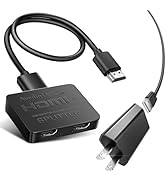
The avedio links HDMI Splitter 1 in 2 Out duplicates a single HDMI input to two displays simultaneously, supporting 4K@30Hz and 1080p@60Hz resolutions. Designed for mirroring only (no extended display), it includes a 4ft high-speed HDMI cable and USB power cable for easy plug-and-play setup. Ideal for professionals needing synchronized visuals across multiple screens with crystal-clear video and advanced audio format support.




| ASIN | B0732MD43P |
| Best Sellers Rank | #225 in Electronics ( See Top 100 in Electronics ) #1 in Satellite TV Splitters |
| Customer Reviews | 4.1 4.1 out of 5 stars (36,560) |
| Date First Available | July 23, 2017 |
| Department | mens |
| Is Discontinued By Manufacturer | No |
| Item Weight | 4.2 ounces |
| Item model number | 1x2 4K@30Hz |
| Manufacturer | avedio links |
| Product Dimensions | 8.5 x 5 x 0.59 inches |
C**R
Definitely buy again, working Great
Quality made and works great
R**N
Splitter duplicates the single view from the original source. Read the review for lesson learned.
I purchased this unit to add an additional monitor to my computer. What I learned is in order to have dual monitors, there needs to have two video outputs coming from the computer. I had always thought the single HDMI should produce a split screen across two separate monitors. Apparently, that is not the case. After installing this unit between my computer and the monitors, this device did feed the screen to both screens. However, Windows or Mac did not detect this device in order to split the screen into two monitors. The view was identical for both screens for the Windows PC. And the device did not display anything on the MAC. I do not recommend this device if you are looking to split your computer screen image into dual monitors. This is an excellent device if you want to duplicate a single image on to two screens. Hope that helps.
T**L
Died after six hours, unplugged a while and worked again.
Worked great for about six hours. I admit was fantastic while it worked for two different size screens without problems. But, then i died and i had to go back to one screen! Now that it has been unplugged overnight, it works again. I checked the computer out, and it is 1080p at 60 hertz, and both my TVs are a 75-inch Toshiba Fire TV 4k and an Insignia 43-inch 4k Fire TV, which should both work fine with 1080p input, like from older DVDs and often the internet sites. I set all devices to 60 hertz prior, so that should not be an issue again. I am retesting (my second use of the device to see and will update this review if it decides to last longer without giving a blank screen to both TVs (no input). This time it did not die, so I am upping it to a four-star since it is handy. If it dies, unplug it and try again later. Also, disable the computer mode on your TV, which should not make a difference, but may have.
C**N
Review from someone who uses it while gaming
Does as intended. There is no noticeable delay if you are playing games. I use it on my xbox and it did take away 4k 120 but it did say 4k 60 so no hate there. It did take away adobe vision and a few other thing but other wise there isnt much to complain about so awesome product in my book.
J**S
Good for light use but not durable
I purchased this HDMI splitter to use with a Karaoke setup. The setup went in to use once a week beginning in February of 2025. There were three weeks where we ran karaoke twice. I'm very disciplined and careful with my gear. Setup and teardown is the same each week, with devices and cables being disassembled and stowed in organized pockets in the karaoke backpack, audience display TV gig bag, or singer display gig bag. It's like clockwork. The device is small and lightweight. It's generally recognized immediately by the laptop and quickly starts sending the source signal to both outputs. On occasion, the laptop would not recognize the splitter. I narrowed it down to when I had powered up the splitter and destination displays before plugging the source HDMI cable between the laptop and splitter. On the 38th setup for a Halloween 2025 show, this device failed to be recognized by the laptop. After many attempts of disconnecting, reconnecting, unplugging, plugging, etc., I gave up. A backup HDMI splitter worked fine. On one hand, that rounds out to a cost of roughly $0.75 per use which is guess isn't bad. On the other hand, it would have been nice for it to last at least a year if not two. I think that running this model of karaoke where the entire kit is setup and torn down each session is probably putting the avedio links HDMI Splitter to an extreme test, as usually these devices are set up and left alone. Connecting, powering, disconnecting and stowing over and over is probably not the typical use case. Considering that, I'll give the splitter a middle-of-the-road 3-stars. It worked as needed for the better part of a year but simply failed without any signs that it was giving out. For the typical user, I bet it would work just fine. For users that need a durable device that can endure regular assembly and disassembly, this might not be right HDMI splitter for you. Pros: Easy to use Small Lightweight Dedicated power cable Cons: Occasional connection issues Failed without leading symptoms
S**A
BUEN PRODUCTO
U**E
Fungerade perfekt, tänk dock på att man bör starta om datorn igen efter man anslutit fick bild direkt men inget ljud men efter en omstart av datorn så fungerar allt perfekt nu och har aldrig varit problem sedan dess.
E**B
Funktioniert einwandfrei
P**O
so i will be quick. It's a splitter and if you connect 2 monitors to it you will get 2 same images on both monitors. i sound stupid and it is but i thought i can have 2 independent monitors connected to the same hdmi port so : Make a research before buying instead of doing dumb things like me 🤣🤣
S**L
My wish was to connect my LG OLED CX 4K HDR 120Hz tv to my computer in mirrored mode. My PC monitor is 1080P HDR 100Hz. Windows can't mirrored screen with keeping the HDR. So this solution wasn't working for me cuz I really want to keep HDR. With this HDMI splitter I now can feed my TV with 1080P HDR at 100hz so I'm super happy. Works beautifully. It didn't works first I had to put it in copy with monitor in output 1 first.
Trustpilot
3 days ago
4 days ago