
⚡ Upgrade your network game with speed, silence, and sustainability!
The TP-Link TL-SG108 is an 8-port unmanaged Gigabit Ethernet switch featuring 10/100/1000 Mbps auto-negotiation ports housed in a durable, fanless metal case. It delivers high-speed data transfers ideal for home or office networks, while its Green Ethernet technology reduces power consumption by up to 82%. With plug-and-play ease, QoS support for optimized traffic, and flexible desktop or wall mounting, it’s a reliable, energy-efficient solution to expand and future-proof your wired network.


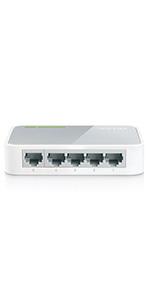


| ASIN | B00A121WN6 |
| Best Sellers Rank | 1,671 in Computers & Accessories ( See Top 100 in Computers & Accessories ) 65 in Network Switches |
| Box Contents | 1 x 8-Port 10/100/1000Mbps Desktop Switch TL-SG108, 1 x Installation Guide, 1 x Power Adapter |
| Brand | TP-Link |
| Brand Name | TP-Link |
| Case Material Type | Metal |
| Color | Multicolour |
| Colour | Multicolour |
| Compatible Devices | Any Ethernet-enabled device |
| Compatible devices | Any Ethernet-enabled device |
| Country of Origin | China |
| Current Rating | 0.6 Amps |
| Customer Reviews | 4.2 out of 5 stars 64,733 Reviews |
| Data Transfer Rate | 142.8 Megabits Per Second |
| Global Trade Identification Number | 06935364021337 |
| Interface | RJ45 |
| Item Dimensions L x W x H | 15.8L x 10W x 2.5H centimetres |
| Item Type Name | Desktop gigabit ethernet switch, steel case |
| Item Weight | 0.6 Kilograms |
| Item height | 2.5 centimetres |
| Manufacturer | TP-Link |
| Maximum Power | 2.77 Watts |
| Number of Layers | 1 |
| Number of Ports | 8 |
| Number of ports | 8 |
| Platform | No Operating System |
| Product Warranty | Manufacturer's Lifetime Warranty |
| Product dimensions | 15.8L x 10W x 2.5H centimetres |
| Switch Type | unmanaged |
| UPC | 840460604079 845973021153 |
| Unit Count | 1.0 Count |
| Upper Temperature Rating | 30 Degrees Celsius |
| Voltage | 5 Volts |
A**S
Easy set up, and great performance
This AC1200 is amazingly good for the price point. Straight out the box it's ready to go via the WPS set-up (which is an absolute doddle). Brought this to solve a dead zone we had upstairs - broadband router on the ground floor (at the front of the house), smart TV in the loft conversion, so 3rd floor (at the back of the house). Previously the signal strength wasn't strong/stable enough to run video streaming services on the TV. AC1200 therefore purchased, and plugged into a power socket in the hallway of the 2nd floor. Result: perfect strong signal in the entire upstairs floors, no drop-outs or degradation of signal experienced. Ample speed and stability to access streaming services. Very happy as it solved our problem.
R**S
Simple, small, functional, what more do we need?
The metal cased TP-Link 8 port Gigabit TL-SG108 1000/100/10 switch works perfectly straight out of the box. No set-up is required. It auto-senses the cable connection and interfaces correctly to both T568A and T568B wiring of the cables, so there is no need for 'crossover' leads. The power supply is a small 9V plug-top unit that barely thinks about getting warm. Measured current from a 9V bench power supply was 85mA (765mW) with no ports connected, rising to 120mA (1080mW) all ports connected but no traffic, during a 7GByte 1000Mb/s backup between two long-wire ports the current peaked at roughly 230mA (~2W) but varied. Much, much better than the old 100/10 hub it replaces which always took about 350mA (~2.6W) at 7.5V 24/7 and also had an inefficient hot mains brick. The LED lights on the front edge, two adjacent to each of the eight sockets indicate activity in the normal way; solid for connected and flashing for data transfer, the green LED for 1000Mb/s and the yellow LED for 100/10Mb/s. There is also a separate green LED showing when the power is correct. I would have preferred the lights to be on the other side from all of the leads as with the version (9.0) of the TP-Link SF1005D (not shown on Az now) I bought in 2012, or on the top as with this version TP-Link SF1005D I bought in 2011, but I understand why it was done here. A couple of keyhole slots in the base of the metal box enable one to mount it on a pair of no6 countersink-head woodscrews to allow tidy routing of the cables. The four rubber feet help to prevent it from sliding off the screws. The 8 port box is 100mm x 160mm x 28mm. My house usually has no wi-fi; the CAT5E LAN is all hard-wired and this new switch living next to the big PC, a media server and the network printer, replaces a previous and out-of-date 100/10Mb/s generic unit from Maplin. The network is mixed traffic, mostly Gigabit, but still some old 100Mb/s Ethernet. The new switch handles it all at full duplex with no problems, and I have noticed a slight increase in the speed of the 100Mb/s transfers as well. I bought this after several months of positive experience with its little brother the TL-SG105 and the TD-W8970 router . As usual, I took the lid off to have a look inside (my work used to include designing high speed electronics) and it is nicely made with good quality components and proper attention to screening and track layout. Recommended. Addendum. Be aware that on this product page either Az or TP-Link has stupidly mixed up all the reviews for all the different varieties of TP Link switches, 24, 16, 8 and 5 port, Gigabit or not, metal and several versions of plastic cases, even for switches no longer available, and they have different performance and best uses. But cut to the chase, and simply go for the latest versions of the metal boxed Gigabit switches.
J**E
Good, easily disguisable, functional wifi extender - easy'ish to install.
Purchased to extend signal in a traditional built house, where wifi just did not extend to all parts. I'd choosen this extender as it was smaller and less intrusive than others. Due to be placed in socket on the wall of my hall landing i didn't want anything that 'stood out like a sore thumb'. This sits neatly and non obviously to the extent you wouldn't know it was there unless you really looked. Exactly what i was looking for Install is easy enough, however found it did take a little time. Once complete, up and running with ease This product certainly does extend the signal, to those areas it did not do before. On occasion, the signal does drop despite no obvious reason. I don't find it a major issue though, when it drops, it back up and running with a second or 2. Overall it's a great product, easily disguisable yet functional, for a good price.
R**B
Easy setup and good range.
Very easy to setup out of the box, requires downloading an app to set up. Once done this works well to extend the range of your home WiFi. Within the app there is a range of options to configure if you want more control. You can select single band signal dual band etc.. the automatic setup gives you the mirror image of your home router setup (in terms of signal etc).
R**G
TP-Link RE300 AC1200 - Dual Band but only use 1 of them at a time
I run a number of Wi-Fi entenders around my house - 3 of which are TP-Link. I've have been running this particular device for several months and, in the main, this is a great product. I have experienced a number of issues with connecting to the router though, failing to be assigned an IP address on numerous occasions - when it occurs you can't connect to the device directly at that point (or remotely) to reset it or diagnose the fault any further. New firmware, different locations, different volumes of traffic but never more than 10 devices connected at once - nothing seems to help it. Only fix to get it responsive again has been to power down the device for at least 10 minutes and then power it back on - connecting to it after this pretty much already worked. This issue does only appear to happen when I'm using it for extending both comm's frequencies. When I drop to a single band, either 2.4Ghz or 5Ghz, the issue of connecting disappears and connections become nice and stable. So, with this devices aerial being so good, I'm using it purely for 2.4Ghz band extending it into my garden and another TP-Link extender to boost the 5Ghz range. This is a very good device, easy to manage (with the mobile or web app) and, provided you only extend a single band at a time, very stable. Considering the alternatives this is good value for money, even as a single band extender.
B**S
No Ethernet port
Very easy to set up and very effective but does not have an ethernet port, which I need to connect to Sky Box, so returning item. My mistake
T**.
Easy-peasy, lemon squeezy
I recently encountered a situation whereby my router was being switched off by a terror-toddler which necessitated router relocation, and due to the placement of the Virgin Media cable this could only be to a far corner of our home. During winter this was fine as we weren't spending much time in the garden at the other end of the house, but now warmer weather has arrived things have changed and I'm finding that the WiFi is dropping out when sitting outside. This device was purchased for just over twenty Great British Pounds and is a bargain when compared to a new AX router or mesh system. I'm a gadget-lover and have never had trouble with such things, that has to be noted. From removing the product from its box, it was plugged in and the status light was flashing, a five second journey to the router and a push of the WPS button, then back again to push the same button on the device and one by one the lights for 2.4 and 5ghz also lit up and remained solid. No more than 30 seconds and two (my RT AC 3200 has one 2.4 and two 5ghz radios) extended WiFi connections appeared in the list of available networks on my phone suffixed with _EXT and simply required entry of the existing WPA2 password. It automatically extended the 2.4ghz and the first 5ghz radios. Signal is now strong in the garden, it has a Blink Mini camera, Netatmo, Blink Studio, Chromecast Ultra connected to it and its all flawless. It uses about two watts according to my IHD. As for any bad reviews, I would say as with any networking equipment, know what your requirements are and research because it's not one size fits all. If your house is mahoosive you're going to need more than one or a dedicated multi point mesh system. If your house has walls like Fort Knox, the 5ghz band from this won't pass through them any easier than the 5ghz band from your router. If you want OneMesh, you also require a OneMesh router. If you run a hotel, a small consumer device isn't what you require for your guest WiFi system. For what I need, it's perfect, it's cheap, it took 30 seconds to get up and running without any apps or setup other than plugging it in and pushing two WPS buttons. I'm on Virgin 200mb, as per the photo I get almost full speed sitting a few metres away from the device. If you have an AC band router, averaged size house and want to extend your network slightly, this is for you. If you live in Buckingham Palace and want to extend your network to the drawing room 400 metres away, probably not.
G**.
Works very well and you can set it up in 5 mins if you sinc it wit your router
Was very hard to set it up with the explanation from the Manuel. But after 1.5 hours if you just sinc it with your router it takes 3 minutes to set it up. Works very well in my two bedrooms upstairs where I use to struggle to get WiFi
Trustpilot
5 days ago
4 days ago



