🌐 Upgrade your home network to pro-level speed and coverage—because buffering is so last decade!
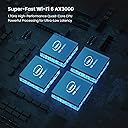
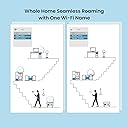
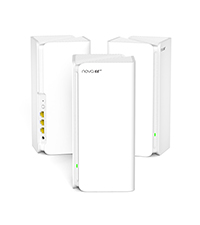
The Tenda AX3000 Nova MX12 Mesh WiFi 6 System delivers ultra-fast dual-band WiFi 6 speeds up to 2976 Mbps, powered by a 1.7 GHz Quad-Core processor. This 3-pack mesh system covers up to 7000 sq.ft, supports over 160 devices simultaneously, and features 3 Gigabit Ethernet ports per unit. Designed for seamless roaming and easy app-based setup, it’s perfect for modern homes demanding reliable, high-capacity wireless connectivity.


| ASIN | B0BFDH25CK |
| Best Sellers Rank | #33,056 in Computers & Accessories ( See Top 100 in Computers & Accessories ) #414 in Whole Home & Mesh Wi-Fi Systems |
| Brand | Tenda |
| Color | white |
| Customer Reviews | 4.0 4.0 out of 5 stars (618) |
| Date First Available | November 22, 2022 |
| Item Dimensions LxWxH | 3.39 x 3.39 x 7.48 inches |
| Item Weight | 4.82 pounds |
| Item model number | MX12-3 |
| Manufacturer | Tenda |
| Operating System | RouterOS |
| Product Dimensions | 3.39 x 3.39 x 7.48 inches |
| Series | MX12-3 |
| Voltage | 12 Volts (AC) |
| Wireless Type | 802.11ax |
A**R
Great router for a great price
I bought this router to pair with a modem to replace xfinitys garbage router/modem combo. I'm so glad I went with this setup because I have seen a speed increase and quadrupled my wifi coverage on my property. I did have a issue with one of the mesh satellite disconnecting but after speaking with tech support they quickly sent out a replacement. Great customer service,great router =happy customer. I highly recommend.
T**O
Works great easy setup
We needed wifi to go 3000 feet to our office out building from middle of our home, not possible. Recommended by phone guy, do mesh wifi. To save you frustration: We have fiber optics modem, we hard wired 1st mesh modem to that - went into a large back room we have and put 2nd mesh modem there and hard wired to tv and hold solid - didn't have to but we chose to hard wire just that TV - mesh 2nd sits on window sill pointed out to office bldg which is where 3rd mesh was placed. Each did easy auto sync to main #1 as we setup and placed each..impressive. They all need an electrical outlet and 3 network ports if needed - don't need to hardwire but our obstacles of french doors, sliding doors and trees.. we had 2 network cords so used them. The first mesh that hardwired into our fiber optics modem came with the network cable. Hope you all can understand my explanation. We love it!!! And got it on sale. Lightening speed now on wifi gadgets... many tvs, ereaders, laptops and phones. Our phone company fiber optics modem was always good but now all long distance equipment is great.
D**H
absolute garbage, avoid like the plauge
it's a shame because wireless range and quality is really good and the interface isn't bad, however I'm not sure if it's bad hardware or bad firmware but these things are ridiculously and infuriatingly unreliable. it's not bad with a capital B, it's bad with a capital BAD. first, I have one unit that just randomly decides to disconnect itself from the network for no particular reason. literally. it's in my office room connected to nothing but my nas that sits idle 99% of the time as well as my office desktop and network printer which both are off 99% of the time. periodically I'll try to access the nas or Windows will give me an alert for file history being disconnected too long and I'll open the router portal and that unit will be grayed out on the tree. sure enough go into the office and the light is blinking green. power cycling the unit fixes it but this happens SEVERAL TIMES EVERY SINGLE DAY. second, the 2 secondary units will just crash or something when faced with too much traffic. how much is too much? a single 1080p youtube video apparently, in some cases. ill be watching a video, then suddenly the wifi will drop out, i look over and the unit is blinking red. after a bit it will reset itself and reconnect, but this is still 2-3 minutes after failure so its not a short quick interruption. same for the other one, i tried to hook up and run a pihole (network wide adblocker) just to try it out and that unit would CONSTANTLY crash 2-3 times AN HOUR due to the entire network having to be routed through that unit to go through the raspberry pi. finally, the primary unit will also itself just randomly decide "im out" and do the blinking red light. this kills the entire network for the house because even if the other 2 units (by some miracle) are fully functional at the time because nothing can connect to the local network anyway. this is the rarest issue of the 3, but still shouldnt happen in the first place. note that this is with an entirely ethernet backhauled setup too, no wireless to wireless bridging, which makes this all the more damning. before i bought the mx12 ive been running a mishmash of a couple entirely different routers (a dlink and 2 tplinks) that all just said the same SSID and password and disabling dhcp on all but one of them, effectively meshing them. i ran that setup for over 5 years, and it worked perfectly. seriously, i had probably 95-98% uptime that entire time, there were almost no problems ever. even going room to room the handoff between routers was seamless. i only upgraded because i wanted wifi6 and i didnt want to spend 300-400 bucks on multiple mid tier routers. clearly i should have.
M**E
Awesome mesh router with fantastic wifi coverage. Just beware of the Cons
Awesome mesh router with fantastic wifi coverage. Just beware of the Cons: Pros: 1. Easy setup 2. Fantastic WiFi coverage. 3. Great Price Cons: 1. Guest WiFi always disables after a hardware reboot or if the Auto System Maintenance nightly reboot option is active. This appears to be a firmware issue. Phone support offered no solution. No update from Tenda email support (yet). 12/15/23 Update on Con1 below. Fixed! 2. VPN does not support built-in OpenVPN client for popular VPN providers like NordVPN 3. Phone based support is limited to basic troubleshooting. Then you have to email support. 12/15/23 Update. Thank you Tenda support! Posting this review prompted Tenda replying back to Con1. 12/15/23 Update - Changed Review from 3 star to 4 star. 12/15/23 Update to Cons 1: Under Guest WiFi there is an option for "Validity". 4h/8h/Always. This option is not for DHCP lease time but how long the Guest WiFi will stay on / up an running. I have personally never seen a switch on a router for WiFi up time. Change this option to "Always" and the Wifi will always be up and running.
A**A
Equipment performs to expectations.
Installation didn't go very well because one of the nodes did not mesh with the others. After having to reset it to original factory configuration it did mesh with the other nodes and is working very well. The only problem is that this node is not receiving updates. When trying to update, the response is unable to update. I'm still waiting for tech support for an answer and a solution. Node 1 and 3 have the latest firmware, but node 2 does not. It's one version behind the others.
E**H
Works as advertised. My house is very old (thick walls) and spread out over a large area bungalow style with a basement. My rural internet provider is an LTE system which means any drop in signal really reduced the utility of the network. I struggled to get good signal in far corners where important devices were, even with wired access point routers that I had set up around the house. The mesh system takes the guesswork out of which node to use and automatically switches to the most reliable connection. From 20-25Mbps on the old system, I am now getting 45-65Mbps depending on the LTE strength on a 50Mbps plan. Streaming is much better now, although there are times where full HD is not possible. I put this mostly on the ISP and not on the device itself. It seems there is quite a bit of throttling at certain times of day. I still used the Cat6e cabling from my previous set up to hardwire the farthest basement node, which in turn is hardwired into my main desktop. This contributes a difference somewhere in the 10-15Mbps range which is important for my purposes. However, for somebody with a faster connection or a much smaller house, I suspect that these would be phenomenal. My father has a similar TP-Link mesh system (AX3000 as well) and the only things I would say which are superior on those units are the slightly smaller footprint and a nicer app. The Tenda app is useable and simple, but not as user-friendly or intuitive, and the functions are somewhat limited in comparison. For the average user, myself included, that is probably not a make-or-break issue. However, the app setup on the TP-Link system is superior in my view. I cannot compare speeds between the units because he has a much faster connection from his ISP. For $100 or more saving on the Tenda units, it would be hard to justify the price differential. TL;DR Value for money Adequate performance as per specs (night and day upgrade from router-based AC or AX system) OK app ISP likely the limiting factor for most users
I**M
الكرتون مفتوح مسبقاً وتغليف يدوي احدى القطع لاتعمل وتم الارجاع
L**R
Me sorprendió gratamente el rendimiento de este sistema Mesh. Ahora, toda la casa tiene internet con una excelente velocidad en todos los rincones. Gracias a su compatibilidad con WiFi 6, la conexión es más estable y rápida en todos mis dispositivos. Uno de los aspectos que más me gustó es que unifica las bandas de 2.4 GHz y 5 GHz en una sola red visible, lo que evita tener que cambiar manualmente entre ellas. Actualmente, tengo varios dispositivos conectados y ninguno ha presentado desconexiones, lo que demuestra su gran estabilidad. En cuanto a la relación calidad-precio, después de investigar varias opciones, puedo decir que es de las mejores en el mercado. La única pequeña desventaja que encontré es el proceso de emparejamiento inicial, ya que en algunos casos el sistema no reconoce los nodos a la primera y es necesario resetearlos. Sin embargo, una vez configurados, funcionan sin problemas y pueden separarse sin afectar el rendimiento. Otro punto interesante es que el sistema realiza mantenimiento automático en horarios de baja actividad. Se reinicia y optimiza las frecuencias para asegurarse de estar siempre en el canal con menos interferencias, algo muy útil en entornos con muchas redes WiFi cercanas. En general, si buscas un sistema Mesh con buen alcance, estabilidad y velocidad a un precio competitivo, el Tenda Nova EX12 es una excelente opción.
M**X
Like it but restriction or parental control on primary and not also the guest network
J**Z
Muy buen producto me ayudo a tener señal en partes de mi casa donde no llegaba el wifi, la señal ha sido muy buena y estable y no fue difícil de configurar usando la app, recomendado.
Trustpilot
2 months ago
1 month ago