❄️ Stay cool, perform hotter — the ultimate thermal upgrade your rig deserves!
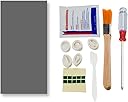
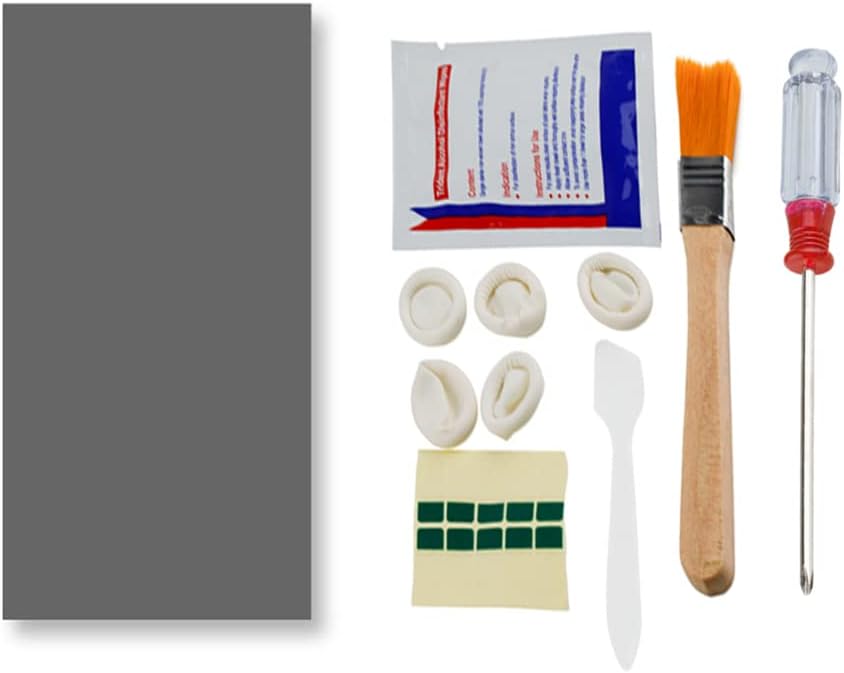
The PTM7950 is a cutting-edge phase change thermal pad and silicone grease combo designed for high-performance CPUs, GPUs, SSDs, and gaming consoles like PS5 and Steam Deck. Featuring 8.5 W/mK thermal conductivity and phase change at 45°C, it dramatically reduces operating temperatures, enhances device longevity, and minimizes fan noise. The kit includes all necessary tools for a clean, professional installation, making it the go-to solution for millennial pros seeking reliable, long-lasting thermal management.


| Best Sellers Rank | #19 in Silicon Grease |
| Customer Reviews | 4.5 out of 5 stars 673 Reviews |
T**D
Reduced my temps significantly at a great cost to performance ratio.
Great value thermal pad/paste. PTM is a phase change material that allows it to be applied as a thermal pad and with heat it will change into a paste. I have bought a few sets of these, and applied to 3 gpus, 2 laptops, a handheld, and my main computers CPU (did not delid, just used it in place of regular paste). I will mention, there is some talk on reddit about the JOYJOM PTM7950 not actually being true PTM7950. I am not that experienced that I would be able to tell the difference, but overall sentiment was that it still performs similarly enough that you will see good results. Adding that with the value of this brand being much cheaper than trying to go through other channels to get the guaranteed stuff, this is a no brainer for most. I noticed huge temperature drops in my Asrock RX 6900 XT and EVGA RTX 3080. I didn't use my i7 13700k without the JOYJOM PTM paste so I can't compare there, but I have not experienced any throttling and the temps are better than I expected with all the issues on the chip. My MSI GE66 Raider 11UE, my partners old Razer Blade 16, and my GPD Win 4 all also saw major temperature drops using these pads on their CPU and GPU's. This resulted in less noise as the fans didn't have to ramp up as high, and better performance. The kit these come with is also handy. I don't really use the finger gloves, but I could see them being nice if you have nice nails and don't want to get paste on them. The cleaning wipes and little brush are a nice touch as there is a good chance you will be cleaning off old paste with the install and these will help you clean up easily. I can safely recommend this to anyone looking to re-paste their computer/parts. I plan to continue buying this as needed myself as its performed well in my tests.
R**O
100% will buy again
This product works really well.On my gaming laptop with the original thermal paste that it came with from factory, I would see my CPU temperatures usually around 180F-200F. I did not like this at all and it’s very bad for your components. When I bought this product, I cut it up into two small squares and wiped off the old thermal paste and put each square on my GPU and CPU. I am really surprised the difference it made. Now when I use my laptop, the CPU temperatures are usually around 155-175F and my CPU doesn’t thermal throttle. I would 100% buy this product again in two or three years when it’s time to replace it.
B**N
This stuff is next-level performance!
This stuff is amazing! The benefits of liquid metal thermal compound without the risks of shorting out your motherboard if the liquid metal decides to go exploring. I have a Dell Precision 5560 laptop with an i9-11950H CPU. Needless to say, that thing runs hot. I had previously been hitting 100C on at least one core almost constantly, and this was after replacing the factory thermal paste with some better stuff. After I put the new thermal pads on, the temperatures didn't seem to change at first but after a little while I'm now seeing an average of 60-70C where it was almost always at least 90C previously. It will not work right away! It takes some time for the thermal pad to melt when it heats up, so running the CPU hot and then letting it cool down seemed to do the trick for me. It took about a day before I noticed the temps lowering significantly. I have a lot of material leftover for my other machines as well, this stuff is an amazing value especially for the price. Make sure to put the thermal pad in the fridge (NOT the freezer) for a few hours before you plan to apply it, as this will make it stiffen up more and make it easier to work with. The protective film was a tad difficult to remove, but the mini sticky tape things that came with the install kit helped quite a bit. I had read online that this product does not work as well when used on a CPU/GPU with an IHS (integrated heat spreader), it is designed to be applied between the bare die and the heatsink, so keep that in mind. Most laptops already have bare die processors, and most desktops have an IHS. All in all, highly recommend!
N**N
Good thermals, seems legit to me. Cheap.
Cannot speak for long term performance. Applied for a week or so. Previous thermal compound was liquid metal in an asus g14 2023 laptop. temps have dropped 15 degrees on load + a 1ghz increase in sustained clock speed. So it made quite a huge difference. if you have a device using liquid metal or a regular thermal paste I highly reccomend ptm7950. With my results I would say that this is a legit ptm7950 - but it is hard to know. Costing much less than the honeywell ptm7950 this is really worth trying out. deducting one star for lack of description of included items. Genuinely did not know what some of these items are for and I just used them creatively.
J**H
Big temperature improvement
Improved my CPU tempature by 15° in my laptop. Definitely put it in the refrigerator so it's easier to apply.
W**A
Works great, but put it on right
I've used it on two different laptops and it's worked amazingly well so far, but make sure to apply it right. The first was a Lenovo Legion 5 that needed a repaste and deep fan cleaning as I was thermal throttling pretty hard. The laptop originally comes with PTM 7950 and probably could've lasted a bit longer, but since I took off the heatsink I needed to repaste. I grabbed a toothbrush and cleaned up the fans gently. After that, I used a powerful air blower onto the heatfins to clear out the dust. Then I cleaned up the CPU/GPU dies and heatsink with some 99% isopropyl alcohol. Upon clean and repaste, my temps were back to factory with fans very quiet, maxing out at 77C on a Ryzen 7 4800H in Cinebench R23 multicore. A month later, temperatures are still the same. I did a bad job applying the pads for the first time. After cutting it to size, you should only peel off one side and apply the other to the area. Once you're very sure that you want it there, use thin tweezers or longer fingernails to peel off the outer side. Try to cover a bit more surface area than the die you're applying it to. The second laptop was on an LG Gram 2022 with an i7 1270P, which would throttle hard to 92C with high fan speed under light load. I did a full cooling mod on that where I took off the backplate's ventilation tape, bent the heatsink legs upwards for greater mounting pressure, and made a better air duct with electrical tape on the fans. Along with this PTM 7950 (which I applied better this time), that stopped me from somehow throttling on that tiny heatsink.
C**6
I Recommend this for direct die cooling.
I did not know how much performance I was leaving on the table..... *** Warning long review *** I used this on: 1. Bought used 2023 zephyrus G14 AMD Ryzen 9 7940HS RTX 4060 mobile 2. Bought new 2020 Zephyrus G14 AMD Ryzen 9 4900HS RTX 2060. 3. New Gigabyte RTX 3090 4. Used open box ASUS ROG ally with the 54w settings enabled in the deep bios (I use a program to get into the hitting settings you don't see in the normal bios screen) AMD universal form browser) 5. Using the leftover scraps on random stuff. South ridge chipset in my old windows 7 retro gaming PC, Nvidia GeForce 1060 Although the stuff in category 5 was pointless. I just didn't want to waste the leftovers. Now to the nitty gritty. Everything loved the PTM7950. Idk how there is any bad reviews. Yes removing the plastic can be difficult, especially when cutting to size for specific applications. Putting it in the fridge helps. I used the freezer method because I'm hot handed and if you don't pre cool your hands. The PTM7950 we'll just immediately soften up with the fridge method. The freezer method makes it stiff enough to easily peel off the plastic before it absorbs the heat from your fingers. And make sure you get the plastic off both sides. The easiest method I came up with: 1. I cut the pcs to the sizes of the various gpus and apus. 2. Instead of peeling one side and applying it to the die like I've seen in various tutorials, I stuck it to the heat sink where the stain is from the previous thermal compound. (Yes I thoroughly cleaned the heat sink, but there is a dye shaped discoloration on all the various heatsinks.) 3. I put the heat sink in the fridge. Because of the thermal mass when you're handling the other plastic peel. The cooled heatsink prevents the PTM7950 from getting instantly soft. It's transferring the warmth of your hand to the cooled heatsink. So I didn't photograph every device. Just 1 laptop and my rog ally. My 2023 Zephyrus G14 surprised me the most. I didn't know how much performance was missing. The 2023 model came with liquid metal on the processor. My gut said it was at risk of shorting out and when I checked the liquid metal almost fully seeped out to some exposed components on the main board. So with the bad liquid metal and old GPU thermal paste. The 7940HS would pull a max of 45w total at 95c. The RTX 4060 would max out between 60-70w 81C under load. With the PTM750 my mind was blown I couldn't believe the performance I was seeing..... Lord Lord Lord The Ryzen 9 7940HS regardless of how I loaded the CPU/iGPU (idle rtx4060) it can pull up to 90w @95.1c. Boost clocks are high and IGPU clocks are high. Actually I had no clue the Radeon 780m could even boost to 3ghz!!! Before the CPU would down clock blew base clock to try and maintain IGPU performance Games that are more GPU heavy vs CPU heave allowed the RTX 4060 mobile to peak at 157w and hover around 120-123W sustained @ 81c when I ran 3dmark steel nomad stress test. 20 loops default. I ran cyberpunk path tracing enabled, dlss auto, frame gen to stress the system 30-35W on the CPU, 90-120w GPU depending on what's going on. I love these improvements. The 4060 use to cap out at 60-71w and the GPU NEVER saw 2.5Ghz before the PTM7950. I was convinced Asus choked off the performance at 1.9ghz. Not anymore lol. Lastly. PS3 emulation. In infamous 2 I'm going 40-42fps now (ran on the CPU and iGPU) my desktop 5950x and RTX 3090 cant do more than 25-30FPS.... So the other device I have pictures is my busted ROG ally. The previous owner messed up the BIOS and removed the PTM7950 like thermal interface material for regular thermall past. So I tweaked the firmware to allow 50w to the z1 extreme chip. It would maintain 50w for a few seconds and then thermal throttle down to about 30-40w depending on the game. Now it holds 50w no problem with mixed CPU / iGPU loads 86C. Boost clocks maintained. High iGPU clocks. Under a CPU only stress test wit will drop to 47w 95c Welp my fingers are on fire. I hope this review helpful. Enough. It's a a good product that I will use on anything with bear dies (no metal heat spreaders). I've watched various YouTubers online use this on desktop CPUs with no issues. Linus tech tips for my example so give it a try.
A**R
Don't bother with liquid metal for most uses! Use this instead.
I used this thermal pad to replace the liquid metal on my GPU. While liquid metal performed well at first, it eventually stained the cold plate over time. After removing and cleaning off the liquid metal, I installed this thermal pad instead. The installation was significantly easier, and the thermal performance is comparable to liquid metal. In addition, it offers far better longevity and is far less risky. Going forward, I’ll be using these thermal pads for all applications except direct-die CPU cooling, where liquid metal still has a clear advantage.
Trustpilot
2 weeks ago
1 month ago