
DOWNLOAD THE APP


Customer Services
Copyright © 2025 Desertcart Holdings Limited
DOWNLOAD THE APP

⚡ Cool, fast, and effortless — the ultimate SSD upgrade your Mac deserves!
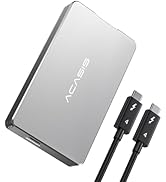
The ACASIS USB4 NVMe SSD Enclosure delivers blazing 40Gbps transfer speeds with broad Thunderbolt 3/4 and USB4 compatibility. Its aerospace-grade aluminum body, silicone thermal pad, and built-in silent fan ensure superior heat dissipation for reliable, sustained performance. Supporting multiple M.2 SSD sizes up to 8TB, this tool-free, plug-and-play enclosure is the perfect upgrade for MacBook and iMac users seeking lightning-fast storage with professional-grade cooling.




| ASIN | B0CSFFMQWF |
| Best Sellers Rank | #489 in Enclosures |
| Compatible Devices | MacBook Pro, Macbook Air, Macmini |
| Customer Reviews | 4.5 4.5 out of 5 stars (164) |
| Data Transfer Rate | 2300 Gigabits Per Second |
| Date First Available | January 16, 2024 |
| Hard Disk Form Factor | 22 Millimeters |
| Item Weight | 4.8 ounces |
| Item model number | TBU401 Pro |
| Manufacturer | ACASIS |
| Material | Aluminum |
| Max Number of Supported Devices | 1 |
| Memory Storage Capacity | 8 TB |
| Product Dimensions | 4.65 x 2.24 x 0.71 inches |
| UPC | 781108279269 |
C**J
Transformed my 2019 27-inch iMac from painfully slow to lightning fast
My 2019 5K iMac had been crawling along on its original failing 2 TB Fusion Drive. Cold boot times were routinely 5–8 minutes, and even opening apps felt like 2010 all over again. I had heard success stories of opting for an external drive to replace the failing Fusion Drive and bought the ACASIS Thunderbolt 3 enclosure + Samsung 990 PRO 2 TB combo. Result: - Cold boot to login screen: 25 seconds - Fully usable desktop: 40 seconds - Parallels Desktop now runs Windows 11 + Debian Linux side-by-side with zero lag (impossible before) - Large file transfers are instant - Maintained 2 TB of storage Install was straightforward: cloned my drive, set the external as startup disk, and it just worked. The built-in fan is whisper-quiet but keeps the 990 PRO cool even under heavy load. Build quality is excellent – solid aluminum, short Thunderbolt cable included, and the little fan toggle is a nice touch. If you have an older Intel iMac that’s dragging its feet, this might be the single best upgrade you can make in 2025. Zero regrets – my six-year-old machine feels brand new again. Highly recommended!
J**.
Works with ipad Pro get the version with the fan
This is a USB4 Thunderbolt 3 case. Fast. Works great. I have 3. It is a little pricey at $99us. But thunderbolt cases are much more expensive than standard USB3.2 cases. I have 2 with the intergraded fan and one without the fan. My drives run so much cooler with the fan. For longevity of your drives I recommend the version with the fan. Just make sure you don't block the intake to the fan. Hooks up to my M2 iPad Pro perfectly. Fan is very quite I can barely hear it.
D**D
Runs Fast and Cool from Mac mini M4
Very happy with this silent fan Thunderbolt enclosure from Acasis. Installation of WD Black SN770 2tb M.2 2280 NVMe was quick & easy and Blackmagic app showed sustained 2680 writes/2860 reads using included thunderbolt cable when attached to my Mac mini M4. These speeds are faster than internal drive in my Mac mini M4. Temp was acceptable with thermal pads provided with enclosure however I did add "icepc M.2 2280 SSD Pure Copper Heatsink Kit Cooler" and iStat menu app showed @ 10 degrees cooler temps compared with the thermal pads only. Probably cause the copper/thermal pad combo now has a very tight fit and contacts enclosure lid. Push button on enclosure allows fan to be turned on/off - but I leave it on (pushed in). Fan is very quiet and makes a big difference in cooling than with it off.
V**I
ACASIS 40Gbps SSD Enclosure With Fan Is Awesome!
So far, works like a champ. I have a WD 8TB SSD (SN850X). Even with the fan off it stays relatively cool under heavy loads (> 1 hour at 1GB/s). With the fan on (which is dead quiet) it cooler than room temp under load. Solid slab of aluminum Very good packaging. I'm pleased. A bit pricey. I hope it keeps working this way.
X**6
Received warranty replacement
Been using for about 2 months and have no issues or complaints other than not really knowing if the fan is turned off or on. Lost my high frequency hearing and have to guess @ the setting. Of course that does explain that the fan is quiet. Have a WD 2TB ssd and it works well. Actually the read & write is faster than my 256GB SSD in my Mac mini M4. No issues with heat -- I run TG Pro to monitor the temps and have been very satisfied with the performance. There are others out there but I went with Acacias based on reviews. No regrets at this time. Edit: 6 months in use -- Working thru an exchange of emails with support we determined the fan is not working. According to web site the warranty is for one year. I asked them about warranty gave them order number and other information. Their response and I quote -- "We have forwarded your question to the colleague in charge of Amazon, and they will contact you later to discuss the relevant matters. Please wait patiently. Thank you." I have been waiting one month so far! Changing my rating due to positive response from Accasis. They have replaced the failing unit. Still not putting at 5 stars due to the fact I had to contact via email several times to get warranty replacement.
A**D
Well designed and ventilated case with fast upload/ download speeds
Well built case for my WD_BLACK 2TB SN7100 NVMe SSD. Installation was a breeze (first one I'd ever done). SSD fit perfectly with only a screw and a rubber heat dissipation sticker to be applied, then slide the case close. Love the built in fan, which does help it cool down faster. A little heavy being all alloy but it's built like a tank. For the price, none of the other cases Id seen came with these features, so I felt it was a good deal. The USB4 cable was icing on the cake
H**T
Works as advised. Not quite the speeds listed but that could be more to do with my setup and devices.
M**J
Purchased this to house a Samsung 990 PRO 2TB SSD attached to a Mac mini m4. Easy to set up and it works great. Connected to a TB4 port in the back of the Mac mini (using the cable that came with the enclosure), I find the read/write speed to be very fast. This allows me to run Lightroom and photoshop, as well as other large apps on the external drive and keep the small internal drive of a base Mac mini freed up. LR and PS open very quickly and run smoothly. I attached one of the heat strips (thicker one) that came with the enclosure to the SSD and I run the fan on the enclosure. The fan is very quiet. The enclosure sits on my desk, behind a monitor and I don't notice it running. Without the fan, the enclosure did get a bit warm (I wouldn't say hot). With the fan, it stays pretty cool and the SSD temperature seems to drop 10C with the fan running. I am very pleased with my purchase.
M**T
EL artículo es excelente, cumple con todas mis espectativas. Gracias.
J**N
Love this tool free enclosure which is extremely well built, and robust, and works with TB4. Installed with a 4TB SSD. Has a built in cooling fan to keep the drive operating at peak speeds. Minus 1 star because the fan is not automatic, but has to be switched on and off manually. Otherwise, highly recommended.
B**0
Looks like great quality product. Came with all required to mount your M.2 NVMe SSD stick. Fan can be a bit noisy but there is a little button that actually turns it off. In actuality the unit rarely gets very warm. I monitor it and if I see it is a bit warm (and I mean a BIT) all just hit the button for and let the fan run for a while. Not the best scenario. If the unit is positioned out of the way of your work area you might not really hear the fan at all. A bit pricy but inline with similar devices available.
Trustpilot
4 days ago
3 weeks ago