
DOWNLOAD THE APP


Customer Services
Copyright © 2025 Desertcart Holdings Limited
DOWNLOAD THE APP

🧊 Keep your CPU cool and flawless — because bent pins are so last gen!
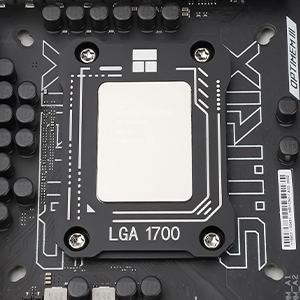
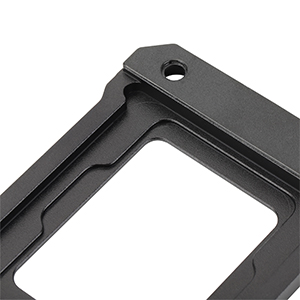
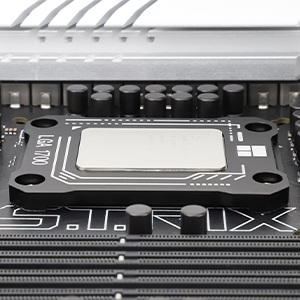
The Thermalright CPU Contact Frame V2 is a precision-engineered aluminum retrofit bracket designed to prevent CPU bending and warping on Intel LGA1700 sockets (12th-14th Gen). It enhances cooler contact pressure, reducing CPU temperatures by up to 10°C, and installs easily with included tools. Built for durability and compatibility, it’s a must-have upgrade for any serious Intel desktop build.



| ASIN | B0CXF16317 |
| Best Sellers Rank | #2,243 in Computer Components |
| Brand | Thermalright |
| Brand Name | Thermalright |
| Compatible Devices | Desktop |
| Cooling Method | forced air |
| Customer Reviews | 4.8 out of 5 stars 243 Reviews |
| Manufacturer | Thermalright |
| Material | Aluminum |
| Material Type | Aluminum |
| Power Connector Type | 4-Pin |
| UPC | 731052659600 |
| Unit Count | 1.0 Count |
K**I
Works like a charm
Installed this with a new 13th gen intel cpu to help with mounting pressure issues with the LGA 1700 OEM bracket. Super easy install. Not only has it helped mount my cpu without the risk of bent pins of a fried cpu, it also helps decrease temps 5-10°! Highly recommend this product for anyone on the LGA 1700 socket.
K**E
Save Your CPU! Perfect Fit & Finish
⭐⭐⭐⭐⭐ I love this Thermalright Contact Frame. It keeps my CPU perfectly straight and smooth, so I don't have to worry about the chip bending or warping under the stock latch. The color looks great on the board, and the build quality is solid. It’s an easy install that provides way better contact for my cooler and total peace of mind. Essential for any LGA 1700 build!
B**D
A definitely needed product for LGA 1700 socket
A friend pointed this to me when I purchased the i9-12900k in Oct 2023. I was having issues where the CPU was reaching high temps and pegging out close to 100 C and thermal throttling. I did not know that the ILM (CPU bracing bracket) on the newer chipsets tends to warp and cause the cooler not to sit properly on the CPU and keep it cooled. Once my order arrived I removed the factory ILM bracket and replaced it with this device. My water cooler now sits perfectly upon the CPU and hasn't caused any issues with cooling on my device. Max temps I have seen are around 80 C max depending on what I am working on. Even running programs such as Aida64 and stressing the CPU temps have dropped from the 100 C range down to 85 C range. This has definitely saved me from causing damage to my CPU due to heating issues. It is simple to install by simply removing the original bracket off the motherboard and utilizing the 4 screws from the original device and placing the CPU in place with thermal paste and simply mounting the bracket over the top of it and screwing it down and installing the cooler. My wife upgraded her PC in June and went with a 12th gen i5 LGA 1700. I didn't even bother trying to install the CPU until I ordered this device and had it in hand. I didn't want to have to remove and reinstall everything like I did on mine so I waited and installed this device to be safe from the start.
R**N
Amazing product
Can’t recommend enough! Much better then stock and very easy to set! Will use one on every build I do
N**M
Oh my...
I read so much about this product. I've read that it can lower temps so much that you can even "feel" the difference. I have an xproto case (open) and when gaming, 3080ti xtreme waterforce, i try to run my game as high as i can. That means i usually am trying to run ultra with a few settings lowered to make it playable. My monitor is the samsung g8 neo 4k/240hz. So you can see why i decided to buy this.... Playing First descendant, cpu temps ran 78 - 88. I was not happy because i remember running final fantasy 7 and it was hitting 50's with cosair's aio. (it broke unfortunately). i run noctua's 95x or whatever it is for the z790i. so after buying it, my temps now run 65 to 75. yes, it droped 10c. i actually could feel it in my room. i was so so happy. i run those monitors that you can see cpu temps, frames, and gpu temps. it stays around on average 70 - 72 when im playing first descendant. it is absolutely worth buying. took me 2 minutes to swap out. get it.
P**Y
Cooked my CPU down
Lowered my temps by a good 8-10C, my contract frame was bent and this solved the issue very well. My is now staying much much cooler and it was super easy to install. Highly recommend if you are having overheating issues
R**O
All good here
Does the job a bit better cooling than standard mechanism.
S**A
Simple install. No issues.
Decided to use one of these when I upgraded my CPU fan. Simple removal of screws from the original mobo clamp, and installed easily. I had watched some installation videos on YouTube to get the general idea. However, some guys wanted to act like if you didn't do it their way, it would cause CPU failure. (LOL). There's no complex trick to this. Just remove the original clamp screws, and then use them for this unit. You don't have to overly tighten the screws ...just snug them down. You'll know when to stop. Seems to work well enough. Not sure I can say that it has drastically improved the CPU temp, but my unit stays fairly cool anyhow.
Trustpilot
2 months ago
1 month ago