
DOWNLOAD THE APP


Customer Services
Copyright © 2025 Desertcart Holdings Limited
DOWNLOAD THE APP
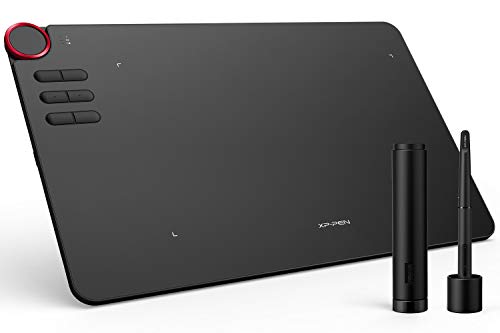





🎨 Unlock your creative edge—draw, design, dominate.
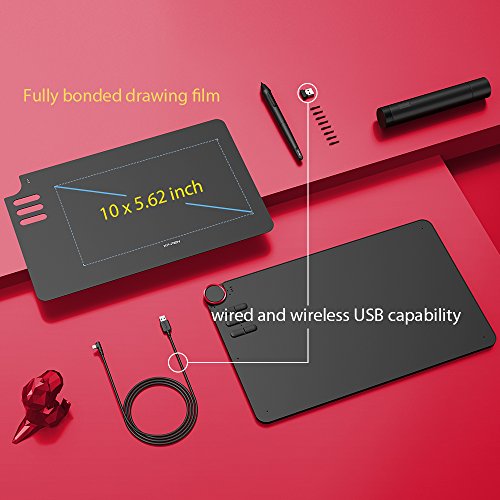
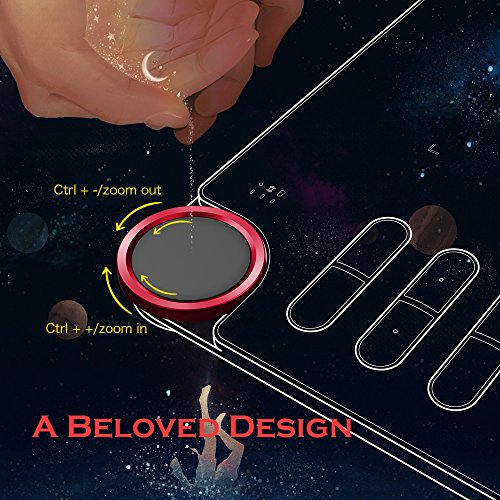
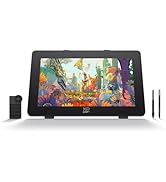
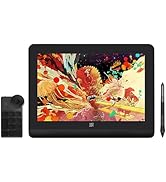
The XPPen Deco03 is a sleek, professional-grade wireless drawing tablet featuring a 10 x 6 inch active area, 8192 levels of pressure sensitivity, and a battery-free stylus. Its standout multi-function red dial and 6 customizable shortcut keys streamline your creative workflow. Compatible with MacOS, Windows, Linux, and Android, it supports both wireless and wired connectivity, making it a versatile tool for digital artists, designers, and educators alike.











| ASIN | B07BF9GNFD |
| Are Batteries Included | No |
| Batteries | 1 Lithium Ion batteries required. |
| Best Sellers Rank | #8,634 in Computers & Accessories ( See Top 100 in Computers & Accessories ) #56 in Graphic Tablets |
| Brand | XP-Pen |
| Colour | Black |
| Country of Origin | China |
| Customer Reviews | 4.4 4.4 out of 5 stars (1,554) |
| Date First Available | 13 March 2018 |
| Generic Name | Graphic Tablet |
| Importer | M/s DNS Overseas: 1003, Raheja Chambers, 213 Nariman Point, Mumbai 400021 |
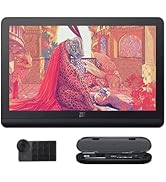
| Included Components | 1 Pen Tablet, 1 P05 Passive Pen, 1 USB-C cable, 1 Quick Guide,8xReplacement Nibs |
| Item Dimensions LxWxH | 35.4 x 21.8 x 0.1 Centimeters |
| Item Height | 0.1 Centimeters |
| Item Weight | 1 kg 260 g |
| Item Width | 21.8 Centimeters |
| Item model number | Deco03 |
| Lithium Battery Energy Content | 0.14 Watt Hours |
| Lithium Battery Voltage | 3.7 Volts |
| Lithium Battery Weight | 6 Grams |
| Manufacturer | XP-Pen |
| Net Quantity | 1 Count |
| Number of Lithium Ion Cells | 1 |
| Operating System | Mac OS, Windows |
| Packer | M/s DNS Overseas: 1003, Raheja Chambers, 213 Nariman Point, Mumbai 400025 |
| Product Dimensions | 35.4 x 21.8 x 0.1 cm; 1.26 kg |
| Screen Resolution | 1920 x 1080 pixels |
| Series | Deco |
| Standing screen display size | 10.62 Inches |
N**S
Good product
Good product , low range for wifi... Nearer the computer more effective, for distance more than a meter , delay seen
U**Y
Overall review
Excellent product. XP pen has always been close to my heart.♥️ Though the BT latency can be improved through driver update. Over it's a good product.
V**J
Best for beginners
This model has built in manual zoom in and zoom out wheel which makes it easy to use and this model is great for beginners
K**A
More than expected🔥🔥
Hi all , I have bought it for my personal use. I am from texturing background and needed a pen tab which can help me in digital drawings. I ordered it yesterday and it got delivered in just 24 hours. The first experience for the product is very impressive. I must say , it's a worth buy. The packaging is very nice. It comes in a big red box with the brand name on top. Inside the box you get the pad , one glove , pen holder , digital pen , set of 8 nibs , usb cable. I used it for 2-3 hours and it's smooth on the pad and working very fine. They have provided list of drivers which needs to be downloaded on your PC. Also please register the product on the website and you will get additional 1 month of guarantee. Overall it's a worth buy , I was confused between wacom and this brand. Now I can surely recommend to go and buy. I got it in 9000 rupee with coupon discount. I will edit my review after a month of use. Thanks and best wishes :)
H**T
Best graphics tablet for beginners
I have been using this for more than 2 months now. All I have to say is I love this tablet. The best graphics tabl for the beginners. That does not mean it is not for intermediate and pro artists. Anyone can use it. But I would strongly recommend this to beginners. At this price it's more than what you can expect. Wireless flawless connection, and amazing pen pressure works really well. Go for it!!!!
R**A
Value for money
Generally i will not write a review of the products for which i purchase. This is the one i am writing after using this tablet pen for 3 months. Really it is marvellous, affordable and drawing tablet i have found. The smoothness when we are working on the tablet is amazing. This is the best tablet for the online tutors too. Without hesitation you can go for it.
T**J
This is the one!
This is my first graphic tablet and I'm more than impressed with the Deco 03. For the price, it leaves the competition way behind *cough* Wacom *cough*. I read some negative reviews regarding the absence of a drive containing the required drivers but nowhere in the description has it been mentioned that it's provided. It was probably just for reviewer's units to save them the hassle. Seriously guys, 1 star reviews for not providing something that is just a download away is mighty petty of you. Okay, back to the tablet... there's so much to love about it. It's a very thin and light tablet, and adding a Bluetooth mode is just cherry on top. The pen is featherlight, battery-free and has 2 customisable buttons and 8196 levels of pressure levels. The wheel on the tablet is a game changer though, it makes it so easy to seamlessly zoom in and out, change brush sizes, or do whatever you want thanks to full customisation offered by the XP-Pen software, also there are six more customisable buttons underneath it. The pen glides smoothly on the tablet and has a paperlike feel to it. Also the pen comes in a cylindrical box with the Bluetooth receiver and extra tips in it which is extra handy. I got this tablet for college and I'm very happy with my purchase. If you're in the market for a graphic tablet, this is the one to go for. It provides the best bang for your buck and you won't be disappointed. Happy creating! :)
D**H
Decent, can't be compared with wacom.
This pen tab looks awesome, installing and everything is fine, but if you have already used wacom. You won't like it. If it's your first pen tab, it's worth buying in this price range
L**M
Been happy with this purchase. Replaced an old Wacom tablet and very happy with the price. Easy to use and responsive. Works well with Adobe software. Interface/software, not idea. Pen is a bit "light", but this is likely a good thing for others. This may sound obvious, but take into consideration that you need space for it your work area. Great tablet, especially considering its price point compared to others out there.
E**O
Se está procurando sensibilidade e estabilidade, ela tem! Se procura àrea grande de trabalho, ela também tem! Super fina, não ocupa espaço e a bateria dura muito, a ponto de esquecer de recarregar. Funciona perfeitamente no pc, celular e tablet, no mac é meio chato de configurar, mas é um problema apple e não XP. Vale muito o investmento!
J**O
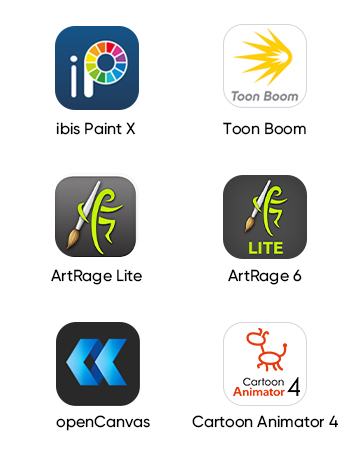
Me encanta, muy buena calidad y tiene software de dibujo gratuito!
S**E
I bought this to replace my aging Wacom Graphire that had been collecting dust due to the really super small drawing area, and for the fact I had just got back into drawing again (with traditional media) recently and figured I'd try doing digital again by using my pencil drawings as a base. Setup was super easy however unlike some reviews you will see online it no longer comes with the 4gb USB pen drive with the drivers. No biggie as you'd just download them from website anyway, even if it did. But it DID come with a protective cover instead which was a nice bonus. The pen is excellent and feels great and glides over the surface smoothly and accurately. The wireless seems to work just fine for me unlike some reviews state. I don't get any jitter or interference at all. Instructions are minimal and to be honest if there is any kind of con to this package it would be setting up the dial and express keys. There's no way to set it to rotate the canvas in when rotating the dial Photoshop, and if there is, i cannot find any guides to do so. You can set it to zoom in and out, brush size, hardness, brush selection etc, but be aware it's not a smooth increase or decrease due to the keys in Photoshop that you set to the dial increase and decease in increments of either 5 or 25% depending on the type of tool you've setup. Also the dial can be physically pressed and makes a click like it is a button, but there's no setup for that in the drivers and that would be better for the dial mode change rather than using one of your express keys to do that. On the subject of express keys, if you own an Nvidia card one of the default express keys buttons is set to the GEForce experience overlay/recording setup, so change that right away. The drivers don't seem as feature rich in Windows 10 vs the Apple OSX drivers I've seen online. For example there's no test area to test your stroke pressure sensitivity within the driver, you have to use your art package. Also in regards to the driver if a new version of the driver codes out export all your settings you took the time to set up because when you update it you will lose all your custom setups for individual apps and everything is reset to defaults . These are all really minor annoyances all of which can be avoided if there was better instructions. I'm still learning to use it and get used to drawing while looking at a screen but overall I'm extremely happy with the purchase minus the few nitpicks. I would highly recommend it and it's way cheaper than getting an equivalent Wacom with the same kind of drawing area. Zero regrets with this purchase.
R**O
una gran opción de desde artistas básicos a intermedios e incluso avanzados, con una igual de buena relación calidad precio, posee un buena zona de dibujo y en cuanto a los botones y el dial son ideales para olvidarte de usar el teclado al momento te trabajar y no estar saltando de uno al otro, lo he probado en affinity photo, affinity design, adobe photoshop y adobe illustrator y otros como krita y en ninguno he tenido problema, los programas lo reconocen de inmediato tan solo en cada programa solo debes activar la sensibilidad a la presión, ademas puedes programar los botones en general o por perfil para que funcionen diferente en cada aplicación, lo mejor para mi es el dial ya que es muy cómodo acercarte, alejarte o rotar del lienzo e incluso cambiar el tamaño de tus pinceles, y en cuanto al modo wireless es muy bueno lo he probado a distancias desde 2.5m sin ninguna perdida responsiva, ademas esto se mejora con la duración de la batería ya que apagándolo al tiempo de no usarla esta dura muchísimo (en mi caso 5 días)dependiendo el uso que le des, si lo olvidas apagar entra en modo reposo y este me a durado de 2 a 3 días para reactivarla solo debes presionar uno de los botones de la tableta.
Trustpilot
2 weeks ago
2 months ago