
🚀 Elevate your data game with UGREEN NASync — where speed meets smart storage!
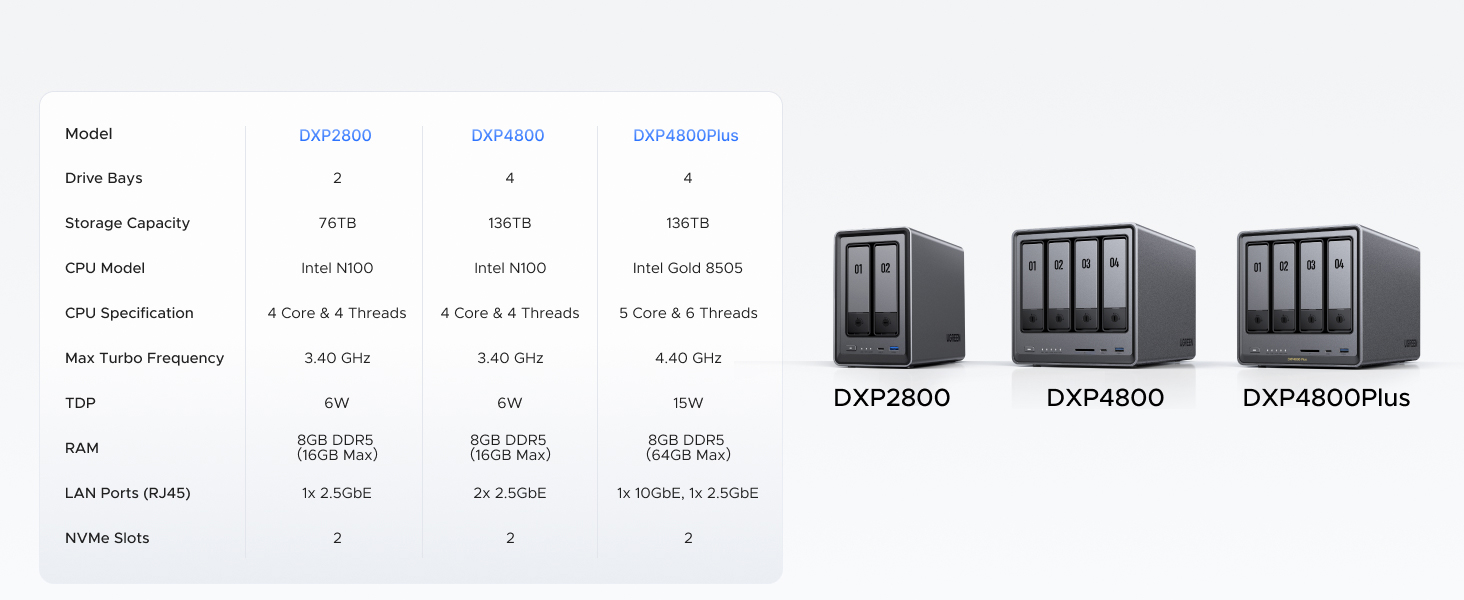
The UGREEN NAS DXP2800 is a high-performance 2-bay desktop NAS designed for small teams and enthusiasts. Powered by a 3.4 GHz Intel N100 quad-core CPU and 8GB DDR5 RAM, it supports up to 76TB storage with dual SATA and M.2 NVMe slots. Featuring a 2.5GbE port and 4K HDMI output, it delivers ultra-fast data transfer and versatile media streaming. Its AI-driven photo album and advanced encryption provide smart organization and robust security, all backed by broad compatibility and 24/7 support.




| ASIN | B0D22HBFK1 |
| Batteries | 1 CR2032 batteries required. |
| Best Sellers Rank | #2 in Network Attached Storage (NAS) Devices |
| Brand | UGREEN |
| Color | Grey |
| Computer Memory Type | DDR5 SDRAM |
| Customer Reviews | 4.5 4.5 out of 5 stars (771) |
| Date First Available | April 18, 2024 |
| Hard Drive | 2x SATA, 2x M.2 NVMe Slots |
| Hard Drive Interface | Serial ATA-600 |
| Item Dimensions LxWxH | 9.33 x 4.29 x 6.97 inches |
| Item Weight | 5.68 pounds |
| Item model number | DXP2800 2-Bay |
| Manufacturer | UGREEN |
| Number of Processors | 1 |
| Operating System | UGOS Pro |
| Processor | 3.4 GHz |
| Processor Brand | Intel |
| Product Dimensions | 9.33 x 4.29 x 6.97 inches |
| RAM | 8 GB |
| Series | DXP2800 2-Bay |
W**L
Great entry level NAS with advanced features to explore
VERY solidly constructed with a thick, HEAVY aluminum unibody, no sharp edges or unfinished surfaces. The design is well thought out and easy to access the M.2 drives and RAM. I thought there were 2 RAM slots but realized you can upgrade to a single 16 GB stick. It would be nice if there were 2 slots so I didn't have to keep a spare 8 GB stick, plus a 16 GB stick adds another big chunk of money to the total cost. Everything was easy to setup and works flawlessly with 2x12TB HDDs and 2x2TB M.2s. With an HDMI port this functions as a low cost HTPC and NAS in one box that doesn't require me to get too deep in the weeds managing things. I was considering the UGREEN mini PC with 4x M.2 drives but this one allows for much cheaper, larger capacity drives with the option for M.2 speed.
D**R
Works great, intuitive interface.
Works great! Money well spent. Very flexible, great for nas, automatic backups, docker, and hosting VMs. No complaints.
K**A
⭐️⭐️⭐️⭐️⭐️ Beginner-Friendly, Blazing Fast, and Beautifully Built – UGREEN NASync DXP2800 Nails It
I’m a beginner when it comes to setting up my own NAS for business use, but the UGREEN NASync DXP2800 made the process incredibly simple. From unboxing to full setup, it took me just 20 minutes to figure out what needed to be done, install my WD 20TB hard drives, and configure the system. The only caveat: formatting the drives took a couple of hours—but that’s expected with high-capacity storage. 💾 Performance Upgrade: I paired the NAS with UGREEN’s Cat8 Ethernet cables (3ft and 10ft) to connect my router to my internet switch and then to the NAS. My system used to feel clunky with competitor cables and older hardware, but now it’s blazing fast and incredibly responsive. 🧠 Easy Setup for Beginners: The tool-free chassis and intuitive interface made setup a breeze. Even with zero prior NAS experience, I was up and running in no time. 🎯 Smart Features: Supports RAID, dual M.2 SSD slots for caching, and AI-driven photo management. It’s perfect for organizing client files and securely archiving business data. 📺 Connectivity & Design: The HDMI output and multiple USB ports offer great flexibility. The unit looks sharp, and paired with UGREEN’s blue and black braided Ethernet cables, my setup is both professional and stylish. Bonus: the braiding is resistant to love bites from my wife’s fur babies, which is a real win in our pet-friendly office. 🙌 Reliable Support: UGREEN’s customer service was excellent. I had a few setup questions, and their team was responsive and helpful.
D**C
Simple, Fast, Performant, Great Software. Buy now, don't look back.
This is the easiest, best 4 bay NAS money can buy. You will be up and running in _no_ time. Snapping in four drives of whatever size you choose takes moments. I unwrapped four Toshiba N300 Pro 18TB drives and snapped them into the chassis in about 4 minutes. Connected the NAS to my 2.5GB ports on my lan and had everything up and running and updated with the latest software in under 30 mins. Time to get going is important, but what's more important is how does it run over time? I am 9 weeks into owning the thing and I can tell you this: The software is easy. The system is complete... it's robust... it has features I'll never use--and that's cool if you're looking for a gimungous media server or whatever... I needed it for digital camera RAW storage in a RAID5 scenario. I couldn't say more good things about the product. Managing permissions for users on your LAN is easy, managing storage and basic drive management, etc. is easy. Updating the software routinely as patches and security updates are released is easy. Once upon a time Apple owned "easy" and now iOS has 1138 settings in the general tab and nobody can make it do anything--but this NAS is _easy_. And good. High performance reads and writes near theoretical limits... I literally can not say enough good things about it. Buy it and don't look back. Great value, great performance.
P**B
Very high quality hardware, but instructions leave a LOT to be desired...
The UGreen 2800 NAS is an exceptionally well built, very high quality unit that comes well packaged with quality connectivity cables. However, even if you have been working with PCs the better part of your life do not be expecting a simple 'plug and play' setup. If you are not technologically adept or able to navigate your way through setting up devices to communicate with each other through your home or budiness network, I'd strongly suggest you don't attempt to set this up without the aid of someone who can. The connection of the unit itself is straight forward. Drives load easily and connecting instructions up to the formatting of the drives are fairly clear and easy to understand. But that is where 'easy to understand' takes a holiday for what I would guess is probably 65% of the people who buy this thinking it's going to be like plugging a USB cable in between your PC and a desktop storage drive. A NAS is a computer, not a simple data storage device. The instructions that come with it cover nothing about setting the unit up to properly communicate with your PC through your home network. You are going to have to find out how to do that through your own research. When you have finished familiarizing yourself with the formatting and setup process for the hard drives in your NAS (drives are a seperate purchase and you need to check for their compatibility with your NAS on UGreen's site) be prepared to take VERY careful notes the whole way through the setup process. All the passwords, network addresses, administrator info...write down everything about the setup in detail as you will be using that information to set things up later. I personally found the UGreen site somewhat difficult to navigate, but what you will need to do is go there initially for instructions and app downloads. Even then, you will want to have your AI equipped search engine handy to research the plethora of additional questions that will come up for everyone but a person who has worked with this technology at work or been exposed to it by an associate. UGreen needs to get a layman who is NOT an engineer to write a soup to nuts set up manual covering all aspects of both PC, Mac and mobile device setup and connection of everything to your network so all devices can find and communicate with the NAS and each other. That manual will also need to be written so a kid can understand it. UGreen (like all NAS manufacturers and most You Tube video producers) seems to be of the opinion that producing exhaustively detailed setup instructions on any mental level below that of an IT expert would somehow 'insult' the average user's intelligence. And as most of you will find out, nothing could be further from the truth. This review has already turned into War & Peace, so I will not attempt to leave such a set of instructions here (although I produced one for myself). Still, UGreen really needs to develop one and INCLUDE that manual with the purchase of the device or at the very least on a very obvious spot on their website. If such instructions exist, I was unable to locate them. The best advice I can give is for people new to NAS system technology is to download the UGreen NAS desktop app to your PC or MAC and their mobile app to your phone. Everything you will need to get the NAS to find your PC, Mac or phone through your network is in those apps. It is just a real pain to get all the details correct so it will function. The good news is, once you figure it out, it does practically run itself. The bad news is, unless you are very persistent and have a good AI model search engine to assist you, you may have a lot less hair left once you get to that point. Please note...the UGreen NAS product itself is five stars all the way...my four star rating is due solely to the lack of simplified instructions that anyone could follow.
M**S
Es un NAS increíble y las capacidades que tiene da mucho margen para sus usos Solo me gustaría que en la galería de fotos se pudieran etiquetar las fotos para poder organizar mas facialmente las fotos
T**N
Great NAS! Got it on sale, and its been awesome and running straight for a month. Slotted in 3-12tb NAS drives and run them in RAID 5. Took 3 days to build the array, but its been running well. It only has a few Apps available at the store so far, including Docker and Jellyfin which work pretty well if you configure them right. Took me a few hours to learn how to do it and configure everything, but thats from 0 knowledge and it was pretty easy to pick up. I wouldn't really run VMs on it, just because the CPU is rather limited. Mostly set up as a photo back up(with the sync and backup App) and a media server(Jellyfin). I run the Jellyfin server on my Linux server though, since I find its easier to configure. You just have to permanently mount your network drives so you can access the NAS storage. It even has a built in remote access without configuring ports, so you can access and backup when your away from you local network Would definitely recommend to get this if you have no experience with NAS, since its very easy to pick up
C**O
El mejor más en éste rango de precio
S**L
Awesome product. A bit pricey. I'm using WD Gold HDDs and I find it still a bit loud.
A**.
Un gran dispositivo, superfacil de usar y muy intuitivo. Si no tienes conocimientos de previos el sistema operativo de Ugreen es muy amigable. Lo recomiendo ampliamente.
Trustpilot
2 months ago
1 month ago



