Some deliveries may take a little longer than usual due to regional shipping conditions.

DOWNLOAD THE APP


Customer Services
Copyright © 2025 Desertcart Holdings Limited
DOWNLOAD THE APP

⚡ Power up your home network — no dead zones, no lag, just seamless speed!
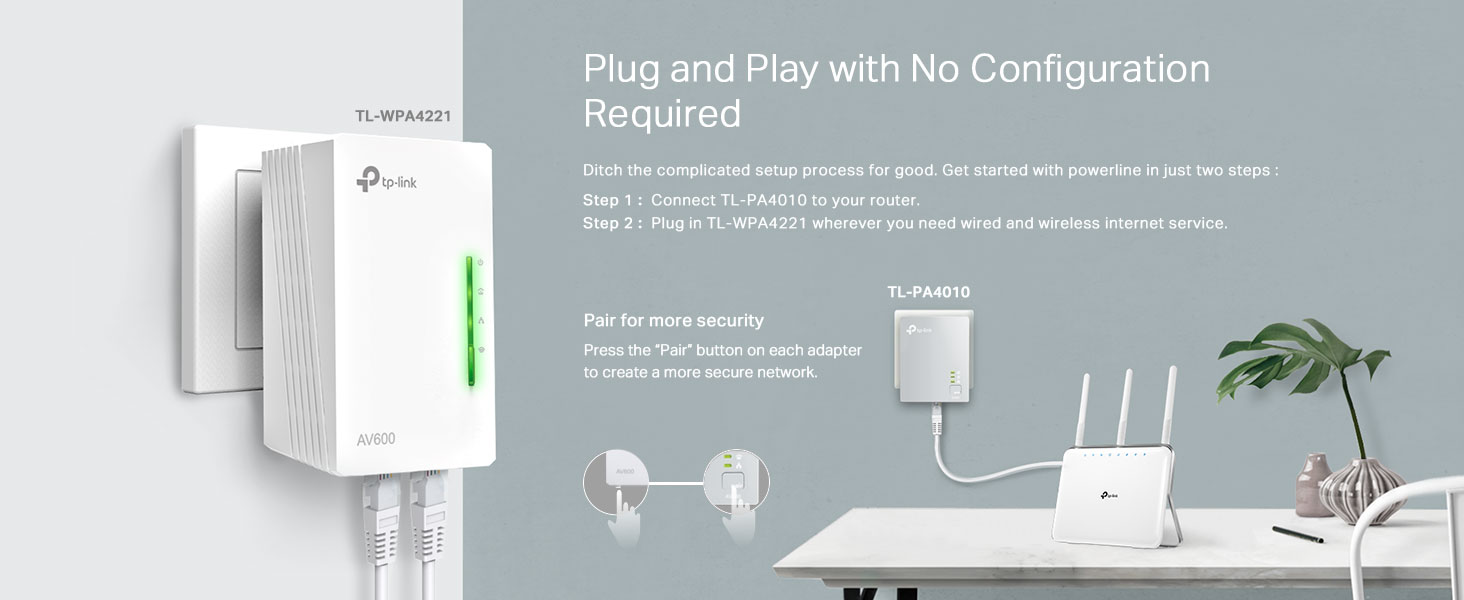
The TP-Link TL-WPA4221 KIT is a cutting-edge AV600 Powerline Adapter and WiFi Extender that delivers up to 600 Mbps wired speeds and 300 Mbps wireless coverage through your existing electrical wiring. Featuring plug-and-play setup, dual Ethernet ports, and one-touch WiFi configuration, it’s designed to eliminate lag and extend reliable internet to hard-to-reach areas in your home or office.




| ASIN | B0D7MSBFQT |
| Are Batteries Included | No |
| Best Sellers Rank | 1,020 in Computers & Accessories ( See Top 100 in Computers & Accessories ) 7 in Powerline Network Adapters |
| Brand | TP-Link |
| Colour | white |
| Customer Reviews | 4.3 4.3 out of 5 stars (22,682) |
| Date First Available | 20 Jun. 2024 |
| Guaranteed software updates until | unknown |
| Item Weight | 210 g |
| Item model number | TL-WPA4221 KIT |
| Manufacturer | TP-Link |
| Product Dimensions | 13.75 x 10.15 x 19.15 cm; 210 g |
M**D
Solved Lag Spikes On PS5 - Exceptional
I was skeptical at first if this powerline adaptor would actually work with mixed opinions online. But it is doing an exceptional job and was easy to set up. My PS5 was suffering lag spikes repeatedly making Cod Bo6 and Fifa difficult to play. My router is on the other side and lower floor of my house meaning weaker wifi signal and interference. I have now had this powerline connected to my PS5 with ethernet for some weeks and i am no longer lagging with steady ping and no packet loss. The download speed is near enough close to full mbps my isp provides and is steady. I even have my BO6 texture streaming on full and there is still no lag with this amazing item. In regards to the wifi extender part of this product, it is decent but does not perform as well as the powerline ethernet connection and download speeds are smaller in comparison. So if you are looking for an adaptor that will solve lag on devices that can be connected with ethernet, it is perfect but not the best option if you want to extend your wifi signal itself to phones and such. It will also depend on your houses electrical wiring and is recommended to be on the same circuit. I didn’t check my circuits or wiring and tested my luck. This product is working perfectly for me and solved my issues hence i give 5 stars!! It is worth trying and if it doesnt work well in your case, it can be returned within the time window.
T**M
Simple setup. Fantastic performance
Fantastic! Works for my garden office where the WiFi booster was too weak to reach. Great Internet speeds, not cut out once. Very pleased with the performance. Plus, pleasantly simple to setup!
F**T
Solid Performance, Great Value – TP-Link WiFi Extender is a Reliable Solution
I’ve been using the TP-Link WiFi Extender for a few months now, and it has significantly improved my home network’s coverage. Setting it up was a breeze, thanks to the easy-to-follow instructions and the Tether app, which made the whole process super straightforward. The device quickly found my network and boosted the signal in areas that were previously a dead zone. The performance is great for everyday use—streaming, gaming, and browsing are all much smoother with fewer interruptions. The range is solid, and I’ve noticed fewer dropped connections throughout my home. It’s also relatively compact and doesn’t take up much space, which is a nice touch. However, there are a couple of reasons I’m not giving this 5 stars. While the extender works well in general, there’s a slight dip in speeds when compared to being directly connected to the router, especially in areas farther away from the device. Additionally, the design could be a bit more streamlined—while it’s not bulky, the positioning of the antennas could be more adjustable. Overall, the TP-Link WiFi Extender is a fantastic product for the price. It does exactly what it promises and provides a noticeable improvement in Wi-Fi coverage without breaking the bank. Highly recommended for anyone looking to boost their signal and eliminate those annoying dead zones!
D**Z
Ideal for Delivering your Wifi to Areas Normally Too Far for Extenders
I use these to supply data to areas of my home that the wifi - even with extenders - does not reach, such as the garage & loft for my CCTV cameras. Bear in mind the two areas to be connected must be on the same ring main for the connection to work. Aside from that the connection is relatively straightforward between the two units and the wifi range of the second quite good. When first set-up the wifi will have a different SSID on the wifi but this can easily be modified to reflect that of the main router. All in all an excellent choice, just don't expect the transmisison speeds advertised which are probably theoretical limits set on a direct cable with no additional sockets, spurs or electrical items that you find in an average home.
D**B
Perfect for getting Ethernet upstairs
Bought this mainly to get a wired Ethernet connection to my upstairs PC and it’s been spot on. Setup was simple, plug one adapter into the router and the other upstairs, pair them and you’re good to go. My PC now sees it as a normal Ethernet connection. Much more stable than WiFi for gaming and downloads, with consistent speeds and no random drops. Ideal if you can’t run long Ethernet cables through the house. Works exactly as advertised and does the job well.
J**-
Frustrating and didn’t work at first
Had an earlier TP link connector that worked great but wanted a dual Ethernet version so upgraded to a newer version. Wish I hadn’t bothered. The new one arrived and following all instructions and with all lights illuminated as they should be I connected my devices to discover that nothing could connect. Tried troubleshooting but all to no avail. In the end gave up and went back to the old system. Update. Went back a few days later and tried to set up again. Again nothing at first but finally got it working by power cycling all my equipment including router whilst keeping the tp link powered. Since then it appears to be working without fault. I’m keeping the review score at 3 stars as this is supposed to be plug and play not plug and power cycle everything else.
M**K
Great adapter
Great product FROM TL link i highly recommend this Iam using inside summer house and working great
R**N
Quick easy and simple
Honestly price to performance is amazing This was purchased for my mates shed what's 70feet away from the house he's got a armoured power cable ran to it under ground Using this device he's now got fast reliable internet in there easy to setup quick simple
U**A
Performs its functions without problems. Immediately connecting, I set up the connection without any help.
M**I
Good wifi extender,work ok
I**O
Parfait
W**.
Diese Adapter sind echt top. Ein Adapter per LAN-Kabel mit dem Router verbinden, den anderen per LAN-Kabel mit dem gewünschten Endgerät verbinden, einmal die Geräte per Knopfdruck koppeln, fertig. Leichter gehts nicht und die Internetverbindung ist stabil. Sehr empfehlenswert
D**F
Como con otros productos, he buscado información previamente para saber cual comprar a buen precio y con cierta calidad. Los hay mejores, obviamente, pero no necesito mucha velocidad, por lo que este considero que es el adecuado para mi caso. Funciona perfectamente y estamos muy contentos con lo que ofrece por el precio que hemos pagado. Me he comprado este PLC ya que el router está en una habitación y el ordenador de trabajo en otra a la que no alcanza la señal wifi. Mover el router era complicado ya que al ir por fibra, se necesita taladrar paredes y pasar mucho cable, nos compramos un repetidor de señal, pero no funciona demasiado bien, por lo que esta ha sido la mejor de las opciones. Se trata de que los cables de la instalación eléctrica sirven como comunicadores para llevar la señal de internet. Solo tenemos que colocar los dos dispositivos a la red eléctrica, emparejarlos y listo! En nuestro caso, compramos este de TP-LINK, sin wifi, ya que nos conectamos a internet a través del cable, y lo único que tuvimos que hacer fue enchufar uno de los aparatos a una toma de corriente cercana al router, y el cable de ethernet, a continuación el otro cerca y emparejarlos simplemente pulsando un boton en ambos aparatos. Una vez están emparejados (lo sabremos por los diodos led de los aparatos), colocamos en el enchufe de la habitación uno de los terminales y conectamos el cable de red (repito, este modelo no tiene wifi) y listo! tan sencillo como eso! Un consejo que he leído cuando me estaba informando de estos productos es que noes recomendable enchufarlos en una regleta, ya que pierden intensidad. Lo que si puedes hacer es incluir una regleta al enchufe del propio aparato, no al contrario. Otra de las recomendaciones es que si hay muchos aparatos eléctricos conectados a la red, pueden generar ruido y debilitar la señal, con lo que la calidad de la conexión bajará. Espero que fuese de ayuda este comentario y te anime a comprar este producto si tienes un caso parecido al no llegarte el wifi a otro punto de la casa.
Trustpilot
2 weeks ago
3 weeks ago