🎶 Elevate your space with wireless sound that moves with you.
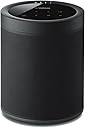
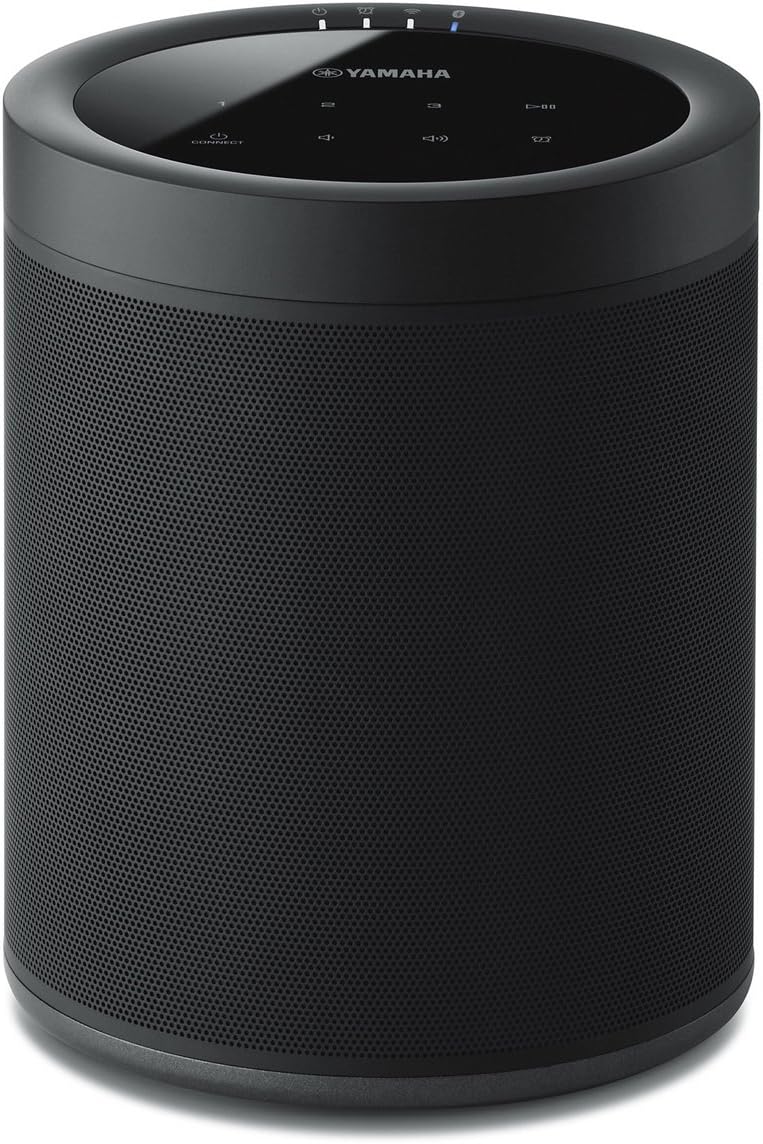
The Yamaha MusicCast 20 Wireless Speaker delivers rich, room-filling sound with versatile wireless connectivity including Wi-Fi, Bluetooth 4.2, AirPlay, and Spotify Connect. Its compact, wall-mountable design fits seamlessly into any space, while the MusicCast app enables multi-room streaming and precise control. Compatible with Alexa voice commands and capable of forming wireless 5.1 surround sound setups, it’s the perfect blend of style, convenience, and immersive audio for modern living.


| ASIN | B07CK93ZZF |
| Additional Features | Stereo pairing;Radio |
| Age Range Description | Adult |
| Antenna Location | Music,Home Theater |
| Audio Driver Type | Dynamic Driver |
| Audio Output Mode | Stereo |
| Battery Average Life | 10 Hours |
| Best Sellers Rank | #18,882 in Electronics ( See Top 100 in Electronics ) #33 in Surround Sound Systems #2,175 in Earbud & In-Ear Headphones |
| Bluetooth Range | 32 Feet |
| Brand | Yamaha |
| Built-In Media | Speaker, manual |
| Color | Black |
| Compatible Devices | Home Theater |
| Connectivity Protocol | Bluetooth, Wi-Fi |
| Connectivity Technology | Bluetooth |
| Control Method | App |
| Controller Type | Amazon Alexa |
| Customer Package Type | Standard Packaging |
| Customer Reviews | 4.0 out of 5 stars 477 Reviews |
| Enclosure Material | Plastic Metal |
| Frequency Response | 40 Hz |
| Global Trade Identification Number | 00027108957302 |
| Is Waterproof | FALSE |
| Item Dimensions D x W x H | 5.2"D x 5.9"W x 7.9"H |
| Item Type Name | • Yamaha MusicCast 20 Wireless speaker for Streaming Music. Black. Works with Alexa. |
| Item Weight | 4.8 Pounds |
| MP3 player | No |
| Manufacturer | Yamaha |
| Maximum Range | 32 Feet |
| Model Name | WX-021BL |
| Model Number | WX-021BL |
| Mounting Type | Wall Mount |
| Number of Audio Channels | 5.1 |
| Number of Items | 1 |
| Number of Power Levels | 1 |
| Power Source | AC |
| Series Number | 21 |
| Speaker Maximum Output Power | 4 Watts |
| Speaker Size | 20.07 Centimeters |
| Speaker Type | Multi Room |
| Specific Uses For Product | Music, Home Theater, Wireless Surround |
| Subwoofer Connectivity Technology | Wireless |
| Tweeter Diameter | 1 Inches |
| UPC | 027108957302 |
| Unit Count | 1.0 Count |
| Warranty Description | 2 Year Manufacturer |
| Warranty Type | Manufacturer Warranty |
| Water Resistance Level | Not Water Resistant |
| Wireless Technology | Bluetooth, Wi-Fi |
| Woofer Diameter | 8.89 Centimeters |
N**W
Love these speakers!
The Yamaha Music Cast system is fantastic! These small speakers sound great and are soooo easy to set up. I now have a few in various rooms and have whole-house wireless music without drilling and running wires through attics and under the home. Did I mention they are soooo easy to set up? No, these are not massive, large speakers that will fill a huge room with driving bass by using just one speaker. They are what they are -- excellent smaller speakers well under $500 that sound great and are perfect for a typical-sized room in a house. They are good looking, discrete, and are easily tucked away within room decor. I put two on opposite corners of rooms and the rooms sound wonderful. I added a subwoofer in the larger living room next to my entertainment center. It's like I now live inside a big speaker shaped like a house, and the music comes from everywhere when I walk from room to room. It is exactly what I wanted and am very pleased. I have always found Yamaha audio equipment to be top notch. I also found the Music Cast app so easy to install on my phone and use. Don't know why some other people have said it is difficult to use. They must work for the competition and are planting negative reviews. I can easily use the app to control the volume speaker-by-speaker, use EQ settings speaker-by-speaker, set up presets with all speakers and levels already set up and accessible by choosing the correct preset number, or I can use presets to have certain speakers off when I want to listen in only one room downstairs and not bother other people upstairs, I can turn on and off the AV receiver and all speakers with the press of one button, can access Pandora and Spotify (those are the ones I use) without turning on my Smart TV or Blu-ray, can skip songs, make playlists, give thumbs up and down to songs, etc., etc, all from the app on my phone. I also have had no problems at all with music cutting in and out like some people have commented. That must be due to them having a poor wifi signal problem. I have a Netgear Orbi wifi system with satellites in two places throughout my two-story home. My wifi signal is fine and the speakers have not cut in and out or lost signal at all. Ever. Not even once. Remember, if you start adding six or more speakers, plus a wireless AV receiver, and have your cell phone set on wifi to control the app and the speakers, you have just added eight or more devices onto your wifi system, in addition to all the other devices that were already using your wifi. So, make sure you have a good wifi signal and all will be fine. So far, I am VERY happy with these Yamaha speakers and their Music Cast system.
M**N
Great Wireless Speaker for Yamaha MusicCast Systems
Integrates well with my Yamaha RX‑A2080 receiver. I didn’t want to run wired speakers to my walk‑in closet and restroom, and the MusicCast 20 wireless speaker solved that perfectly. The sound is great, and it connects easily to my iPhone. I only purchased one, but I can see how these would work well as rear or presence speakers. It definitely saved me money by avoiding ceiling speakers. The price is fair for the quality — you get what you pay for.
B**M
Works fine as surround
The build quality of this speaker is great, very nicely designed, the sound is just fine but isn't worth it if you don't want to use it as wireless surround speaker. Connection is relatively easy: 1. Get musiccast controller app 2. Add your receiver first 3. Then add wireless speakers( I had issue connecting to virtual network it creates during the setup but it solved by restarting my phone and the speaker once) And that's it, just don't forget to turn surround speakers on in your receiver settings. Just 2 points: 1. If you you want to use them as surround speakers they can not be used as separate stereo speakers. ( you need to release speakers from your receiver within the app and then set them up as a stereo pair) 2. These speakers cant be used as zone 2 (basically zone 2 speakers must be wired) I'm happy with my purchase as there’s no alternative for wireless surround speakers as far as I know and I hate wires.
S**N
Steps to add Speakers to 5.1.2 Surround Sound
Great speakers once you get them connected, the problem is that was a huge headache for me (at first). So much so, that I spent 3 days tinkering with these and my wireless network settings to no avail, only to box everything up in frustration with the intent on sending it all back. Fortunately, once I cooled off and waited for the holiday weekday to pass I called Yamaha, and thankfully they got me working. Initially, I could only get one speaker to add to my wireless network, but the second speaker simply would not add. I thought maybe it was a bad speaker, so I exchanged it at the store, but sure enough the new speaker also would not connect. After 3 days of trying, I finally called Yamaha, and they said it was common, and that a better method was available (though not in any manuals or guides). SO, if you are pulling your hair out trying to get your receiver and two speakers to connect for rear surround sound, here is the EASY way (using a receiver and two speakers): 1) HARD WIRE the receiver over ethernet and add it to the Yamaha Music Cast app. 2) Temporarily HARD WIRE the first speaker via ethernet as well, then add the device in the music cast app (give it a specific name like “Surround Left”) 3) Click on the SPEAKER in the music cast app, and go to information > network settings (then notate the IP address) 4) Open a browser on your PC, and go directly to the IP address of the speaker 5) Click on network settings 6) Click on "wired" and it should let you change it to "wireless" 7) Enter the SSID, security type, and password of your wireless network, then click OK 8) Disconnect the ethernet cable, & reboot the speaker (it should connect on its own over wireless now) 9) Now REMOVE the speaker from the music cast app altogether 10) Since the speaker is still connected to your wireless network, you should be able to reconnect it back into the music cast app by holding down “connect” on the top of the speaker for 5 seconds. 11) Repeat steps 2-10 with the second speaker 12) Once the receiver and two speakers are showing up in the app, CLOSE the music cast app completely (swipe up on an iOS device) 13) Re-open the app, click on the receiver, choose "music cast surround speakers" and now add the two speakers. 14) Once you see the “successful” message you should be set with wireless surround. Why these speakers have so much trouble being added wirelessly, or why Yamaha does not add the above steps in their manual is beyond me, but now that everything is connected properly they work great! ALSO: While the advertisement of the Yamaha Receiver and these speakers say they only work in 5.1 setups, the receiver DOES allow adding two extra "front presence" (i.e. height) speakers, making it 5.1.2 ....... (which is basically like 7.1), FYI ****** 8/6/19 UPDATE ***** I noticed after a while the speakers began going "in and out" occasionally. To fix this (which may have been overkill, but it worked for me) I moved everything wireless in my house to my 2.4Ghz "N" network, and reserved my 5Ghz "AC" network for nothing but these speakers. I also put a network extender in the room where these speakers are, so that the signal was uninterrupted through walls. Once I did those two things they've never once sounded choppy. Hope this helps others =)
T**M
MusicCast is Highly Overrated. Hope it Works Out of the Box! Speakers Are OK...
This review, while I talk about the speakers, is in large part about the Yamaha MusicCast system and their subsequent customer service. I purchased these speakers to be used with Yamaha’s RX-V685 AV receiver. I wanted to have the ability to use wireless speakers and not have the issues of running wires through walls, behind fireplaces and the like. Long story short, I live in a large three-level townhouse and to be sure I had enough wi-fi coverage everywhere, I used the best access points on the market, and have one sitting one foot behind the AV receiver on a wall that is hard wired via ethernet. The two MusicCast 20 wireless speakers are 3 feet and 12 feet respectively from this access point. Everything on the house is on one common network, with speeds consistently in excess of 400mbps upload/download speeds. I’m telling you this so that you understand that the network is not any portion of the problem. I’ve had problems getting my speakers to connect to the AV receiver through the MusicCast system. When they finally do, they will “magically” disconnect themselves a few days later and I’d have to go through the process again. Very frustrating. Sometime it would take literally days for them to reconnect. I’ve called Yamaha tech support several times, usually waiting on hold for more than an hour for their 1st level support, and we’d always go through the same steps. No luck. The 1st level says he’ll forward it to a 2nd level person who will have to call me back because they are out to lunch (they sure do eat a lot!). Well, as you may guess, they never call back. In addition, they don’t return emails. I would’ve been fine if the two speakers would have stayed connected with AirPlay, however, they would disconnect from that with my iPhone sitting just 10 feet away. Needless to say…I’ve had enough. I put my speakers on eBay yesterday and have ordered another pair of wired speakers (clearly NOT Yamaha) and will just run the wires that I guess I should’ve done in the first place. The sound from the speakers was fine, but not overwhelming. The concept is fantastic, it just doesn’t always work and the follow up tech support was abysmal. Not worth the hassles. I’m sure you’ll see other reviews where “it worked just fine first time…don’t know what problems others were having.” That’s great if it works for you. If it doesn’t, buyer beware.
S**E
Very Pleased
This speaker meets my expectations as an additional room speaker. It was easy to set up on the fridge against a kitchen wall opposite our YAMAHA RX-V4A Receiver, which is in our den. It powers up whenever the receiver is powered on in the MusicCast App, and the sound is rich. Very pleased.
A**D
It's an okay speaker, but not highly functional.
Yamaha really really really needs to work out how those volume synch and lip synch function. I am unable to adjust the "master" volume properly with my TV, which doesn't make any sense given they're synched to be in the same room on the same system. The sound itself is fine. Honestly for as much as you spend on the soundbar and music cast, I'd go for something better. EDIT: Also, MusicCast as an app/capability is very very klunky and buggy. The room linking does not work well, and even when I configured something that came an approximation to functionality, their Tier 2 support LITERALLY said not to configure it that way because it was not stable. EDIT: I have processed a return for this speaker, and am processing a return for the Yamaha Soundbar. It is not possible to accomplish my requirements (a speaker set in a different location to extend the TV sound (not as a "rear speaker") and have something sound decent/synch to the TV). There is a chance that the MusicCast 50 might be useful to do this, but it appears only to be a single "rear/center" speaker, not more of a "mono" configuration. Even if it does, we're talking about $1k for this, and you can find better speakers that meets more requirements out there. The sound was never "room filling" regardless, either way. I was hoping for better from Yamaha, and they were an epic fail.
A**.
Proprietary wireless REQUIRES CONSTANT WI-FI.
Almost not worth the setup hassle. This could be simplified without the app. When I bought the sound bar from a home theater store they were not in a hurry to recommend the speakers for the rear channels. I NOW UNDERSTAND WHY! They do not have the implied ease of connectivity via proprietary wireless or just blue tooth!!! They require WiFi or simply will not work. The sound bar works fine and sounds fine. The Bluetooth alone will drive you nuts because every time you connect the app WITHOUT using the WiFi support it will want to pull a Bluetooth signal from a more pure source, like your phone! Yamaha skip the app! Use a simple onboard pairing button and your own proprietary remote control supplied with the sound bar! Why create conflicting controllers that fight with each other???!!! As others have said, once you get past the hours of frustration the ‘room-filling surround sound ‘ does sound like what you want. The difficult process should be streamlined without the app. The app took its time delivering firmware to the speakers before they were functional. The setup literature makes no mention of requiring both Bluetooth connectivity and WIFi. This is why the Audio on this product is better, but the overall satisfaction mediocre. The design needs work.
Trustpilot
2 weeks ago
1 week ago