We remain fully operational. Our teams are working around the clock to ensure your deliveries continue safely.

DOWNLOAD THE APP


Customer Services
Copyright © 2025 Desertcart Holdings Limited
DOWNLOAD THE APP
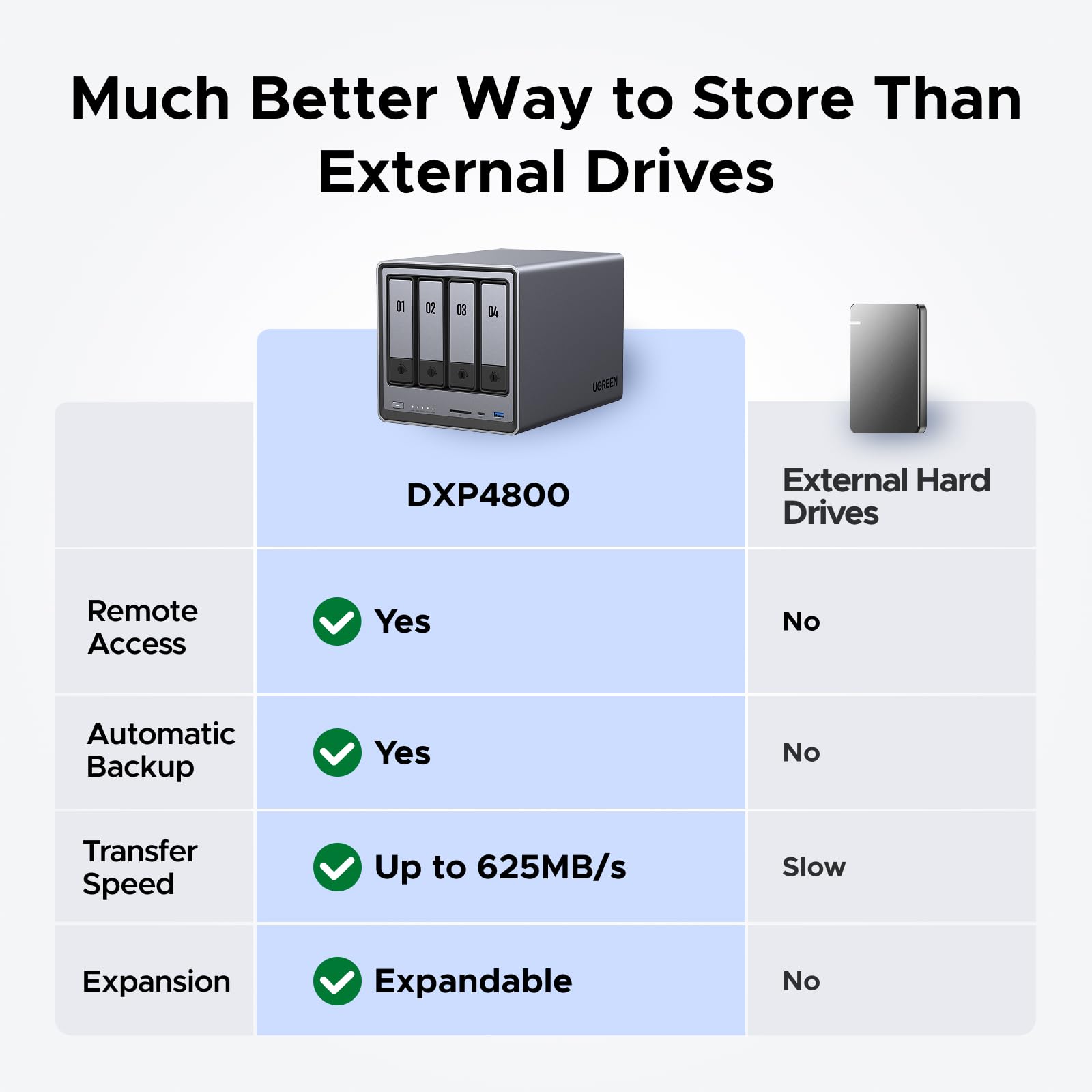


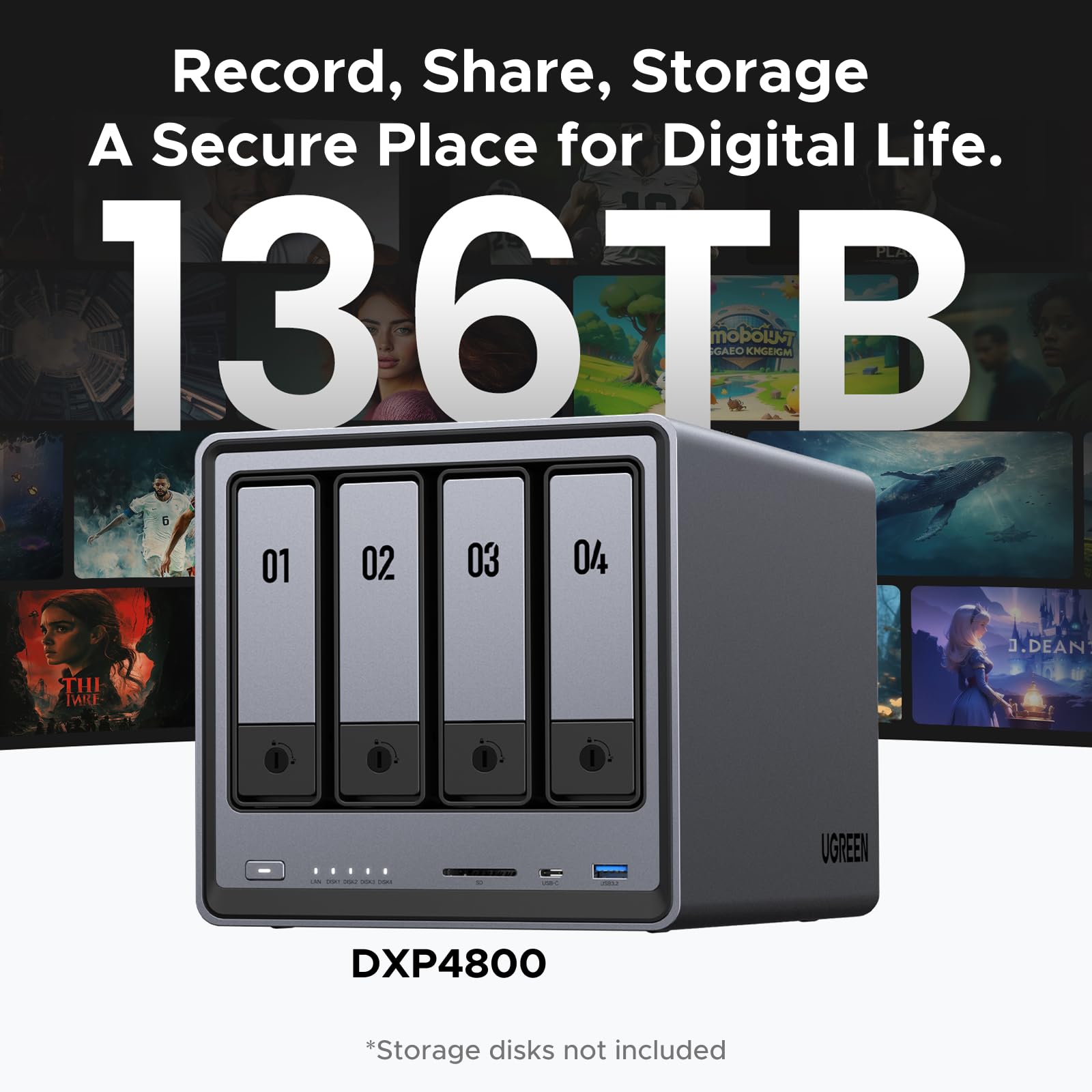

🚀 Elevate Your Storage Game — Speed, Space & Security in One Sleek NAS!
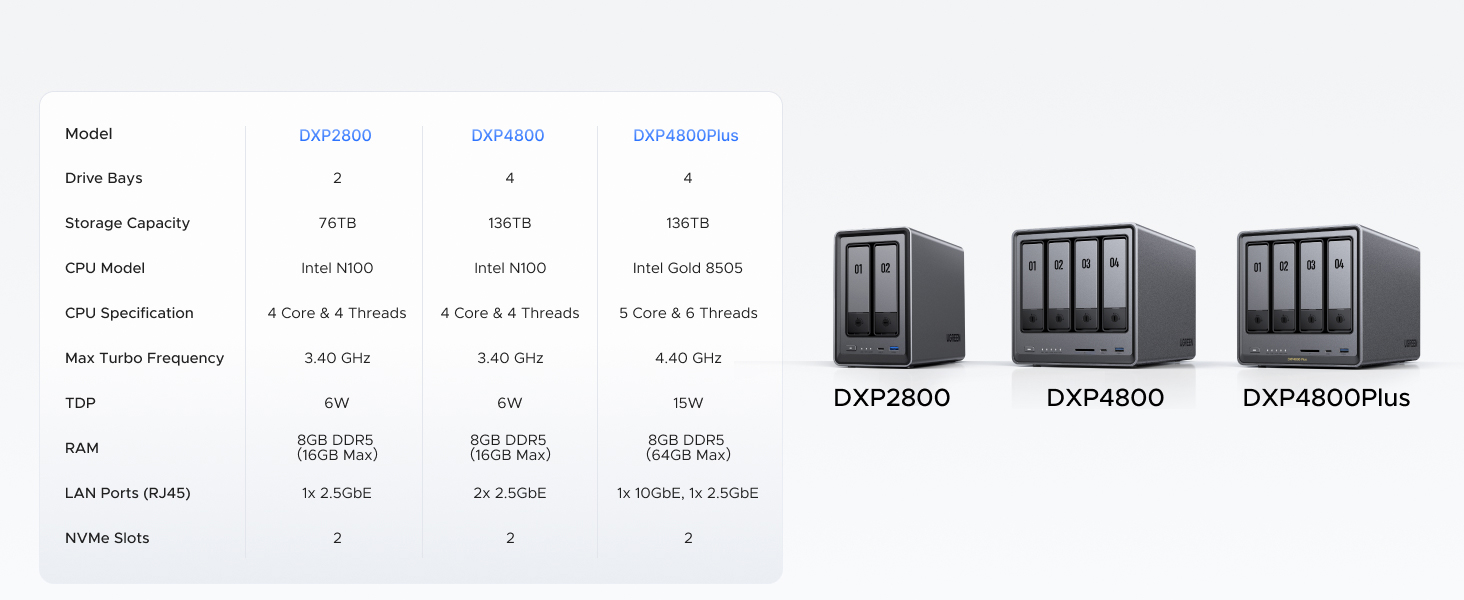
The UGREEN 4 Bay NAS DXP4800 combines a cutting-edge 12th Gen Intel 4-core processor with massive 104TB expandable storage and dual 2.5GbE network ports for ultra-fast data transfers up to 625MB/s. Designed for seamless cross-platform access and fortified with professional-grade encryption, it’s the ultimate storage solution for professionals demanding speed, capacity, and security in a sleek grey enclosure.




| ASIN | B0D22HF3VN |
| Are Batteries Included | Yes |
| Batteries | 1 CR2032 batteries required. (included) |
| Brand | UGREEN |
| Colour | Grey |
| Customer Reviews | 4.5 4.5 out of 5 stars (1,346) |
| Date First Available | 25 May 2024 |
| Form Factor | M.2, 3.5-inch |
| Guaranteed software updates until | unknown |
| Hard Disk Description | Mechanical Hard Disk |
| Hard Drive Interface | Serial ATA-600 |
| Hard Drive Size | 96 TB |
| Hardware Platform | Computer, Mobile phone, Tablet |
| Item Weight | 6.17 kg |
| Item model number | DXP4800 4-Bay |
| Lithium Battery Energy Content | 220 Milliamp Hours (mAh) |
| Lithium Battery Packaging | Batteries contained in equipment |
| Lithium Battery Weight | 3.2 Grams |
| Manufacturer | UGREEN |
| Number Of Lithium Ion Cells | 1 |
| Package Dimensions | 38.1 x 27.43 x 26.16 cm; 6.17 kg |
| Series | 25371 |
C**O
El mejor más en éste rango de precio
T**Y
Definitely a solid NAS. I bought it 6 months ago and used a lot to write a detailed review. Pros: +Good quality hardware. +NVME & HDD storage pool options. +Ultra High speed access/transfers with 10Gbit Ethernet on NVME Storage pools. I think this is the key reason I have chosen this NAS. I can easily reach over 1GBytes/sec. speeds over the 10 GBit network (even can go faster with 2 ethernet link aggregation). I almost stopped using my external NVME drives after having this NAS. (This is really Great!!) Before this NAS I was planning to have Synology DS923+ and 10 Gbps network upgrade. But NVME storage pool is not available unless you don't purchase Synology nvme drives which is even more expensive than MacBook SSD upgrades!!! Besides you cannot find any Synology NVME over 2TB!!! Go to hell Synology!!!! +Silent cooling. +Very fast in general and Very fast startup/shutdown. (Thanks to having a separate NVME drive for operating system) Previously with my old QNAP NAS, it takes ages to boot up so I was never shutting it down and the times I don't it was consuming power for nothing. Now I don't hesitate to Shut down, it boots up less then a minute!! +Compatible with all HDDs I have. +Freedom for using and OS you want. Actually I am using with stock Operation System (UGOS Pro). But I have plans to try TruNAS someday. Cons: -Original Operation System is good, fast and stable, But still needs improvements. For example; manually adjusting the fan speeds, Or conditional adjustments like QNAP has "if X drives goes over 40C increase the fan speed". There few more things that I don't see in the their software, so still there is room for improvement. But still at least faster than QNAP's slow QTS system. -NVME cooling is not efficient. Actually fan doesn't have any effect on SSD cooling. Initially I was using 4TB WD SN850X. Several times I heard the FAN speed up when I was writing on SSD. I checked the system if there is another reason, CPU was cool everything was cool but NVME was over 50 C. And due to fan has no effect on SSD compartment it doesn't cool the SSD down and it blows high for nothing during this write process. So you have to find a cool working SSD with this NAS. But it is kind of hard since it is a NAS and the SSD you choose should have DRAM and TLC Nands. Mostly you can find this combination in higher and drives which are generally get hot. Seagate firecuda 530 and Samsung 990 Pro or any other cooler working SSDs are better options for this NAS. - Similer issue with above SSD compartment is very slim and you cannot use SSDs with original heatsinks. I already had a 8TB WD SN850X (with original heatsink) and I couldn't use it as well. I didn't want to remove the heating cuz I know it will be hell hot. In general finding the perfect SSD for this NAS is really tricky. But there are some 3D print options on the web to make this compartment larger to use heatsink or even to attach another fan for SSD compartment, but in my opinion FAN is unnecessary, if you can install a proper heatsink, I believe all SSD will be fine.
M**L
I’ve been following the UGREEN NASync series since its Kickstarter days, and as soon as it hit Amazon Canada, I didn't hesitate. After nearly a year of daily use, I can confidently say this is one of the best tech investments I’ve ever made. The "Apple Tax" Solution: The real value of this NAS became clear when I bought my new MacBook. As many know, upgrading internal storage on a Mac is incredibly expensive. By using the DXP2800 as my personal cloud, I was able to buy the base model laptop and store all my heavy files, photos, and media on the NAS. I can access everything from anywhere in the world, saving me hundreds of dollars in hardware upgrades. Performance & Reliability: Even with the stock 8GB DDR5 RAM (I haven't felt the need to upgrade yet), the Intel N100 CPU handles everything smoothly. I primarily use it for: Automatic Photo Backups: It syncs my phone photos instantly, allowing me to keep my phone storage free. Media Streaming: It serves as a flawless movie hub for my home. Fast Connectivity: The 2.5GbE port is a must-have. A great pro-tip: if you need even more speed, you can use one of the USB ports for an extra ethernet adapter! Software & Build: UGREEN has been very consistent with software updates. The app is intuitive and improves every month. The build quality is premium and feels like it was designed to last. It’s quiet, efficient, and fits perfectly on my desk. Pros: Significant long-term savings on phone/laptop storage. Easy M.2 NVMe and RAM upgrade paths. Solid 2.5GbE performance out of the box. Consistent software improvements. Cons: As a "light to moderate" user, I haven't found any real flaws. It does exactly what it promises. Final Verdict: If you want to own your data and stop paying for monthly cloud subscriptions or overpriced hardware storage upgrades, this is the way to go. Highly recommended for families and small teams!
D**N
It's not often that I write 'glowing' reviews, but putting together the UGREEN DXP6800 has been a real treat. I've outfitted the NAS with six 12TB Western Digital Blue drives in a RAID 6 configuration, added two Samsung 990 NVMe SSDs for cache, and expanded the RAM to 16GB. The DXP6800 is really well constructed and more importantly, well thought out. The drive installation is super simple and the access to the SSD and RAM is excellent. One of the nicest things about this product is the comprehensive documentation. Every feature, every setting, every option is outlined in very thorough detail and written by someone who obviously understands the product inside and out, and is also fluent in English. This is the best documentation I've seen on a high-tech product in a long time. The features and performance are also top-notch, with an impressive lineup of additional (and USEFUL) apps that can be installed - and again, with full documentation on each app as well (and a good overview describing what the app is before even installing it). I was able to put the array together, get it configured, stripe the drives, assign the SSD as read/write cache, create user accounts, install SMB to map it as a 'network drive' and DLNA for the media server - and every step just made sense. There wasn't a single time where I was scratching my head, wondering how something was supposed to work ... it just works as it's supposed to. I'm very pleasantly surprised.
R**.
I will start by saying I have been in enterprise IT and software all my life, so my needs requirements and standards may vary from the average home user. That being said, I believe in bang for the buck, and the DXP8800 delivers above and beyond its competition for the price point (as long as you equip it accordingly). I have finished the burn in and testing period with this NAS and I am extremely satisfied. I purchased this to move off of my aging 6x6TB WD I7 32gb NAS cube. The UGOS Pro operating system has come a long way and as of this review it is mature and handles everything you will likely be throwing at it except for the most advanced enterprise use cases where this device as a whole wouldn't be considered. My DXP8800 setup is as follows beyond factory delivery: 96gb Crucial Ram, 6x16TB WD Red Pro Spinning Disk, 1x WD 850 2tb nvme, 1x WD 850 1TB nvme, 2x Noctua NF-12 fans. While I considered moving to TrueNAS, I have found the UGOS pro native operating system to be more than sufficient for my advanced needs. Despite what you might find in older research, UGOS pro is natively seeing all my RAM and making use of it in Cache (previously the synopsis was UGOS pro was capping at 64gb, no longer the case) Let's start with the drives: I went with WD Pro because while I primarily stream media, I stream it in 4k and this is my primary use for this NAS (plex >70% use). I also use the device for Time Machine backups which was especially easy in UGOS pro OS for setup. These drives are going to run hotter and noisier than the WD Red plus drives and equivalent because they are basically enterprise drives. My NAS is in my home networking area, so noise wasn't an issue but to be honest these drives click and grind and while you dont want to have this sitting next to your desk, the reality is a NAS of this size should not be sitting at your desk. I also appreciate the enterprise reality of things that most consumers don't consider: the WD pro drives have internal vibration controls which mitigate issues when co-habitating with other devices spinning in the same case at 7200 RPM. The DXP 8800 with these drives alone can saturate the 10gbe connection, but the additional warranty, addition of the helium barrier etc make it worth it vs the plus drives alone. It's your data, and if you are running a NAS to begin with you run a lot of it and integrity is important to you. Dont cheap out. Let's talk NVME: I run all my docker and VM's on the low speed port of the NVME side of the bus with my 2tb WD 850 nvme. I chose the versions with heatsinks for both NVME's and they fit fine so it was worth the upgrade. I also used the big thick pads provided by Ugreen to make contact with the NVME heatsinks and the case to improve cooling performance however marginal. Important to note that I chose NVME with onboard DRAM so there was less processor interaction with data compute. For this device, my research concluded that onboard DRAM would play a role and I dont regret the decision despite the extra head and +1=1.5w of additional power. I am running the 1tb NVME as a cache drive in the high speed slot, but so far have seen no utilization of cache (so consider your real needs). The large 30gb media files I am typically streaming are never going to make it to cache. I am going to leave it in place for now as I move to more smaller files and leverage the storage more across my home, but as of now I dont regret the cache purchase but am seeing no real world improvement thus far. If you are using TrueNAS you can force a more specific use of the cache, but then you are maintaining an L2ARC tuning environment that as nerdy as I am, I dont see a real-world home use for. Let's be realistic, this is a Home/SMB NAS, and a very good one. But if you are trying to throw this in your business enterprise you should be x10'ing your budget and go with something enterprise. Another thing I have come to see debated is noise levels: for the purposes of this review I will reiterate that anyone looking at an 8-bay NAS really shouldn't be parking it on their desk. That being said, lets talk real noise world statistics as noise and heat dissipation are unwisely not discussed simaltanseously : I already discussed why my drives are noisy and if you drop down to WD Red plus drives at 5400 rpm they will never make noise, that I can attest to even with my old 6TB 5400 plus drives. So let's talk fan noise: I have upgraded both fans to the Noctua industrial NF-F12 fans. With the stock fans, I was seeing ~40C per spinning disk and ~42C per NVMW idle / light load temps in the fan's "default" setting (meaning the system controls based on temperature, vs low or full fan setting). In full-fan mode, the stock fans can drop the same idle/light load temps to ~36C and the NVME's to ~40C. Not terrible, well within operating specs and I am comfortable the stock fans would carry my current setup under load so for most users esp those not using the big fat pro drives I am using, will be fine. The stock fans are impressive and not as loud as I expected running in "full" mode. I still chose to upgrade to Noctua, not only because I have been using them in most of my builds for year but also because they are the best at what they do. After the upgrade, I put the drives under load and yes these fans are very loud at "full" setting (but still below typical IT server levels). However, at heavy load with these fans cranking my drives never got above 40C and my NVME never above 47C. At idle with "full" fan setting, these fans keep the drives at 22C !!! In default mode (ie systems controlled) my spinning disks are sitting at 32C and my NVME at 36C with idle to light loads. Anyone moving towards loading this chassis beyond 5 disks should perform this very inexpensive and easy upgrade. For those interested in Plex, I have had no problems testing a down-convert (heavy) transcode of 4k to 1080p plus audio and found that pulling from an Apple TV 4K has no performance issue whatsoever. The new i5 in this machine despite being technically a mobile processor spec, holds its own better than my old system by a large margin. Unless you are transcoding 5+ streams at once (at which point this NAS is not your use case) you will not need an external GPU or anything to carry you forward in the near future. Plex performance has been monumental on this system in a docker container. As I mentioned earlier, while I am an advanced user I dont see the merit in moving off UGOS pro for SMB or Home use at this point no matter how advanced your needs are. I wish one of the big tech bloggers would let the world know how far this OS has come in a year vs what the forums represent. It supports VM's, dockers, all SAN NFS and attachment requirements now for use cases that you shouldn't even have for a device like this, but it does it and does it well. Drive sleep works great, performance is solid, backups are easy and integration and navigation for people who dont really understand remote storage like they think they do is a god send for the prosumer. You can accomplish very advanced tasks in UGOS pro without risking breaking something because you dont really know what you are doing. I cannot comment on the smaller enclosures first-hand, but I do know that Ugreen 6 bay and 8 bay are identical in terms of my use case and review. The smaller docks do make some changes, but I believe most users will see results better to if not equal to what you will get on Synology or Qnapp. I expect those vendors to pivot hard with new offerings coming in the next year, but I dont see them getting to this price point any time soon if ever. Build quality is extremely important, and Ugreen made this thing more aesthetically pleasing than it needs to be but my thanks anyways. I found it very easy to work on, well constructed and thoughtful to meet the needs surpassing what someone looking at this NAS should be using it for. Performance has met specs. There are a lot of people out there talking about network, disk etc but these are highly environmentally variable. I have not performed any advanced or undercover configs or tuning with my setup on UGOS pro and despite the zero cache utilization I can saturate a 10gbe port which lets face it is amazing at this price point. Your mileage will 100% vary on your setup, but I spent more on drives than the NAS itself: I understand my use case. FYI there is value in having 2x10gbe bandwidth available to your NAS even though your devices individually arent 10gbe, but again it varies on your use case. My Apple TV will soak a full line 1gbe if I let it streaming the right content, no problem for any network unless other things are also making similar requests. In conclusion, the is s a recommended buy: you just cant go wrong for the price/performance and whatever it is you think you might be missing you arent. If you genuinely are, this is not the hardware category you should be shopping. The below is a list of my upgrades and where to find them on amazon: FANS: https://www.amazon.com/dp/B00KFCRATC?ref=ppx_yo2ov_dt_b_fed_asin_title RAM: https://www.amazon.com/dp/B0C79K5VGZ?ref=ppx_yo2ov_dt_b_fed_asin_title&th=1 NVME: https://www.amazon.com/dp/B0B7CKZGN6?ref=ppx_yo2ov_dt_b_fed_asin_title&th=1 Hard Drives: https://www.amazon.com/Western-Digital-16TB-Internal-Drive/dp/B08K3VVKSW/ref=sr_1_1?crid=31QE24X27ZDJ8&dib=eyJ2IjoiMSJ9.dIpadfnImZ7C_0Kqqte1uAL9l3bBfISZMpN4Lm9RnDEI4XsNq2vZ3AKDZwyLljcoO7BXeIcKmOApaZoVB3YMBA1r3D33x5vcDCFmY3N_3y2kyw27LwYZ_-QeP0S-qgwDiRmYRbVBXSbVRttmEA4UM4wDcHPyh6p-7Icu8nIz0fTMOcKt47RdNHpiKtjXZZvvZ0deFR1dA5Fc6y8eordLZ0u1v9iFEy_6cpXbqFDWJGo.uO4pURF5JM1_nzSspjXBlnFqFI3ud5JH-W258FIWLwo&dib_tag=se&keywords=wd%2Bpro%2B16tb&qid=1753114536&sprefix=wd%2Bpro%2B16tb%2Caps%2C157&sr=8-1&th=1
Trustpilot
2 months ago
2 weeks ago