Desert Online General Trading LLC
Dubai, United Arab Emirates
Desert Online General Trading LLC
Dubai, United Arab Emirates


⌨️ Elevate your desk game with precision and durability that professionals demand!
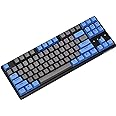
The DURGOD Taurus K320 TKL is a compact 87-key mechanical keyboard featuring high-quality Cherry Blue switches for tactile and audible feedback, a robust 50 million keystroke lifespan, and full N-key rollover with anti-ghosting. It offers adjustable angles for ergonomic comfort, detachable USB Type-C cables for versatile connectivity, and compatibility with both Windows and Mac systems, making it ideal for gaming and professional use.


J**P
Currently the best under 100$ keyboard available
Durgod is currently the best under 100$ keyboard available in the market. It stands on par with Filco and Leopold in terms of build quality and performance. When compared to Coolermaster's MasterKeys, it suffers from absolutely no key rattle (the spring tang noise you hear especially when you hit the enter, backspace or spacebar keys). It is also a slight bit less noisy than my Cherry MX Brown Switch Coolermaster TKL keyboard. Hence, methinks, the extra $20 dollars you pay is well worth it. The two detachable cables (not braided) supplied is USB type C, which is an added bonus.Those were the pros and now for the cons...* The led lights for the capslock key is faint and not in-your-face bright unlike Coolermaster's. Is this even a con, I wonder?* I have noticed some versions of this keyboard reviewed on youtube come with extra blue Durgod engraved keycaps supplied in other countries. This package came with a keycap puller but no extra keycaps.* Durgod website is lackluster or even nonexistent. Luckily, I have no use of their software.
O**A
Was great at first. I don't recommend anymore. Looking at replacing after 6 months.
First off I went from a full sized Azio mechincal keyboard that used Kailh brown keys to this Cherry Brown and OMG what a difference in feel and sound. For one it fits better on my slide out VIVO keyboard drawer. I was worried that unlike most high end keyboards that the all plastic body would be something I wouldn't like, flexible etc ... FAR from it. This keyboard is solid and for the size it weighs quite a bit, not moving around like my older keyboard did.So far I love the keyboard and will work around how to get the software working since it does all I need right now, type symbols on my computer.So far only two cons:One, is one I knew going in and that is that the software is Windows not Linux.The website is horrible and really buggy. I was finally able to download the .exe file with Chromium on Linux, Firefox was a no go.Update 02122020: The rubber pads came off the small back lift feet after only a month. The front pads are okay. it does cause the keyboard to slide and needs repositioning a lot more now.Another Update, 03012020: I think the overall price was way more that what I got, off with another star. Don't get me wrong, I like the keyboard BUT, 1) for the very HEFTY price of $130 USD the rubber feet should stay on forever, 2) I should have more lighting options without software since I run Linux or maybe something I can compile 3) A wrist rest that works well with the premium price tag.I love it but wouldn't recommend it to a Linux user and only tell a friend if I gave them all the info above.UPDATE 04/17/2020:Now the keyboard just fails and only starts working again if unplugged and plugged back in for the last 2 months, or at 4 months old. For $130 this is not a good keyboard overall. Shame is that it does feel good. So recap, rubber feet fell off within two months and within 4 months or so I have to unplug / plug it back in a few times a week. Personally I would look else where.UPDATE 04/18/2020:Now after only 6 months of causal typing have to replace my $130 keyboard where my last $70 keyboard wouldn't have needed replacing after over 2 years of use if I hadn't spilled coffee on one side of the keyboard. I won't every buy or recommend Durgod keyboards. Not to go hope I find a better one for less.
K**R
Awesome keyboard/build, but software and firmware issues make it unusable
I love the feel of the keyboard, and build quality is awesome.Unfortunately, I made the mistake of loading the software from Durgod in an attempt to remap CapsLock. That was a big mistake -- the keyboard was completely useless after that, their custom driver was complete garbage. I did manage to remove that driver and rebind it to the stock microsoft driver (in Windows 10), and that made things much better, but still... not good.In particular, the keyboard frequently locks up such that all keys no longer work. (Easily verified by pressing ScrLk and noticing that the lights no longer work.) Removing the USB cable (from either end, it doesn't matter which, so it's not a bad connection in the cable) and reinserting resolves... for a while.The software I installed included a "firmware upgrade", which I think is largely responsible for the problems.It's incredibly disruptive to be typing along and suddenly have the keyboard stop responding. This can happen at any time, and does not appear to be linked to sleep/wake on the laptop or anything like that. It's infrequent enough that I haven't yet replaced the keyboard, but I'm close to it.If they would fix the software so that it Just Worked, this keyboard would be a 5 star instead of 1 star review. When it's working, it's a joy to use. But the hangs are just completely unacceptable.Note that I have other keyboards (membrane keys) which I like less, but which don't suffer these problems at all.
R**S
Scratched keys, annoying sounds, US layout; not as special as I expected at this price point!
Based on the UK reviews (albeit not many of them) on this I expected to receive an exceptional product, but I was let down by a few flaws that although seem mild individually, add up to be annoying for a keyboard that costs over £100. I would value it at around half the price after using it.Cons:• Some of the keys are clearly damaged. PBT keys are supposed to be exceptionally robust compared to most other materials, hence it takes an intentional or rather hard force to damage a key in the box. Judging from the fact that some of the keys on the edge of the keyboard (left arrow & escape) have clear scratch/dents I'm going to guess the product was manhandled at some point before I received it. The box it came in was undamaged so it must have been somewhere along the supply chain before shipping.• The spacebar, left shift and enter keys among other minor keys clearly need greasing. The scratchy noise and feeling when pressing them is annoying immediately after using the keyboard. The keys are a mixture of lubricated and unlubricated, so keys next to each other make obviously different sounds.• US layout - This is something I knew before purchasing (that there is a dollar sign and no £ sign on the keyboard), but the fact that the # key prints a £, and the \ key prints a #, and many other such incorrect labellings for a keyboard being sold in the UK is driving me nuts! Almost half the symbol keys will print something else. If you're someone who cannot remember where all the symbol keys are, think again about this purchase.• The Durgod branding looks quite bad. It is on the side and there are brands that print these logos on the top of the keyboard, but those keyboards are half the price of this one. For this price I would expect better.ProsThere are many, but you may not notice them if the above annoyances become the center of your focus.• The weight (900g) makes the whole keyboard seem premium.• Even though the case is made out of plastic, it seems like high quality plastic (apart from the damaged parts).• Overall it looks great, minimalistic and the color (space-grey) looks excellent on a black or white desk.• USB-C cable is a great addition (Pro), but I must add here that it's half the length of its USB-A counter-part so if I do use it, it might be a bit too short for me (Con).
J**F
Really good value keyboard
Fantastic build quality, clearly punches above its price.As specified, the box came with 2 cables, with I found both a bit too long for my setup, got an Amazon Basics USB-C to USB-A cable that worked as a charm.After installing rubber o-rings under the keys, I found the keyboard extremely comfortable to use. The keys don't sound too loud when pressed, as long as they are not pressed too hard (which is a bad idea in the first place).Using it with a Macbook Pro running macOS Catalina and was pleasantly surprised that the media keys work properly (Fn+F1 for play, etc). I had to go to the typical procedure for Windows keyboards under macOS of assigning Alt to Command and Windows key to Option, but after that it works fine. The only problem is that since there is no right Windows key, I didn't get a right Option key, which messes a bit with some shortcuts I've muscle memory for, but that is no deal breaker. The Windows menu key is not recognised, can't do anything with it, again no deal breaker. PrtSc, ScrLk and Pause were recognised as F13, F14 and F15, and I was able to assign shortcuts to them.As a software developer, I find the US layout by far the most natural, still get the pound sign with Option+3 on macOS.Overall very happy with the purchase so far, personally regret not pushing the button sooner. Was using an Apple Wireless keyboard for years for my desk setup, I think it's an excellent keyboard, but personally find the comfort on this one leagues away.
R**0
Key's been BROKEN after a month use and even NO response from seller!
I bought this K320 keyboard a month ago and it was good in the first few weeks. However, about two weeks ago the F7 key (also the key for volume up) started not functioning from time to time. And from the last week, the F7 key finally went wrong and did not respond anymore even though I tried my best to save it.I have tried leaving a message for the seller regarding this issue because the return window's closed. But I haven't heard from them yet, please come up with a solution (like a return or a replacement) if you see this feedback, thanks.
K**E
Quiet! Works great.
The media could not be loaded. I have had blue switch keyboards for the last few years (gaming and work). I was starting to get annoyed with the clacking sound of blue switches but still wanted a mech keyboard. This is exactly what I wanted. All the keys seem even, they are significantly more quiet then the blue switches on my other keyboard. I also really like the minimal "old" look of the keyboard.
I**D
Fantastic Mechanical Keyboard
The easy of typing on Cherry Brown switches, the sound and the overall build quality of the keyboard is probably some of the best I have every had the pleasure of using. I really enjoy the fact that the overall aesthetic of the keyboard as it is very simple.The keyboard itself has a very good size especially on a small desk and it is also quite sturdy and I don't feel like I can break this in anyway. The caps themselves feel great to type on and have a nice finish on them. This is an American keyboard so there maybe some signs you won't be able to figure out so I would recommend experimenting with holding the Ctrl, Alt and Shift buttons if you can't locate a particular symbol.If I had an option to then I would certainly invest in a back-lit version as I have no begun to work in the dark haha.
Trustpilot
1 month ago
2 weeks ago