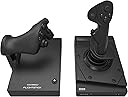
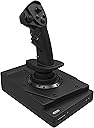
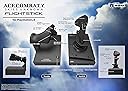
✈️ Take control, dominate the skies, and never miss a beat!
The HORI Ace Combat 7 HOTAS Flight Stick for PS4 offers a professional-grade flight experience with separate joystick and throttle, adjustable sensitivity, and immersive haptic feedback. Officially licensed by SIEA and Bandai Namco, it features an integrated touchpad and headset jack, delivering seamless control and connectivity for Ace Combat 7 enthusiasts and VR pilots alike.


| ASIN | B01A0P8NBC |
| Customer Reviews | 3.8 3.8 out of 5 stars (232) |
| Date First Available | October 13, 2017 |
| Is Discontinued By Manufacturer | No |
| Item Weight | 7.5 pounds |
| Item model number | PS4-094U |
| Manufacturer | HORI |
| Product Dimensions | 27.56 x 19.69 x 0.39 inches; 7.5 Pounds |
| Release date | January 18, 2019 |
| Type of item | Video Game |
D**M
After the shipping was straightened out, these are fantastic.
My original review was a one star due to the whole shipping ordeal that everyone preordered experienced. I received the product yesterday and I used them last night. Overall quality is better than some controls twice the price, feels great and great fit to the hands. My only complaint is that I wish they were a tad heavier weight wise. Other than that, these controls are great. They really shine in VR mode! Completes the whole feeling of actually flying the aircraft!
E**K
Excellent Stick and Throttle!
I've been hoping for a long time for someone to come out with a HOTAS for the PS4 especially for Ace Combat and well, here it is! It's a beautiful stick and throttle combo!
T**S
I'm sending it back after a few days. Huge dead zone, complete inability to be precise.
It's made well enough, no complaints there. They're light so without the suction cups the base of the stick lifts up, the bases of both are roughly 8"x6". The vibration, or "haptic feedback" is only in the stick and is focused more at the top of the stick than the center where most of your hand is. The rudder buttons are poorly placed, at least for me and my fingers aren't short, the buttons are directly under the center of your hand which can cause cramping or fatigue. The knobs do absolutely nothing, at least on PS4 though they do have resistance which may indicate a use on PC. There is a literal fake button on the throttle just below the switch labeled 1-2-3. That switch changes how the throttle behaves, switching the rudder buttons to accelerate and decelerate and the throttle forward and backward movement then controls the rudders when switched to 2- when switched to 3 both the rudder buttons and throttle motions control the camera and remove throttle and rudder control completely. There is a bit of a dead zone. There are two different directional buttons, one on the throttle one on the stick, the one on the throttle is turned on it's side so when you press what you think is up, you're actually pressing left. A dedicated Post Stall Manoeuvre button. The triangle and square button should have been swapped since the controller has square on the left, not on the right like the stick. The track pad, which resizes your minimap, is impossible to touch without removing your hand from the stick or throttle, so good luck making use of that in battle. The PS button doesn't turn on the console! Once it's on the HOTAS functions like a normal controller. It definitely takes some getting used to and you need to find a comfortable way to use it. I'll update in a few days once I have more time with it and can say if it's worth $200. *Update- it's not worth it. Huge dead zone and a complete inability to be precise. If there were no dead zone then precision wouldn't even be an issue. It's absolutely impossible to resize your map without taking your hand off of one of the controls. It's a novelty, it's a gimmick, it's not a controller for people serious about playing the game. No console HOTAS is worth the money, don't waste yours. You'll play infinitely better with a regular controller.
C**I
Most money for the worst experience
Pros: - It says 'Ace Combat 7' on it. Cons: - L1/R1 and L2/R2 buttons are mapped opposite. Throttle control is default mapped to L2/R2, but when i pushed forward on the joystick throttle, guess who starting Yawing to the right? This guy. Conversely, i decelerated the joystick throttle and sure enough, yaw to the left! Out of curiosity, i started pressing the L1/R1 underbuttons (which is yaw, and SHOULD be controlled by TWISTING the joystick left and right) and wouldnt you know it? The plane started accelerating! - As mentioned above in parenthesis, YAW on this controller is some soft-press underbutton (1 button, not 2) located on the part of the joystick that controls throttle. With previous joysticks ive used, the yaw control was mapped to twisting the joystick left or right. (In a real plane, the yaw is controlled by footpedals. twisting the joystick is really the better secondary option). - THERE IS A DEADZONE WITH THIS JOYSTICKS MOVEMENT!!! How is this a thing?!?! You want to hairline adjust your pitch or roll? Tough, this controller doesnt register movement until you've move the joystick past a certain point. So any smooth, hairline adjustments turn in to jerky, harsh changes in direction. Perhaps you can learn the nuances of this sensitivity over time, unfortunately the next problem makes this controller overall un-usable... - There. Is. Lag. For a WIRED controller. Its about a half-second lag between input and response. So those tiny adjustments to your heading? You'll NEVER hit your mark, because of the deadzone PLUS the delayed response, you basically just wind up rolling the plane over and pulling up into the ground. Other minor W.T.F.'s: - There's buttons on this joystick that have no function. None. Whatsoever. Which may not be seen as an issue, but when there are buttons on the controller that have been wired opposite each other (L1/R1 & L2/R2, im looking at you), you'd think the company would take the time to ensure the buttons that DO something actually DID what they're SUPPOSED to do. Instead, lets add a few more buttons for sh*ts and gigs and ignore proper functionality of the buttons that actually control gameplay. - No instruction manual with this joystick. Minor complaint, yes. But since the joystick came with a big rubber piece that is supposed to be attached to the joystick, i spent a few minutes trying to figure out where the heck that rubber piece was supposed to go. I found it, but I digress... There IS a QR code you can scan that is SUPPOSED to bring you to a link to download the manual. Instead, I'm brought to the companies website where I am asked if I would like to purchase this joystick. REALLY?!?! And upon intensive scouring of your companies website, guess what I NEVER found? The manual. - My final minor complaint: You can not attach these two pieces together to make them 1. Dont get me wrong, i LOVE having the joystick and the throttle control separate, it makes for the VR experience. But when im playing without the VR headset, i would prefer to have the controls resting on a table right in front of me. And if im playing aggressive, i would like to use both my hands to hold the whole controller still while im playing. When they are separate, i find quick movements make the joystick and throttle bases slide around. Forget those crappy rubber suction cups that come with it, even though i think the cost of making those might be more than the cost of the rest of this busted-a** controller. TL;DR: This controller is worth 25 bucks at most. Its absolute garbage and any money invested in a flight joystick controller would be better spent with ANY other option out there on the market. Avoid buying at all costs. PS. I dont EVER write reviews for products, but THIS one NEEDED to be written...
M**L
Its a bit to set up for different games, supposedly it just a ps4 controller in the shape of a flight stick and throttle. I found it to be abit of a challenge to set up the buttons, and there are the same buttons on the throttle and the stick, so it seems to me that it limits the configurations and designations for different games. Over all it adds to the experience of flight. Nice for ace combat and starwars squadrens, but again abit limited, Or maybe in the ps4 (settings-accessibility- button assignments) there might be way ??
D**Y
Wow! J'ai acheté ce joystick pour jouer à Star Wars Squadrons... Tellement trippant! Ok, c'est dispendieux et complexe de programmer des commandes, mais après, c'est incroyable!
A**.
Not good at all flimsy cheap plastic my opinion complete garbage for almost $300 man I wish I would have saved my money
Trustpilot
1 week ago
2 weeks ago