🎤 Elevate your headset game—wireless pro audio, anywhere, anytime.
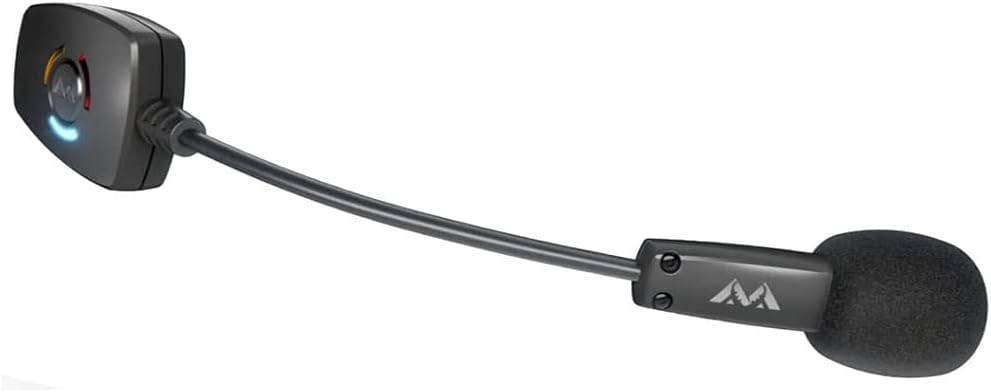
The Antlion Audio ModMic Wireless is a detachable boom microphone that magnetically attaches to any headphones or VR headset, delivering professional 16bit/48kHz audio quality with ultra-low 34ms latency. Compatible across PC, Mac, Linux, and PlayStation platforms via USB-A, it offers dual mic modes for noise cancellation or high-fidelity recording. With 6+ hours of wireless battery life and a flexible design, it’s the ultimate upgrade for gamers, streamers, and remote professionals seeking premium voice clarity without the wires.


| ASIN | B07KQF165L |
| Antenna Location | Gaming, Streaming, Video Conference |
| Audible Noise | 75 Decibels |
| Best Sellers Rank | #9,887 in Electronics ( See Top 100 in Electronics ) #385 in Over-Ear Headphones |
| Brand | Antlion Audio |
| Built-In Media | Wireless USB 2.0 Type-A Receiver with USB Extension Cable; USB-A to USB-Micro Charging Cable; Magnetic Clasps and Adhesive Stickers; Cleaning Pad |
| Color | Black |
| Compatible Devices | Personal Computer; Laptop; Gaming Console |
| Connectivity Technology | Bluetooth |
| Connector Type | USB Type-A |
| Customer Reviews | 4.1 out of 5 stars 2,738 Reviews |
| Enclosure Material | Neodymium |
| External Testing Certification | Não aplicável |
| Frequency Range | 20Hz - 20kHz |
| Global Trade Identification Number | 00761878978586 |
| Hardware Platform | PC |
| Item Dimensions | 7.3 x 6 x 1.4 inches |
| Item Weight | 210 Grams |
| Manufacturer | Antlion Audio |
| Microphone Form Factor | Detachable |
| Model Name | ModMic |
| Model Number | GDL-0700 |
| Number of Batteries | 1 Lithium Ion batteries required. |
| Number of Channels | 1 |
| Polar Pattern | Unidirectional |
| Power Source | Battery Powered |
| Recommended Uses For Product | Gaming, Streaming, Video Conference |
| Signal-to-Noise Ratio | 75 dB |
| Special Feature | 16 bit; 48 khz; 20hz to 20khz frequency, noise-canceling; latency of only 34ms |
| UPC | 761878978586 |
| Unit Count | 1.0 Count |
W**.
Still kicking after 4 years of heavy VR usage.
A bit late on the review for this microphone, but since the company haven't released any updated better version of this device this review should still be relevant. I bought this microphone back in 2021. I used it heavily for 4 years and to this day the battery life is still pretty decent after a full charge. I am still using it currently. I bought it mainly for VR usage. I attached the magnet to my VR headset and now it's got a dedicated mic and it sounds way better than the microphone my old HTC VIVE Headset. One of it's greatest strengths is that you can attach this mic to any current or future headphones that you buy. Most headphones that come with mics built in are usually crap anyways so to have the option to attach this high quality wireless mic to any thing is a big plus in my book. Sound quality is very decent. It's definitely a microphone just for communication so don't expect to sound like a $500 studio condenser/dynamic microphone. It's still way better than any $20-50 microphone just by sound quality and convenience. Battery life last around 6+ hours now so it has definitely dropped from the 12 hours when it was brand new. Still pretty good considered it was used heavily for 4 years. If you have any kind of audio interface or mixer software that can process the output from this mic. You can adjust it with noise gates, equalizers, compression, and all that good stuff which will make it sound like a $500 mic. That's something else you have to spend entirely, but it's something to keep in mind that you can do to improve the audio quality of this mic. My biggest issue with the mic is the charge times. It take like an hour or longer to fully charge. It's an old mic so it doesn't have any of the new quick charge features of todays smartphones and gadgets. It would be a great update feature if they ever do refresh this mic. When this mic does finally die I am definitely going to get another one.
J**E
Good mic but need more of the Magnets
Really Good Mic I used to use the HTC Vive and well that mic was garbage Got this and Improved audio quality allot so definitely Recommend There is a few negatives the case with extra things got Stolen so can really put it on more things now and Also playing BeatSaber you kinda end up Breathing into it so just be careful with that
S**Z
Buying first gen usually comes with it's caveats.
Update 10-12-2020: Just an update it's still working. The only issue that has developed since I got it is the longer the mic is off and charging, it takes forever to turn back on, almost as if it's dead, but continuously pushing the button it finally turns on IMPORTANT UPDATE 3-28-2019!! The useless slugs at Microsoft who couldn't develop their way out of a box released a buggy update at some point since the time I posted this review. The audio quality is dropped down to old telephone quality which sounds really awful. Simply doing the normal method of quality change through the icon on the bottom right and going into properties to change it simply doesn't work. It always reverts back to telephone. You have to change the quality settings through the control panel route. Well I've had my ModMic from 2016 and never had an issue but I've always hated the cable. It was long and rigid so it never really just flowed but, it was a small price to pay for a better headset setup. I was pretty stoked to see it come in a wireless flavor now and I got it for xmas. Pros: - WIRELESS! Not having that cable....it's like running around without underwear on. It's great. - Those new magnets, same size but man do they suck that mic down. I really like them. - Very simple intuitive controls. All on one button. Tap it to mute, hold it down for a couple seconds for on/off, simple as that, no extra crap needed. - Sound quality is what you'd expect from ModMic - Battery life seems to be fine, I just throw mine on a charger when it's not in use but I went 5ish hours so wasn't a huge deal. Due to location of the charger you can easily just plug a usb cable into your mic and keep on going, especially if your keyboard has a hub. However, downside will be listed in cons. Con: - The idea that you can charge your mic while playing, is great, but they give you a bulky rigid usb cable to do so. There's plenty of soft braided cables out there to make it less a pain to charge while playing, especially for the 120 dollar price tag. - The 120 dollar price tag is a bit of a bite to take. I got it for xmas so...I didn't have to worry about it. I don't think it's worth 120 at all given that: - The quality feel of things isn't what I'd expect for a 120 device. The plastics used are cheap and the wireless hub is huge. Plugging it into a hub on your keyboard results in the other port almost not being able to be used. The case it comes in REAKS of burned materials. They claim it's "normal in the manufacturing process" which is just a cop out excuse for "it's made in a Chinese factory with awful working conditions because we wanted to make sure we were able to get the most profit out of the 120 we're charging". Nothing I've ever bought smelled like it came out of a burning building before. It's a piss poor excuse and they should feel ashamed for defending it. - The hub only shuts off with the computer, unless you unplug it. Otherwise if you shut your mic off like you should, you get this irritating blue blinking light till you turn the mic back on. - QC obviously isn't there yet as the first one I received was defective. The switch to go to Uni-Directional was broke and didn't allow sound through so was basically just a mute switch. Pretty pathetic if you ask me, for 120 dollars. Other Thoughts: - While I do believe there were more cons than pros to this, especially given for the price you'd expect a top tier feeling device, I will say that ModMic was pretty quick to respond to the email I sent after xmas about it. They gave me a list of directions to go through for testing purposes but I felt it was pointless. The mic simply didn't work when switched, no testing is going to prove that wrong. They offered a replacement free of charge from their site but given it was time sensitive, Amazon overnighted me a replacement which was a better way to go. Having a wireless mic is pretty awesome, especially if you get a working one (which I did on my 2nd one) but the quality of it, the dead mic on my first order, there isn't 120 dollars here. Wireless technology is old at this point. Antlion has a very strong following, there is no excuse of "niche product" to charge this much to make up for low sales. Their low sales are going to come from it being so expensive simply because it's a wireless modmic. Nothing they did is any different than what's been done in the professional audio industry. Plenty of devices out there that are wireless using the APTX drivers that don't even cost this much. - I've included pictures of it attached to both my Audioquest Nighthawks and Focal Elear.
M**S
Best wireless headset mic. Period. Never buy a wireless gaming headset ever again.
If a professional headset mic (i.e. my Shure SM35-XLR) is a 10/10, then the wireless ModMic is a solid 8/10 for audio quality. The BEST Logitech headset mic is a 3/10 for audio quality by comparison. That's the kind of quality jump we are talking about. It sounds fantastic. There's absolutely no reason why you should buy a Logitech, SteelSeries or any other wireless gaming headset now that this thing exists. Seriously, just get a quality pair of open-back wireless headphones (recommendations below), attach the Wireless ModMic to it, and have the best sounding wireless gaming headset, and the best sounding headset mic in a relatively inexpensive pairing that you can't get anywhere else. If you think getting a $120 wireless mic and a $200 wireless headphones is too much money, consider this. If you buy a gaming headset and if the headphones goes dead, you have to replace the whole thing. If the mic on the headset goes dead, which is usually the first thing to go (my Logitech G933 only lasted 18 months, which has been a normal life cycle for all my wired gaming headsets), then you have to replace the entire headset. With a Wireless ModMic, you only replace the device that fails, not the whole thing. And this mic has no moving parts, so it won't get damaged as most gaming mics do. All my Sennheiser headphones have lasted for 3-5 years. You are going to be saving more money in the long run, and get a better sounding setup as a result. As for what headphones to pair this with, I recommend open-back headphones because there's no possible way to get no-latency sidetone (i.e. being able to monitor or hear your own voice through the headphones) with a ModMic. With open-back headphones you'll be able to hear yourself talk. I use the Sennheiser HDR 185 wireless headphones. You can buy the open-back Sennheiser headpones individually without the base station, and then buy the Sennheiser RS 175 RF which is the closed-back version of the headphones and the base station that has one or two more features that the station that is normally bundled with the HDR 185 does not have (bass boost, mainly). The RS 175 RF base station and headphones system pairs with the HDR 185 headphones, and it multicasts to both headphones meaning two people can be listening from the same base station at the same time. The ModMic comes with an extra attachment so you can use your ModMic with two headphones. So whenever I want to listen to music closed-back for sound isolation or open-backed so I can hear myself talk, getting one station and the two headphones works well. But whatever you choose to do attach this great wireless microphone to, just do it. Never buy a wireless gaming headset again. It's the best sounding wireless mic I have used that is practical. In the past I even tried using wireless lapel mics. It kind of worked, but the transmitter in your pocket is a drag, and the $300 RodeLink had too much hiss in the background. For those two reasons combined I stopped using the wireless headphone/lapel mic solution for high-fidelity communication. Yes, I've thought of and tried just about everything to solve the problem of gaming headsets with crappy mics, and the Wireless ModMic solved that problem once and for all.
F**O
Functions great, but a bit cumbersome (update 4.5.2021: still annoying to turn off)
Update: The below issue is small, but it's honestly still a pain to deal with. There really needs to be a firmware update where you only have to hold it for a good second, and pairing takes a 5 second hold. It's just so cumbersome to turn off. A lot of times, I'll let go of the power button early because I'm paranoid that I'll put it into pairing mode, so it doesn't turn off. And there are still instances where I hold it too long and it goes into pairing mode. It's actually very annoying to think so much when turning off a device Edit: I want to put the edit up here so you can read it. 5 STAR: All the cons mentioned below is completely negated if you just listen for the click. After the click, turning it off is indeed 2 seconds. I admit that I was wrong on this one, and this totally changed it to a 5 star! Overall, it's great little device; but the cons, while small issues, are quite annoying, and ruin the overall experience. Perhaps with a firmware update, they can change the cons below. I have yet to use the mic for longer than 2-3 hours at a time, and I typically put the mic right back on the charger once I'm done. So I haven't felt the low battery life I've seen in some reviews Pros: - Good sound quality, and blocks out any ambient noise from AC or what not - Strong magnets (I had the wired modmic before and that would fall off at the slightest bump) - No interference with any other wireless devices (this was an issue I had with previous bluetooth mics) - Good build quality (again, had the previous wired modmic, and that thing literally fell apart on me) - Once paired, really easy to turn on and use Cons: (Yes, this is enough to drop it 1.5 stars in my book. The below issues are very noticeable oversights, and they're more aggravating than they sound below) - Turns back on when you plug it in (why is this a thing?) - Really cumbersome to turn off........You have to really press it hard and hold for what the directions say is two seconds. But you actually need to hold it for a GOOD three seconds to turn off. And if you hold it for 4 seconds (contrary to the directions saying 5 seconds), you're in pairing mode, which makes the first "con" even more annoying. And regarding the pressure you need to turn if off; if you lighten up on your press by even a little, it won't take. - The bluetooth USB adapter doesn't turn off when the modmic is off, so it's constantly "breathing" the blue light
R**X
A Mod Mic of Convenience
This is the second Mod Mic I've ever used, I didn't like the wires of the older Mod Mics. Mod Mics are still a bit new to me, never used them until I've recently upgraded my audio setup for my PC, I wanted to start with a new setup, mostly for longevity (Headphone + separate Mic), instead of traditional headsets. So far this is the most convenient Mic I've ever used, because of the seamless wireless connection and of the magnets. What's included: - Wireless Mod Mic (Nearly 8 inches) - USB Dongle (Slightly below 2.5 inches) - USB A to Micro USB charging cable (5 ft) - USB Extender cable, for the USB Dongle (3 ft, 4 inches) - Zipper carrying storage case - 2x Magnetic Base Clamp - 2x Sticky circle pads - 1x Sticky cable management holder (For your USB Extender cable, if you choose to use it(?)) - User Manual/Pro Tips sheet - "Read this!" Installation Guide paper Pros: 1. You only have to pair the device once - For example, after you restart your PC for an update or something, the Mic and it's USB dongle will simply auto-reconnect and be ready to use without having you to do anything else. 2. Wireless Magnetic Connection - Since the Mic is wireless with a magnetic connection, you can simply pull it off and stick it onto any metallic surface that is close to you. Such as your own PC's case, metal bars on or next to your desk, etc. I think it is useful for situations of when you don't want to wear the Mic, such as eating at your desk and you don't want to get your Mic dirty. All you gotta do is pull it off and stick it onto somewhere close to you, when you are done with eating or whatever else, you can just grab it again and pop it back on your headphones. 3. Usage while Charging - You can also use the Mic while it is charging, for this reason, I recommend to anyone with the Mic to place it on the right side of their headphones. So that the charging port is facing down, it would feel a bit awkward to have the cable coming from the top, and that will force the cable connection to possibly bend and cause damage. But the Mic also comes with 12 hours of battery, so it is unlikely that you will run into the problem of charging it while using it, but mistakes can happen and sometimes we forget to charge it, so it would be a good idea to think ahead, just in case. 4. Superb Voice Quality - All of my friends says my voice is a lot clearer than before, when I was using headsets. The Mic can go up to "1 channel, 16 bit, 48000 Hz" in sound settings. 5. Plug & Play - No software installation required, just plug everything in and it is ready to go. 6. A really long battery life - Self-explanatory. Cons (More like "Could be improved" or just inconvenience): 1. Mute button requires some pressure - The mute button that is in between the 3 lights on the Mic requires quite a bit of pressure to be pressed down. You can't just lightly push the button to mute, If there's a level of pressure of between 1-10, with 1 being really light touch and 10 being enough pressure to push your whole head before it activates, I'd say it is at 7. 2. A really solid adjustable Mic wire - That adjustable wire between (not sure what to call it) the 3 lights and the microphone itself at the front, it is a really solid piece of wire/tube, which is a good thing, but a bit TOO solid. The magnets that hold the Mic up is strong enough to keep it attached, but not enough from external pressure, such as from your hand. So when you want to adjust the mic position, you have to use two hands, otherwise, you would accidentally push the Mic itself off and it would fall off. Neutral: 1. Mic Status - The 3 lights on the Mic indicates Connected (Blue), Muted (Red), and Charging (Yellow), you can't really see the status of your Mic unless you pull it off and look at it or look at the USB Dongle (Such as muted). You do get a USB extender cable to extend the reach of the USB Dongle, for if you don't want to plug it straight into your PC's USB ports. But if you don't want to use the cable, I would recommend that you plug the Dongle to the frontal or top side of USB ports that are on your PC case, if applicable. In case you don't want to plug it to the backside, where you can't see the lights on the Dongle to check status. A little addition I think that could make it slightly better: I think the USB Dongle should have a little magnet too, because when you're not using your mic (completely off), the dongle will just keep blinking until it is reconnected. So to prevent constant usage, they should add a little magnet to the dongle too, so that you can just pull it out of your USB port and stick it onto your PC case, then grab it and plug it back in when you're using your Mic again. Overall, I am very satisfied with this Wireless Mod Mic, I would definitely recommend this to anyone that is using Headphones + separate Mic setup and wants the freedom of choosing what you want to do with your Mic, it is a lot better than headsets. The Cons & Neutral aren't much of a deal-breaker to me, they are just things that could be improved to make it an even better Mic.
S**H
Great Idea with Terrible Controls
I love the idea of the modmic, especially the wireless take. However, they doomed this one to the landfill with their utter lack of user experience testing. I have several high end headphones I vastly prefer to any "gaming headset" I've tried, so I long ago settled on a separate mic/headphone setup. This lets me use my Sennheiser HD800s headphones with Topping D90+A90 DAC + Amp as a gaming headset. However, I got tired of the second cable tangling itself in everything, so I decided to give the modmic wireless a go. Unfortunately, whoever designed the control scheme for this thing is some sort of masochist who hates people. They gave it a single button for all user interactions. Not terrible in theory, but whoever programmed the controls is an idiot. A single tap mutes/unmutes - good. The problem comes from the other two functions. Hold the button for at least 4 seconds, but no more than 4.3 to turn off the device. Hold it any longer than 4.3 seconds and it goes into pairing mode and forgets about the receiver you have it attached to. You *literally* have a .3 second window, during which there is *no* indication from the device that you hit the "off" time, to let go of that button. Then, it gets *even worse* if you overshoot that window and go into syncing mode. For whatever reason, it refuses to sync back up with the receiver *every single time* that this happens. I can turn it off and back on 10 times, but it keeps going into "paired" mode (light no longer flashing) only on the headset, the receiver is fully aware that syncing failed and keeps flashing. As far as I can tell, this happens *forever* until you swap to a different machine and re-try the sync. Luckily, I happen to have a house full of computers so this isn't fatal, but if you have only one, be aware that holding the button for more than 4.3 seconds will effectively brick your headset. I actually reached out to Antlion about this, and they told me *that this is expected behavior* and suggested trying a different computer to do the sync. Talk about some great customer service. I'm going back to researching a standalone desktop mic + desk mount arm to replace this as it's just become a huge letdown. Oh, and audio quality is only OK. They make a big deal about it not sharing bandwidth with the outgoing audio signal, but it's still mediocre at best. To Antlion: There are several different ways to make this thing SO MUCH easier to use without actually changing the core hardware (mic capsule, analog-to-digital conversion, wireless connection). For example, you could separate the two "hold to activate" functions so that one (perhaps sync) requires a double or triple tap *then* a hold, while power off only requires a hold. Alternatively, I would have been more than happy to pay the few extra dollars required to add a second button (or switch) to the thing so you'd only have at max two operations per button (one tap one hold). Hell, even keeping the two hold actions but separating the times by a much larger period (say 4 seconds to power down 8 to sync) would make it better. As currently implemented this is just a huge annoyance
N**Y
Great Mic But Expensive
This is about the best wireless mic you can get for your headphones. It works really well, and setup is easy. Sound quality is lots better than my last boom mic, and about as good as a Blue Yeti for simple voice comms. The sticky magnetic bits work well on most headphones, but not at all on a perforated and very round headphone. It did stay on a perforated flat headphone though. Love that I can add a good mic to my favorite headphones without running extra wires. Dislike the the power/mute button setup. You hold down the button a couple of seconds to turn it on/off, but you're supposed to tap it to mute as well; getting the timing right to turn it off is some times frustrating. Wish there was feedback when the mic is muted. The red light comes on to indicate mute, but since the light is at the base of the microphone, by your ear, you're never sure whether you're muted or not without taking the mic off and looking at it. Taking it on and off headphone and getting it back in the right position is easy thanks to the design of the magnetic holder. At over $100, it's an expensive mic, but this has been a good addition to my setup and I'd probably buy it again if given the choice.
Trustpilot
1 day ago
3 weeks ago