Desert Online General Trading LLC
Dubai, United Arab Emirates
Desert Online General Trading LLC
Dubai, United Arab Emirates






Unleash Your Internet Potential! 🚀
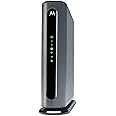
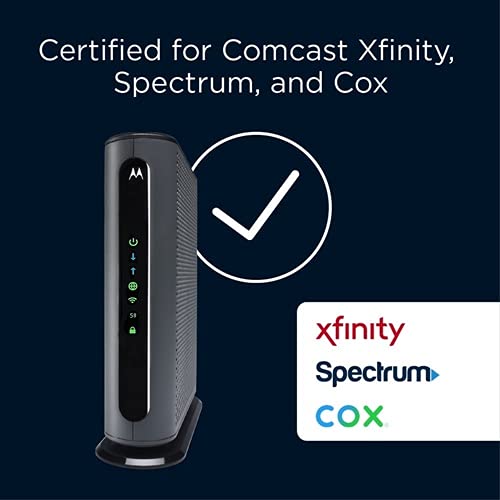
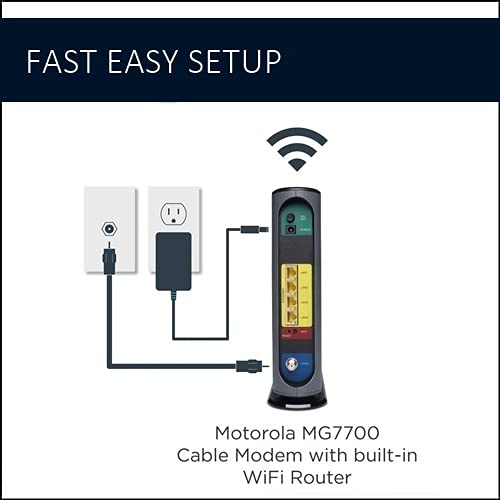
The Motorola MG7700 is a powerful modem and Wi-Fi router combo designed for high-speed internet plans up to 800 Mbps. With DOCSIS 3.0 technology, it features a built-in AC1900 dual-band router, four Gigabit Ethernet ports, and advanced security measures, making it an ideal choice for both home and office use. Save on rental fees while enjoying superior performance and range.


| Wireless Type | 5 GHz Radio Frequency |
| Brand | Motorola |
| Series | MG7700 modem |
| Item model number | MG7700 |
| Item Weight | 0.634 ounces |
| Product Dimensions | 8.6 x 2.6 x 9 inches |
| Item Dimensions LxWxH | 8.6 x 2.6 x 9 inches |
| Color | Black, Grey |
| Manufacturer | Motorola |
| ASIN | B07BRZ2KW5 |
| Is Discontinued By Manufacturer | No |
| Date First Available | March 28, 2018 |
J**L
Easy to set up, strong Wi-Fi.
Works awesome! Wifi reaches everywhere and strong in our 2 story 2 bedroom town house. Even outside. Easy to connect it also, just hooked up to Xfinity cable and went thru the Xfinity app to connect it. Worth every penny.
J**M
The product is good, but the support is terrible
I installed the product according to the Quick Instructions and the Ethernet worked perfectly right away, but I was having a lot of problems with the 2.4 G wifi dropping out. I reinstalled everything again, but had the same problem. I downloaded the entire huge manual from the website and spent all day doing and redoing very thing it said to do. I also discovered that instructions in one part of the manual were different from instructions in other parts. I also discovered that the device did not respond in the way that the manual said it would. I tried calling the Help line and was told there was a 9 minute wait. After 1.25 hours, I was still on hold when I got a message that "There is nobody available to help you. Goodbye" and I was disconnected. The next morning I called as soon as the Help center opened and finally got a human being. I started to tell him everything I had done, when he interrupted me and asked "Did you do a factory reset?" I said that I had done it many times according to the manual's instructions. "Push a paperclip into the reset hole and wait 10 seconds". The tech person said "That is the problem. Hold the paperclip in for at least 20 seconds." I did that and at 20 seconds a lot of lights started flashing and I had finally done a correct factory reset. After that, I reinstalled everything and now the device is working extremely well and I am very happy with it. So the bottom line is that the device works well, but the instruction manual is confusing, self-contradictory and wrong.
O**K
This is a review of the Motorola MG8725 Multi-Gig Cable Modem / Router...
DAY 1 -First, the modem/router arrived on time and in excellent condition. Setup was straight forward. I followed the included quick start guide and had the MG8725 up and online in about 15 minutes. Currently, I have 30-35 devices which connect to my network so rather than changing the network name (SSID) and password to something new and exotic, I used the same network name and password that I had previously. That saved me having to go to each of the 30-35 devices and putting in a new network name and password.The MG8725 found all my devices; however, I spent some time going through and naming them in the Motosync app as the app did not clearly identify most of the devices that came online. Luckily, I had a list of all the MAC address and which device went with which address.Now for how well it works or does not work....The Motosync app is all right to use for extremely basic setup, but I could not find where it would allow me to set up reserved or static IP addresses. For that, and many other more advanced settings, you must use your browser and type in the MG8725's IP address. The app did let me setup a guest network which is necessary for me to have.The download speeds are faster (when I turn off the device's VPN) with the MG8725 than they were with the Xfinity modem/router combo that I had been renting. I have a 1200 Mbps plan with Xfinity and had been getting about 150 - 250 Mbps on wifi devices and anywhere from 550 - 975 Mbps on my LAN devices. So far, the MG8725 has given me download speeds of 600+ Mbps on my wifi devices and speeds at or above 700 Mbps on my LAN devices... (a huge improvement for the wifi devices and about the same speed for the LAN devices). As of now, my only real complaint with the MG8725 is the upload speeds. With Xfinity's combo I was averaging between 35 to 40 Mbps for both wifi and LAN devices. With the MG8725 I am now averaging between 5 and 6 Mbps! I am still playing with it, and I may eventually discover a way to increase the upload speed, but after playing with it for a day, I am left feeling disappointed.My intention is to return here after 30 days to update this review. Hopefully, by then I will be able to report that the upload speed situation has been resolved and that no new problems have been encountered.DAY 2 -The problem with the slow upload speed has been resolved and the culprit was not the MG8725 but Comcast. I had used the Xfinity app to add the MG8725 and the app failed to set up the device completely/correctly. I called Xfinity and eventually was able to speak with a living/breathing human being and she was able to fix the situation.DAY 30 -So after 30 days I've encountered no new issues. I am very happy with this combo modem/router unit and have no regrets. Should any issues arise, I'll make a new update but after a month of use, I am happy with the purchase and would recommend this unit to any family or friends looking for a reliable high-speed internet connection.
T**E
Great Modem/Router!
The Motorola MG7700 is an awesome modem/router. It replaced an older Netgear N450 modem/router that kept dropping its WiFi connection, and had to be rebooted constantly. The Setup of the MG7700 was very easy, and it did not even require calling Comcast to get it configured. I just went to the activation website and put in my Comcast account information. The MG7700 was connected to the Comcast network within 15 minutes (150 mbps plan). The MG7700 improved the WiFi connection to all of my N and AC wireless devices. I live in a 2400 square foot house and I have multiple RING security cameras around the perimeter of the house. The connection between the MG7700 and all of the RING devices is fast with no dropped connections ever. I also have 3 Rokus, a Samsung Smart TV, a Honeywell thermostat, 3 cell phones, 2 laptops, a tablet, 2 Echo Dots and 3 Amazon smart switches connected intermittently to the MG7700 throughout the day. They all stay connected with outstanding WiFi speeds. In fact my Acer laptop connects by AC wireless at 866 mbps. Most of the N wireless devices connect around 156 mbps, and everything stays connected without any drops. I also have 3 desktop computers (1 is a server) and 1 network printer connected to the 4 ethernet ports with no connectivity issues at all. I have been a Network Administrator for over 20 years, so setting up the MG7700 was really easy for me. For those that need help there are many online websites that show how to "tweak" the settings in the MG7700 for the best Wireless connectivity. Trust me the suggestions do work to maximize the WiFi connections. For security purposes I highly recommend changing the MG7700 user name and password. Also change the SSIDs and their security keys, along with the default IP address of the MG7700. Lastley, make sure that the firewall is turned on. This will keep those prying eyes off of your home network. I have used many Motorola products over the years, and they have all worked great. The MG7700 is no exception. Those individuals leaving bad reviews either do not know how to setup a WiFi router correctly, or just received a lemon (it happens). I highly recommend the MG7700 to anyone that wants a fast, secure and reliable home network.Update: it is now 4.5 years later (08/11/23), and the Motorola MG7700 is still working as well as it did when it was brand new. I have had no issues with this modem/router whatsoever. The internet speed (now upgraded to 300 mbps), and the wired and wireless connections are still as fast and stable as ever. The only very rare internet lapses are on the ISP's side. The only addition I have made to the MG7700 is attaching a USB powered, 120mm computer chassis fan to the outside of the MG7700 (blowing air on the motherboard/transceiver chipset side). This helps to keep the MG7700 cool 24/7. Heat is the worst enemy of a router, and all computer equipment in general. Keeping the MG7700 cool will keep connections stable, and greatly increase its longevity. As I originally stated in this review 4.5 years ago, the Motorola MG7700 is a great product, and I highly recommend it (and its newer successors) even more now.Update 2: Well, after 5 years and 3 months of flawless use this Motorola MG7700 finally (partially) stopped working. The 5 ghz wireless transceiver completely quit working. However, the cable modem and 2.4 ghz wireless transceiver still work fine. With the planned-obsolescence of these modem/router combos being about 3 to 5 years, I have no complaints at all, as this Motorola MG7700 has indeed performed flawlessly during this entire time. I have recently replaced this Motorola MG7700 with a Netgear Nighthawk CAX30 modem/router combo. The CAX30 was very easy to setup with Xfinity, and it is working great so far. I will leave an honest, detailed Amazon review for the CAX30 after it has been in use for a while, but So-far-so-good.
Trustpilot
3 weeks ago
1 month ago